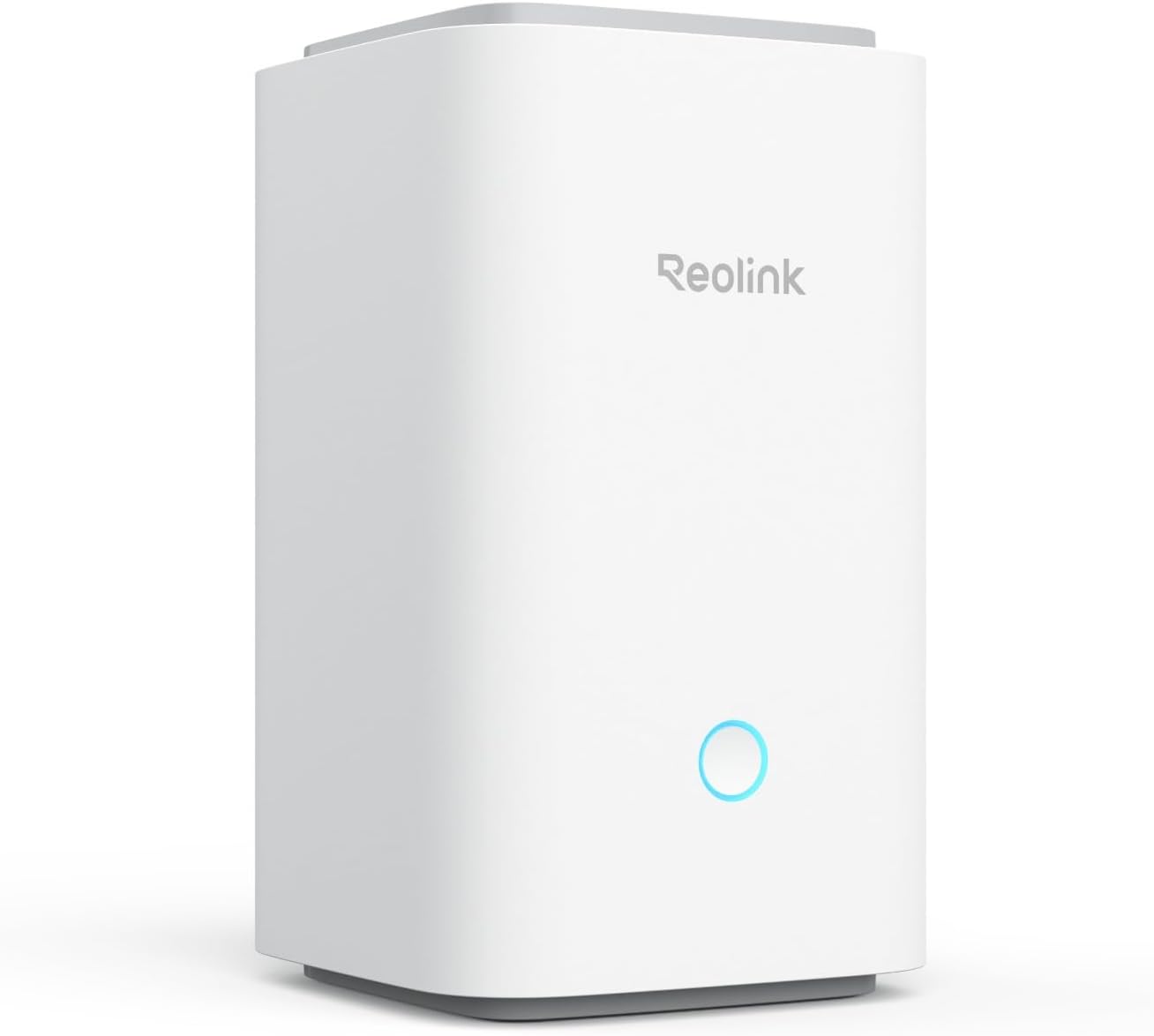
🔒 Secure your space, stream in style, and never miss a beat!
The Reolink Home Hub is a cutting-edge integrated security storage device compatible with multiple Reolink cameras. Featuring 64GB onboard storage expandable up to 1TB, it supports offline recording to safeguard footage even without internet. Leveraging Wi-Fi 6 technology, it delivers smooth 4K live streaming and playback with minimal latency. The hub centralizes management of up to 8 cameras, offers instant motion alerts with siren alarms, and protects your data with AES128 encryption, making it a robust, privacy-first home security solution.


| ASIN | B0DP9MYNQ5 |
| Amazon Bestseller | #21,376 in Electronics ( See Top 100 in Electronics ) #67 in Bullet Surveillance Cameras |
| Are Batteries Included | Yes |
| Brand | REOLINK |
| Color | white |
| Customer Reviews | 4.0 4.0 out of 5 stars (9,100) |
| Date First Available | February 19, 2025 |
| Included Components | 1 x 1m Network Cable, 1 x 64GB TF Card, Power Adapter, Reolink Home Hub *1 |
| Item Weight | 730 g |
| Laser Class | Local Recording |
| Model Number | Reolink Home Hub |
| Name List for Name Plates | Home Hub |
| Product Dimensions | 9.53 x 9.53 x 16.21 cm; 730 g |
A**ー
画像が、夜間でも鮮明で、申し分ない。
A**ー
カメラの性能は満足でものでした。USB-Cポートの初期トラブルがありカスタマーサポートに連絡したところ敏速に交換品が送られてきました。サポート体制は満足できるものでした。難点はソーラーパネルを接続しても充電している気配がなく太陽光が弱いのか、そもそもパネルの発電効率が悪いのか判断できずしばらく様子見しております。 その後ソーラーパネルが十分発電していることが確認できました。バッテリーは常時80%台を保っています。 カスタマーサポートには大変お世話になりました。製品購入後も手厚いサポートがありお勧めします。
も**た
現在2台使用していますがこの製品は視野角180°取れるのがメリットだと思います。 またWIFIも問題なく接続でき、接続方法も音声ガイダンスもついていて(日本語ではないけど) 問題なく使用できています。 付属のソーラーパネルは6Wのものでしたが普通に使用する分には問題がないと思います。 自分は同社のArgus PT Ultraを導入した際に同梱のSP1ソーラーパネルが容量不足だったので 2眼のArgus 4 ProだとSP2ソーラーパネルで大丈夫か心配でしたが手元の使用環境では問題ありませんでした。 今回のレビューで星4とさせていただいたのはまだアプリが発展途上?という点と中長期でのレビューではないため 星1分マイナスとさせて頂きました。
A**ー
近くでも反応したりしなかったりでした。反応しないと防犯の意味がないので、返品しました。
太**郎
難しい配線の設置が不要で簡単に念願の監視カメラ取り付けができました
P**K
リピート率たかい商品です。このタイプは4台保有しております。
の**ー
反応式なので24時間撮ってる訳ではないが反応の強度や範囲を調整できるのは素晴らしい。子供の帰宅時間とか見られるし、広範囲が撮れるてるのでコレ一台で十分でした。
B**O
** be sure to remove the sticker 'before first use' ;)**
** be sure to remove the sticker before first use** Easy setup and good live camera feed.
V**A
Great product, greatnimage quality. That couldn't be easier to install!
L**Y
Reolink Home Hub, Home Security Systems, Expandable Local Storage, UP to 16MP Motion Recording & Playback, Encryption Algorithm, 2.4/5 GHz WiFi6, 64GB microSD Card Included, No Monthly Fee This is absolutely awesome. What does it do? Ability to manage 8 reolink cams and store all 8 cameras' footage into your hub locally. You own the data. Encrypted. The nonpro model (this one) is just a hub that takes 2 micro SD cards. (pro hub lets you connect more than 8 cameras and takes a hard drive instead o SD). It does come with an 64gb high endurance card. I put the sandisk 512GB card in the second slot. This hub allows you add to your reolink ecosystem and associate REOLINK cameras with the hub. Check if your reolink cameras can work with this hub (see the reolink site). The hub can manage up to 8 reolink cameras. It allow ALL reolink footage to be stored to your local home hub (rather than the cloud) thus eliminating the need to subscribe to cloud space --> of course the benefit of uploading to cloud is obviously for the fact that the data is safe from fire and in a different location. The hub connects via ETHERNET to your switch/router. so long as your cameras are on the same network as the hub (same subnet), it is able to connect to your hub and store the data. In fact this hub association with solar powered cameras such as the two that come with this kit, is actually better for batterylife on the solar powered cams becasue the hub manages when and how footage is sent, reducing unnecessary wake-ups and conserving battery. Also he hub acts as a local relay, minimizing power-hungry Wi-Fi activity thus saving battery life as well --> it was found in some forums that you get a huge power savings using the solar power cams with the hub rather than without the hub. Now how does this work when cameras have SD card install in standalone mode and then you join the camera to the hub? what would be the point of keep SD card in the camera itself? Well it acts as redundancy. If network is down, and cannot reach the hub, then footage is stored in the sd card directly in the camera. if your home uses power, and hub is down, then the solar powered battery cams still operate and footage is stored on the sdcard installed in the camera itself. So yes theres still a good reason to keep sd card in the camera itself, even when you have huge storage in the home hub. Something i immediately noticed when using reolink cameras with the home hub is that i can connect to each camrea quicker . Something i didnt expect but was a pleasant surprise. If you have more than 8 cams on your property you could actually buy a second one. Manage two sets of cameras in your home. Example: use one hub for front yard cams and another one for back yard cams. Buying one hub is a nice low cost of entry (compared to the home hub pro which is pricier). Most homes you'd just need one hub. But for more elaborate properties you might either upgrade later on to a home hub pro to get more than 8 cameras... or just expand youir existing setup with another 8 cams with a second home hub. ------------ Anyway, i'm impressed. i absolutely floored by the reolink hub. Thus far i've got nothing but great news on this system. VASTLY superior to main stream camera systems. Adding home hub imo is a total MUST HAVE. It adds a lot of value to the setup for very little cost. Saves you from needing a cloud subscription . I can easily recommend this one.
S**A
Purchased last year (2024) and used over an Alberta winter while wintering in Arizona. Very pleased with this product. I can view any time & anywhere I am in the world. I was able to refine the alarm zone to avoid every vehicle and dog walking by. Easy to look back on previous alarm triggers. Solar panel keeps camera charged at all times. Thinking about purchasing another one to monitor my backyard. Totally recommend this camera.
P**A
Easy to install , the image is clear and the solar panel works perfectly even in cloudy days . We installed the Reolink app ( free) in our phone , so you can check camera battery , images and sound You need to buy an USD card separate or have cloud account for recording
J**E
Update July 29, 2020: Well. the new 5 dBi antenna has been on for sometime now and has improved the situation to a large extent. I now use the HD (1080P) setting full time and only rarely get the "Poor Network" message, but I do still get it. Update July 2, 2020: 1. Make certain battery is charged to 100% before you use it, I can't stress this enough. 2. Unless you don't care if you can use the 1080P video you paid for, have this camera as close to your very powerful router as you can get or it will force you to use :Fluent: which is kind of blurry. I have tried everything I can think of and even though my camera is only about 15 feet from my very expensive Range Extender )Linksys RE7000 *) I can't get it to run 1080P successfully. It keeps telling me that my network is flaky. Anyway, I really like all the other aspects of this camera. It seems very stabile and provides a very wide image and, at 1080P it has a very clear image. Even though ReoLink recommends against it I am going to try a different antenna. The one the ship is only 2dBi gain which is ok in normal circumstances but I guess my circumstances aren't normal.. I found one on Amazon (where else?) that was designed to work with Security Cameras and is 5dBi gain and maybe longer. I know it can't damage the camera and I feel it could help me in this situation. I will come back here to update this review either way. * This is a different one from the one I talk about below =================================================================================== Update June 26, 2020: I finally have one gripe, sorry.. I actually went out and bought a good Wi-Fi extender, to see if it would solve the apparent bandwidth problem even though my iPhone was seeing max bars a the install location the camera would present the "Due to poor Wi-Fi reception it is suggested that you use "Fluid" resolution (whatever that is) instead of 1080P". Sorry to say it didn't help. I am presently working with Reolink support to resolve this hopefully. Having said all that I still feel this is a great product Update June 15, liking it more all the time. Reolink customer service has indicated a willingness to listen to some of our suggestions, perhaps even implementing some of them, of course I won't hold my breath. On a more positive note: 1. The battery hasn't dropped lower than 82% that I know of, maybe at night, however. Of course we have had a load of the big yellow light in the sky known as the sun. Can hardly wait until next week when we get a week or so of rain. 2. False triggering of alarms remains low, except for the one very windy day we had, when I got a bunch Update June 14, 2020: 1. Finally got email alerts to work. During the setup process you need to input the port used by your email server, in my case Outlook. The number suggested by the setup process is wrong you need to use port 587. However, if you get a lot of false detections you are going to get a lot of emails. I turned this feature off. 2. As for the windows client problem, my advice is to read the user guide provided. You need to use the camera's UID not the IP address. I finally did heard from Reolink service and they seem to want to be very helpful. They told me that the phone number I contacted is a scam. They don't charge for in warranty and sometimes, out of warranty service. The say they are looking into some of the problems: 1. Having to renew the "free" cloud subscription every month 2. The inability to delete images/videos from the SD card I consistently have been getting 4 bars of 2.4g WiFi yet sometimes I have trouble connecting in the app. Yesterday I was in my car in the driveway the app told me I was using cellular when I clearly had a strong WiFi connection on my iPhone 6s =========================================================== Original post: Installed yesterday, first what I like, it is easier: 1. Image is acceptable. 2. Alerts aren't too bad, yet 3. Same with night vision 4, Hardware and camera are first rate. I totally disagree with negative comments about the Solar Panel mounting arm. I couldn't get the locking screw hole in the camera mount to line up with the screw so I left it out. Unless we have an earthquake or tornado I don't see the camera coming loose 5. The Solar Panel seems to do a great job keeping the battery topped off. Now on to what I don't like: 1. Setup is NOT easy, for some reason you need to be within a couple of feet for it to connect to the router. I must have gone thru setup a dozen times. 2. Installation was NOT a breeze, see also number 4 above 3. Support from the company is basically non-existent. i contacted their Support number only to be told that I would have to pay $50 for the support I needed 4 Setting up email alerts is difficult I never did get it to work 5. Support documentation is almost non-existent. I guess this is to be expected when you consider number 3 above 6. The "free" cloud must be renewed each month, once a year or lifetime of camera, would be more appropriate 7. I don't like the fact that you can't erase individual videos from he Micro SD Card. In order to get rid of they you need to format the card which forces a reboot. Yet they let you erase individual or all videos in the cloud, an oversight perhaps 8. I never got the Windows client to hook to my camera How do I know who the user is and what password is needed? When all is said and done, however, I feel this camera is one of the best on the market at this price point. Maybe that doesn't say much about the competition, however. I am hoping the company sees this review
Trustpilot
1 week ago
2 weeks ago