Desertcart purchases this item on your behalf and handles shipping, customs, and support to Croatia.
๐ Dominate your digital realm with MSIโs ultra-wide speed and clarity!
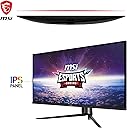
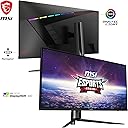
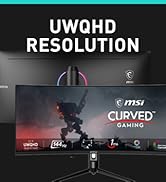
The MSI MAG401QR is a 40-inch ultra-wide gaming monitor featuring a sharp UWQHD 3440x1440 IPS panel, a blazing 1ms response time, and a high 155Hz refresh rate with Adaptive Sync. Designed for immersive gaming and professional multitasking, it offers versatile connectivity including DisplayPort, HDMI, and USB-C, plus ergonomic options like height adjustment and wall mounting. This monitor balances premium performance and value, making it a stealthy powerhouse for gamers and managers alike.


| ASIN | B0BX2CLB9D |
| Adaptive Sync | FreeSync |
| Aspect Ratio | 21:9 |
| Aspect ratio | 21:9 |
| Brand | MSI |
| Brand Name | MSI |
| Colour | Black |
| Compatible Devices | Computer |
| Contrast Ratio | 1000:1 to 3000:1 |
| Customer Reviews | 4.0 out of 5 stars 269 Reviews |
| Display Technology | LCD |
| Display Type | LCD |
| Hardware Connectivity | DisplayPort, HDMI, USB Type C |
| Has Color Screen | Yes |
| Image Brightness | m2 |
| Image contrast ratio | 1000:1 to 3000:1 |
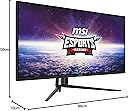
| Item Dimensions D x W x H | 10D x 99W x 50H centimetres |
| Item Weight | 12.4 Kilograms |
| Item height | 21 inches |
| Manufacturer | MSI |
| Maximum Display Resolution | 3440 x 1440 Pixels |
| Model Name | MSI MAG 401QR |
| Model Number | MAG 401QR |
| Mounting Type | Wall Mount |
| Native Resolution | 3440x1440 |
| Network Connectivity Technology | DisplayPort, HDMI |
| Picture Quality Enhancement Technology | AMD FreeSync |
| Product Features | Height Adjustment |
| Refresh Rate | 155 hertz |
| Resolution | QHD Ultra Wide 1440p |
| Response Time | 1 Milliseconds |
| Screen Finish Type | Glossy |
| Screen Size | 40 Inches |
| Screen size | 40 Inches |
| Screen surface description | Glossy |
| Shape | Rectangular Prism |
| Specific Uses For Product | Gaming |
| Total HDMI Port | 1 |
| Total USB 3.0 Ports | 1 |
| Total USB Ports | 1 |
| Total Video Out Ports | 4 |
| UPC | 824142292709 |
| Viewing Angle | 178 Degrees |
S**N
Amazing Value
This monitor is kind of a stealth deal. A 40 inch, IPS ultrawide for less than half of most of its competitors. Almost all of which are VA panels. Whether it's flatness is a pro or con to you, it depends. I don't mind it. But I've never used a curved monitor. There isn't much difference between this IPS and my old 1080p Asus Designo 27in in terms of colour accuracy and it has the benefit of higher refresh rate. I play a lot of Driving/Flying/Train sim games and some other genres as well and this monitor is perfect. Very immersive experience at the distance it sits from me. The contrast ratio is really good for an IPS without crushing the blacks and the light bleed is fairly uniform and unobtrusive. I didn't notice any ghosting, though I'm sure it exists. The stand is well-engineered, perhaps even overengineered. It's very solid, but requires eight screws in total to assemble. The tilt....works but it's extremely tight and does not tilt down. Also my panel had absolutely no dead pixels! Cons: Mystic Light LEDS are so dim they might as well not exist. The navi button broke within an hour of owning the monitor and I somehow shoved the whole thing into its hole with not much force, making the OSD useless. Luckily, this monitor will accept MSI's gaming OSD software which has all the onboard OSD functions anyway. So this is really largely a non-issue and I didn't want to RMA a 40 inch widescreen, that'd be a headache. sRGB mode looks fantastic, the other modes tend to lean towards heavier saturation. If you LIKE saturation-forward stuff, this monitor is great. However if you're going to stick in sRGB mode for artwork for the accuracy, the nits are somewhere between 300-350ish and that's a little dim. You can get closer to 400 by cranking the brightness but that'll start washing stuff out and balancing it with contrast and such will heavily saturate. I like heavy saturation while gaming and the lower brightness doesn't bother me too much in this space. But in a bright room, it could be annoying. However for the cost, expecting a 400+ nits display is a little ambitious.
D**L
Excelente por el precio
Para el precio, 40 pulgadas uwqhd (3440x1440) estรก muy bien, es un IPS a 144hz que se puede hacer OC a 155hz (120hz con cable USBC) personalmente no lo hago ya que la diferencia no de nota y te bloquea algunos settings del monitor, HDR tambiรฉn es bastante bueno. El monitor es GRANDE, no lo aparenta en las fotos pero lo es, asรญ que necesitas un escritorio o un รกrea grande para disfrutarlo. Totalmente recomendable ponerlo en un brazo al escritorio o a la pared ya que la altura es estatica. Cรณmo opiniรณn personal, si tienes una tarjeta de video que soporta resoluciรณn dinรกmica, pon una resoluciรณn mayor y creo que se le saca mejor provecho , yo lo tengo en una PC con una amd 7900xt y lo tengo a una resoluciรณn de 5120x2160 y me da la impresiรณn que se disfruta mucho mรกs el tamaรฑo real del monitor. Si fuera curvo serรญa un plus bastante interesante pero no es necesario. Ciertamente se calienta un poco pero nada de que preocuparse 100% recomendable
O**E
Underrated budget gem
This monitor is seriously great. I was torn between a handful of ultrawides but opted for this one as going to larger panels (49" and above) results in less vertical space and more horizontal space. Transitioning from my previous 32" 1440p panel to this was a breeze as they essentially share the same height. I like this monitor enough that I have a second one on the way to stack them up for work. Only glaring downside to be found is the stand is abysmal. Seriously. Don't buy this unless you also plan to grab a mount or have one that can support this panel, but a serviceable one can be had for $30-$50. Side note: I'd avoid any monitor mount that has a quick disconnect feature where the monitor connects to the arm via the slide and thumbscrew design, as the weight and size of this monitor will most likely cause a small amount of droop at the connection that is hard to alleviate. There are a lot of these out there, so reading assembly instructions or looking at customer photos/product photos first will save a lot of headache. I would opt for a simpler design that directly connects to the back of the panel via screws or go premo and get an Ergotron or similar quality arm. I'm currently using VIVO mounts, specifically the ones that mount the monitor to the plate w/ 4 screws and have had no issues with droop or sagging. (STAND-V001T for reference) OSD menus are fine, if a little slow to navigate, but you're going to most likely set it up once or twice, and then rarely, if ever, dive back in. Picture looks great in SDR and has almost eye searing brightness at 100%. IPS panel is actually an IPS-ADS panel made by a company called BOE. There are some alleged refinements over a traditional IPS and while I'm not at liberty of being able to make a direct comparison, I will say colors, viewing angle, and motion on the panel look great. No perceived ghosting for myself, personally. No backlight bleed whatsoever and that's highly impressive to me as I had a few years run with VA panels instead because I got sick of playing the IPS lottery. I can't make any claims about HDR as it's not important to me for gaming or work. If you're looking for an HDR monitor, based on the HDR400 spec alone this probably will not satisfy, but it's more of an extra feature than the main event and while Win11 brings lots of autoHDR goodness, I'm still not convinced about leaping fully into HDR. USB-PD and KVM switch is super neat to have onboard, and while I haven't needed either just yet, I have plans to utilize these soon. Overall, it's an exceptional panel with a wealth of functional, full-baked features. I think it strikes a great balance of price/performance. While it may not have the most bleeding edge panel tech like QD-OLED, and it's no HDR beast, and the stand is absolute nonsense, I think there's a lot to like here for $400, and even more when it's priced at its current $350.
N**G
Deal Breaker!
I was worried about the picture quality before I received it, but it turns out great. No single dead pixel on the one received, the color is beauty if you know how to adjust the sRGB. You can use KVM to install the MSI monitor control panel, you can install an APP on your phone to control the setting when you under the same WIFI. If you use the menu from the back button, you will be frustrated with the responded time, but the APP works great and reactive fast. Cons: 1. Never Never Never use the HDR, once you turn it on, the screen looks horrible. 2. The PIP mode is great, but the PBP not looking so good, you will see a big black area on the top and bottom and makes both screen unreadable 3. Not very friendly with monitor arm, I have to get a heavy duty arm to support, they are quite expensive. At this price, nothing more you can ask for. If it has any problem, it is my problem, not its.
L**S
Full feature large monitor at killer price
I've had this since release, I bought mine on Amazon though. I was on an LG C1 48" OLED, but 4K was really starting to kill my performance in newer games. I also have LG 32" 165Hz IPS and VA monitors as well as a similar spec Dell. Coming from that I'm very happy with this monitor. It's obviously not to the level of detail, clarity, darks or colors of my OLED, but I'm daily use and gaming I've come to find that besides darks, it's not that much of a difference. My biggest concern was pixel density, but I honestly can't see pixels unless I stick my face right up to the monitor. I sit a bit further back so it looks great. It's a 144Hz monitor that overclocks to 155Hz. IPS looks great, colors are ok, my AMD GPU definitely adds vibrance to the colors, but you can also do adjustments on the monitor. Performance is great, no smearing, no ghosting, I haven't had screen tearing either, but I'm also running everything well above 60fps with my 6950XT. The stand is good and fairly sturdy. Overall I'm recommend this monitor to anyone looking for something bigger than a 32" or 34". It's size can be an issue on a smaller desk, but you can also just mount it on an arm to get it off the desk.
Trustpilot
1 month ago
4 days ago