Description
⚡ Power Your Performance, Connect Without Compromise!
- FUTURE PROOF YOUR SETUP - Designed for next-gen client and market demands, ensuring your rig stays ahead in performance and connectivity.
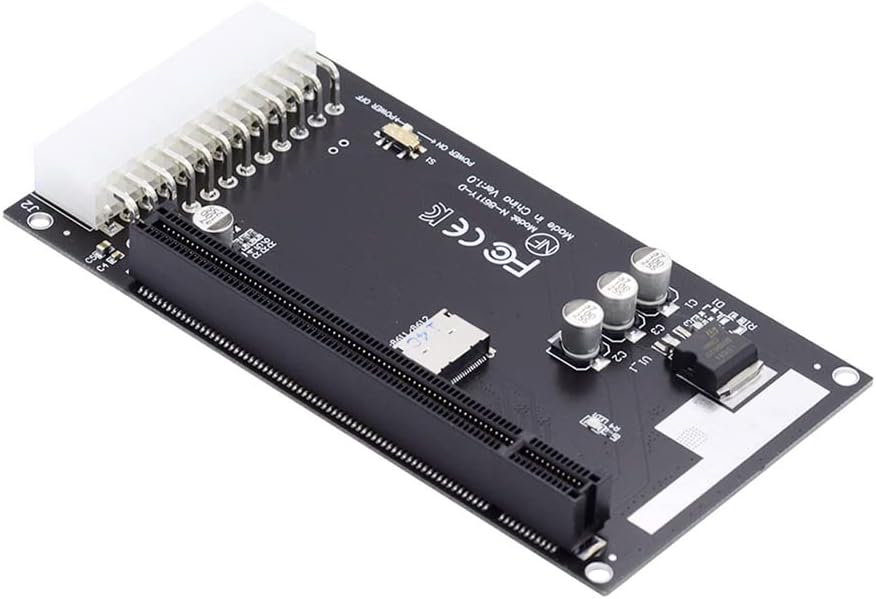
- POWER UP WITHOUT LIMITS - Robust ATX 24-pin power port ensures your high-performance GPU or PCI-E card never runs short on juice.
- PLUG AND PLAY SIMPLICITY - Effortless installation with instant recognition on systems like Minisforum UM780 XTX—get up and running fast.
- UNIVERSAL PCI E COMPATIBILITY - Supports all standard PCI-E 16x, 8x, and 4x cards including USB, LAN, Audio, and Graphics for ultimate flexibility.
- SLEEK SMALL FORM FACTOR DESIGN - Compact Oculink SFF-8611/8612 connectors optimize internal and external system integration without clutter.
The Cablecc 4X Oculink SFF-8612 to PCI-E 16x adapter is a compact, high-efficiency converter that enables seamless connection of PCI-E 16x, 8x, and 4x cards via Oculink SFF-8611/8612 interfaces. Featuring a dedicated ATX 24-pin power port delivering stable 12V power, it supports a wide range of devices including graphics cards, USB, LAN, and audio cards. Perfect for professionals seeking a sleek, plug-and-play solution to expand or upgrade their PC’s internal and external connectivity.