Buy anything from 5,000+ international stores. One checkout price. No surprise fees. Join 2M+ shoppers on Desertcart.
Desertcart purchases this item on your behalf and handles shipping, customs, and support to Croatia.
🚀 Boost Your Wi-Fi, Boost Your Life!
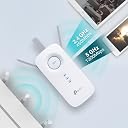
The TP-Link AC1750 RE450 is a powerful dual-band Wi-Fi range extender delivering up to 1750Mbps combined speed. Featuring three adjustable external antennas and a gigabit Ethernet port, it ensures broad, reliable coverage and fast wired connections. Its intelligent signal light helps you find the optimal placement, while the built-in access point mode and TP-Link Tether app provide versatile, user-friendly network management. Perfect for professionals craving seamless connectivity across home or office.


| Brand | TP-Link |
| Colour | White |
| Data Transfer Rate | 1750 Megabits Per Second |
| Frequency Band Class | Dual-Band |
| Special Feature | Access Point Mode, Dual Band , LED Indicator |
| Wireless Communication Standard | 802.11a/g/n |
D**Y
Just Perfect!
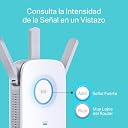
The RE450 is an 802.11ac range extender with a maximum data rate of 450Mbps on the 2.4GHz band and 1,300Mbps on the 5GHz band. With two fold-out antennas on either side and one that pulls out of the top of the device. PROS * Good value * Easy to set-up, good instructions and operated as it should first time. * Very good throughput and range performance CONS * Bulky * Takes too much space on the switch board due to it’s width so some double sockets will not be accessible by a second plug. * It isn’t the most graceful device and is easy to knock out of place. * It houses an ungrounded plug on the back and is extremely top heavy. This dual-band extender plugs into any wall outlet and delivers solid throughput speeds and good signal range. Even though it's bulky its performance, particularly at long distances, makes it good choice for wireless range extenders. The front of the RE450 sports a large Range Extender (RE)/Wi-Fi Protected Setup (WPS) button with an LED light ring around its outer edge. The ring is blue when the extender has a good connection to the router, and red when it is too far away. It blinks blue while a WPS connection is in progress, and is off when there is no active connection. Below the button are 2.4GHz- and 5GHz-band status indicators and a Power indicator. The left side holds Power and reset buttons and a button that turns off the LED lights. Over on the right side is a single gigabit LAN port, and there's a two-pronged plug at the rear. Installing the RE450 is a snap, especially if your router supports WPS. Start by plugging it in to an outlet that's close to your router and wait for the Power light to turn blue. Press the WPS button on your router and immediately press the WPS button on the extender. Once the LED ring changes from blinking blue to solid blue, you're done. I used this method, and it took less than three minutes. You can now move the extender to a location that is ideally halfway between your router and the dead spot in your home. If the LED ring turns red, you have to move the extender closer to your router. The TP-Link AC1750 Wi-Fi Range Extender (RE450) is an excellent choice if you're looking to extend the reach of your wireless network. It offers solid close-proximity throughput, and performs wonderfully. Should you buy it? YES. The RE450 has all the best features: dual-band compatibility, WPS, an access point mode, a Gigabit ethernet port, helpful indicator lights & external antennas. So it's a highly recommended purchase!
V**H
A Decent signal extender but not a booster
I got this extender to extend my 300mbps connection to a new room, which is around 5-7ft away from the actual router. When I purchased, I observed this router extends the signal to upto 10000ft, our house being only around 2500sqft I thought this should suffice to give us good signal across the house with decent speed. After I received the product following are the issues I noticed: 1. Since I use act broadband, and the router band selection is set in auto, this extender doesn't always pick up any other bands/channels other than 36&48. I think it's a general issue across all TP Link products. Tip: please buy the extender from the same company has router. 2. I changed my router configuration to only broadcast in 48 channel. After that the router consistently picked up the signal. 3. Wi-Fi boosting is almost negligible: When I did a speed test by connecting directly to base wifi network and extended wifi network. I saw a negligible gain off speed of around 5-10%, surprisingly sometimes the speed on extended network was lesser than the speed on base network. But when we connect via it's lan port, the speed was around 50-60% of the available speed. So that's in the range off 140-180 MBPS, my actual speed 300 mbps. PS: This speeds are only in the 5G network. In 2.4G it's very abysmal, it's like 10-20% of the available bandwidth, around 20-30 mbps if you are lucky. 4. Signal strength: The signal is generally available across my house, but once we go to a different room the maximum speed you'll get is around 50 mbps. Anything farther than 50-80ft you'll have signal but not enough data speed. In conclusion, Buy this only if: 1. You have a TP Link router already, from here you can easily extend. 2. Don't fall to the marketing gimmicks off 10000 sqft, it's usually a max of 500sqft of useable bandwidth. 3. It's not technically a wifi booster, it gives a gain off max 20%. 4. Please remember this doesn't support one mesh. Limited configuration options. Remember this: Using an extender will always increase ping and latency. Also the upload speeds are not usually same as download speeds. The extender takes around 30sec to fully boot and be ready. If 5G is available then there will be no internet on 2G network.
S**I
Great product at this price
How ever its a nice product but little backdated. Got it after checking reviews and according to my budget. Using it with my TP link wifi 6 router since last 8 months, no issues, great speed and performance, features are also quite good and easy to setup. Mesh is working as it says. So highly recommended. EXCEPT its not a wifi 6 repeater, its a wifi 5. And big big drawback is it only support a fixed 5ghz channel (48) like others said. So without knowing this it will be hard to configure. And size it little bulky, I would be happy if it was little smaller size to carry while traveling. Also range is good, but through walls its not that good.
T**R
Excellent quality product
R**A
Not Reliable: Constantly Loses 5GHz Connectivity
Disappointed with this product. Initially, it connects to the 5 GHz band without any issue, but within a day or two it automatically drops and only connects to 2.4 GHz. This severely impacts performance and defeats the purpose of having a dual-band setup. The main network in the Tether app doesn’t even show the device connected to the 5 GHz band, while my other devices continue to work fine on the same network. I first assumed it was a router issue, so I tested it across three different routers and even switched between two ISPs—but the problem persists, clearly pointing to a flaw in the device itself. The only temporary fix is to reset the router, but the issue returns within a day or two, making it extremely frustrating to use on a regular basis. To make matters worse, TP-Link customer support has been unhelpful and disappointing, offering no real resolution. Overall, not a reliable product and definitely not recommended if you are looking for stable 5 GHz connectivity.
R**O
Easy setup & better connection strength like main router
(1) Setup was done within 5 minutes using Tether mobile app. Followed the instructions came with the product. No hassle at all. (2) The distance between my main router (Airtel Fiber) and this booster is almost 32 ft. Also I had to keep this booster right behind a thick beam near ceiling wall (see the picture attached, beam on both sides). So, I was in doubt about the quality of the signal that this booster will be able to receive from my main router. Also, I use my laptop from another room's extreme corner (13 ft from booster) with another beam located right after the booster. BUT, glad to share that this booster's receiving power was excellent and speedtest done on laptop was excellent too, almost same speed when laptop was connected to main router (5Ghz).
A**Y
Ethernet port does not extend internet connectivity as advertised by TP Link
I purchased a TP Link RE450 (AC1750) Wi-Fi extender the other day and found a really strange issue with the Ethernet port, and wondered if anyone else has this problem or knows of a possible cause. When I set it up, the Wi-Fi aspect was all fine. It detected both 2.4GHz and 5.0GHz bands of our home router instantly and maintained a consistent and stable connection. The extended Wi-Fi networks were also perfectly stable on both bands. However the Ethernet connection was extremely unstable. From a cold boot, I could connect to the Internet just fine for up to 20 minutes, and then the Ethernet connection would just suddenly drop out for a moment, before reconnecting and repeatedly dropping out again. Each drop out would last about 2 minutes and would then repeat every 5 minutes or so until I physically unplug the RE450 and re-plug it. And after every reboot I can get a prolonged 20 minutes of connection before it drops out every 5 minutes again. When the connection is lost, both lights on the Ethernet port go out, but there's no mention of any connection loss in the RE450's logs. The weird thing is, all the while the Wi-Fi connection remains perfectly stable. Even when the Ethernet client device is down, devices connected to the extended Wi-Fi networks can still access the Internet. As a test, I connected two devices - one via Ethernet and one via extended Wi-Fi and then pinged Google's IP on both in parallel. When the Ethernet-connected device dropped out, I would get the expected "timed out" results but when this happened the Wi-Fi-connected device did not encounter the same issue. I have tried numerous factory resets and upgrading/reinstalling the official firmware from TP Link's site but this hasn't changed anything. I have also tried using different Ethernet cables, updating the drivers on the client device, and even swapping out different client devices connected to the Ethernet, but all of them experienced the same issue on Ethernet, but not on Wi-Fi. For the record, the devices I tested are a Mac desktop, a Windows PC, an Android phone, and a Nintendo Switch (via dock USB Ethernet). All devices were running the latest updates. It's clear that the extender isn't losing connection to the main router since the Wi-Fi is maintaining a constant connection to the Internet, so could this be a hardware issue with the Ethernet port on the RE450 itself? Many thanks in advance for any advice. Edit: I have tried changing the on-board config to use the Ethernet port as an extension of either the 2.4GHz or the 5.0GHz bands, but this didn't solve the issue. I also have an older RE200 which uses the same firmware/setup as the RE450. When setup with the exact same config as the RE450, the RE200 does not exhibit this problem. Edit 2: The official response from TP Link's support is that the Ethernet port is just a "backup" connection for initial config of the device and was never intended for actual day-to-day use. This directly contradicts their advertising material and the included instruction manual clearly says the Ethernet port is for things like PCs and set-to boxes or games consoles.
J**A
Expensive but good product
Product was pricier than most but very easy to setup and working well after 2 weeks of using it. Gives option for 5hz network as well which is nice even tho we do not have dual band. I Put extender in bedroom as wifi was not reaching there and now new signal is working great. Zoom calls working perfect, movie, streaming, gaming, all without lag. Would recommend for sure 👍
A**R
Satisfactory product
Works good so far! Need to ensure it is in decent range. Good speed connection.
I**O
Todo perfecto !!
Después de un mes de prueba he de decir que este repetidor wifi me ha sorprendido gratamente, aunque los primeros días estuve a punto de devolverlo y ahora os explico el por que. Siguiendo con el análisis del producto, y siendo el primer repetidor wifi que uso en la vida, la verdad es que no puedo estar mas contento con la compra. Cobertura wifi tanto 2,4/5G impecables (después de colocar el repetidor en el punto óptimo de la casa), interfaz web muy intuitiva y fácil de entender, fácil instalación y configuración en un par de pasos... Básicamente lo compre para poder tener wifi en una TV que colgué en la habitación, a la cual le llegaba apenas una raya de cobertura y ahora, le llegan todas. Probada la señal wifi con Netflix y ni un solo corte o pixelación. Antes, ni me conectaba la TV a la wifi sin el repetidor. Enfín, no puedo ponerle pega alguna al producto, al menos de momento. En cuanto a lo de que estuve a punto de devolverlo, os explico el porque y la solución por si le sirve a alguien que tenga uno y esté padeciendo los mismos problemas. Resulta que los dos primeros días, funcionaba de lujo, hasta que al día siguiente, pruebo a ver la TV en la habitación y resulta que me dice que no hay internet. Ya me huelo movida, ya que el repetidor no se había tocado desde que lo instalé y no había motivos para que fallara. El caso es que la extensión de cobertura había desaparecido y los leds del repetidor seguían encendidos y fijos como debía de funcionar. Intento acceder por web para buscar el posible problema, y me encuentro con que no puedo acceder. El repetidor colgado del todo. Toca desenchufarlo de la red y volverlo a enchufar, y a funcionar. No le dí mucha importancia hasta que al día siguiente y sucesivos, volvía a pasar. Como digo era constante, me plantee devolverlo, hasta que empecé a buscar información por internet en foros por si el problema no fuera del repetidor... Efectivamente di con la solución y no era el repetidor el que fallaba. Resulta que el router de Movistar que tengo en casa, en opciones avanzadas de la banda 5Ghz tenía una opción marcada llamada... SCS (Smart Selection of Best Wireless Channel). A mi prácticamente todos los días, la banda 5G se me cambiaba de canal, incluso teniendo puesto yo el canal manualmente y era por tener esa opción activada. Por ejemplo, aunque el canal en el router lo tenía manualmente puesto en el 36, viendo yo en las opciones que me indicaba ese canal, realmente mirabas la red con un analizador de redes, y mi red 5G aparecía en el 108. Fué desmarcar la opción SCS en las propiedades avanzadas de la red 5G del router, y desaparecer de raíz los cuelgues del repetidor, ya que el canal ya no se cambiaba por su cuenta. Espero que os haya servido a alguien que tuviera los mismos problemas que yo. Un saludo.
C**E
Great OneMesh compatible device
Great device. Ideal if you have a OneMesh compatible router and do not want to change the whole system. The gigabit Ethernet port is very useful for not wireless enabled devices.
A**S
Perfeito!
Identifica e amplifica 2.4GHz e 5GHz! Super recomendo o produto! Uso para cloud gaming e funciona muito bem! Para quem tiver moden de operadora(vivo, oi, net/claro, etc), não esquece de verificar em qual canal a sua faixa de frequência de 2.4GHz e 5.GHz está operando (geralmente é 48. mude para 44 se puder) pq se não ele não identifica o Wi-Fi e não consegue conectar ao Wi-Fi. Tem vídeo no YouTube de como configurar bem certinho! Enfim, ótima aquisição e investimento! Obs: Se sua velocidade for 1Gb ou mais, o moldem que vc tem provavelmente usa um protocolo diferente de transmissão (Wi-Fi 6/6E/7 e não Wi-Fi 5). Não tem nada haver com a frequência 2.4GHz e 5GHz. Se for o caso, vc vai precisar de outro modelo. Re605X por exemplo ou um que suporte Wi-Fi 6 e etc.
A**E
Plus que parfait fonctionne très bien
Enfin un répéteur Wi-Fi qui fonctionne, installé dans une pièce où il n'y avait pas moyen d'avoir de connections utilisation en 2.4 Vous pouvez couper le led si nécessaire sur la face avant
Trustpilot
3 weeks ago
4 days ago