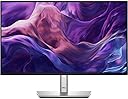
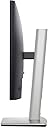
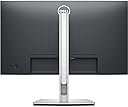
My Apple Cinema Display from many moons ago recently broke. Since Apple displays are ridiculously expensive these days, it was time to find an affordable non-Apple replacement. I went through 3 other monitors that did not work for me and had to return them all, either due to incompatibility issues, design flaws, or playing the 'find-the-right' cable game to no avail. Needless to say, I was a bit frustrated. Finally, this one worked for me, ticking all the important boxes.I needed something with a built-in USB hub that would power my mouse and keyboard, as my computer is located 6ft away from where my monitor needs to be. I tried a Dell USB-C monitor but that didn't work with my Mac Mini 2011, even with a purchase of what I thought would be the proper cable. Another display (Samsung) worked until my computer fell asleep. Then the connection was no longer recognized and I was forced to restart my computer with an improper shutdown to get it back. For the Dell P2422H, however, all I needed was a lengthier USB upstream cable (it comes with one, I just needed a longer one) and the connection works great. No sleep recognition issues and you can set the monitor to keep the USB ports powered even when on standby mode, which is a nice feature.Unfortunately, I could not get the displayport to work even with the appropriate cable (I bought a DP to thunderbolt 2/DP cable to no avail). In the end, HDMI was how I had to connect it. This was the only real annoyance because I have a second display (Acer brand) I wanted to use to connect via HDMI, but now have to play the 'find-the-right' cable game once more, or send that monitor back––c'est la vie.The monitor height adjustment was confusing at first, but all you do is just push it down and the weight of the display holds it in place. If you need to pick the display up, just make sure you do it by the stand. If you try to pick it up by the bottom of the display it will just re-adjust the monitor height all the way to the top setting before you can pick it up. Since my old Apple Cinema had no height adjustment at all, this is a welcome addition.The two USB ports on bottom front-left of monitor are nice and convenient. The other monitors I tried had them all in the back and were very hard to insert anything into without having to move the monitor out of place. This has a mixture of USB's in back, which are good for things you want to permanently live there, while the lower front ones are good for USB sticks and the like.I'm not really qualified to give any sort of pro-assessment of screen quality, but it seems pretty darn good to me. The settings controls are much better than most monitors I've used with a ton of options. Having the little 'joystick' to move the cursor on the menu is far better than those with just buttons, especially the ones with 4 buttons in a row that are used for the 4 directions, which gets really confusing really quick (Acers tend to have something like this). I had to mess around a bit with the Mac Mini display settings, and settled on one of the "P3" settings in conjunction with adjusting the Dell's brightness and contrast up considerably from the default. Kept the color profile at "standard." All that seems the most suitable for my eyes.I also like that there is no border on the display save for 3/4" or so at the bottom, which saves a lot of space on the desk. I have an iMac with a 21" display but the entire size of the monitor is the same as this 24" due to the rather large border.All in all, I can confirm that it works well on a Mac Mini 2011. Not sure how it would be with newer Mini models, but might want to be prepared for the thunderbolt/display port connection not to work, even with what appears to be the right adapter cable. Hopefully you have better luck than I with that, but I'd say HDMI is the safest bet.The overall weight is not too bad. It is fairly easy to pickup, but the stand is quite sturdy, so I don't worry about it falling over.As to the long term I cannot say. Have only have the monitor for a week or so. If something bad happens in the future I will update the review. Though you might have to buy a cable or two to connect to a Mac, I think it's certainly worth it considering the price you'll pay for Apple displays.