


๐ฎ Switch It Up: Elevate Your Entertainment Experience!
The IBIS Pro 4K HDMI Bi-Directional Switch allows seamless connection between two HDMI devices, supporting stunning 4K resolution at 60Hz with 4:4:4 color depth. With HDCP 2.2 compliance and no need for external power, it's the perfect solution for gamers and media enthusiasts alike.
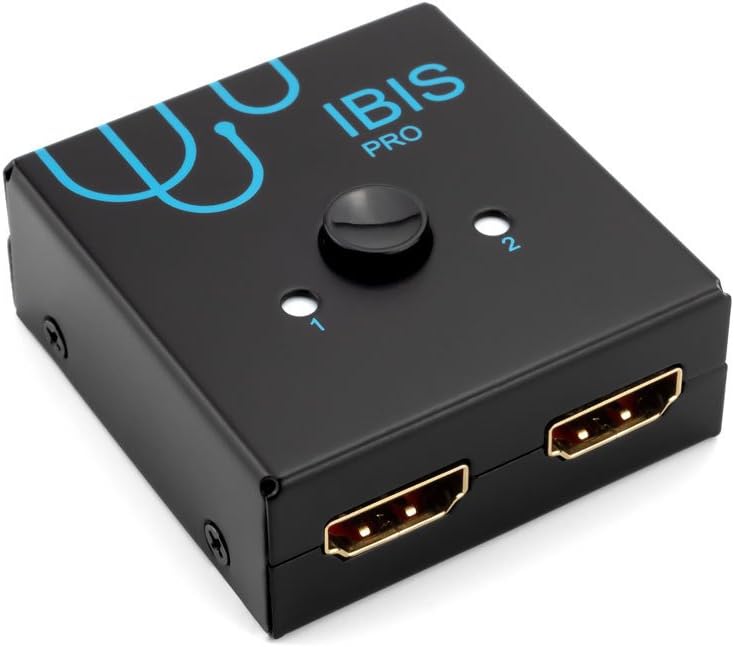


| ASIN | B07FN9J3KY |
| Brand | Sewell |
| Cable Type | HDMI |
| Compatible Devices | Blu-Ray Player, Gaming Console |
| Connector Type | HDMI |
| Connector Type Used on Cable | HDMI |
| Customer Reviews | 4.3 out of 5 stars 123 Reviews |
| Manufacturer | Sewell Direct |
| Mfr Part Number | SW-33076 |
| Model Number | SW-33076 |
| Number of Ports | 3 |
| UPC | 685289330767 |
| Unit Count | 1 Count |
| Warranty Description | 1 year |
B**.
Using this to switch PS4 Pro HDMI output signal between 1080p Plasma and 1080 1ms gaming monitor
WARNING: If you are having issues with your PS4 ( Playstation 4 ) losing its signal for a second or two during gaming ( screen turns black ), after tons of trial and error I realized it wasn't this switch's fault or the dozens of HDMI cables I tested. You have to disable HDCP ( settings -> system -> Enable HDCP ->turn OFF check ). HDCP is required hardware encryption for blurays and streaming movie/tv service like Netflix but you don't need it for gaming. Ok back to the review, the fact that I have a more complicated PS4 Pro setup due to having the VR ( newer rev ) plugged in caused me to test a lot of different cable configs and HDMI switches. I'm only needing to output a 1080p signal but it's also between two different displays that are expecting different color ranges. I have to adjust the color space in the PS4 system settings but that's not the switcher's fault. Overall it's worked quite well as long as I disable HDCP for gaming. One simple button press and I'm quickly bouncing between the displays. Honestly, Sewell makes pretty nice high end products so it's hard to go wrong with them. This switch has served me well for over a year and I play the PS4 quite often!
M**S
Works fine with Xbox One X to send 4K HDR.
Works great. I'm using it to toggle between TV and HD PVR. Just make sure you connect the 4k signal first if you trying to send 1080p from one device and 4k HDR from the other. Otherwise it will think your TV can't handle HDR and not send it. I had the older white IBIS before this. Works just as well. Quality product. I recommend it.
E**I
Using to bypass PSVR box while using my PS5 and it's working (4k 60fps HDR).
Using this with my PS5 and PSVR due to the PSVR box not passing through HDR. From what I can tell, using HDMI 2.1 cables, I am getting 4k 60fps w/HDR like I expected and wanted when routing PS5 > splitter > TV. Then when I switch to the PSVR routing, everything works as intended there. Hoping they release a HDMI 2.1 box to get 4k 120fps in the future. Will definitely pick one up if so. As is, it's working exactly how I want given the setup I'm trying to automate as best as possible.
S**Z
Great idea just didn't work for me.
This product doesn't do what I was under the impression it does. I wanted to use it for my son's psvr to fix the glitches that it has. I read up on this a lot, and I was convinced that it would work for what I needed it to. It is a great idea, but it didn't work for the psvr. Luckily the cords that I bought with this ended up fixing the glitches.
P**P
Ps4 pro 4k HDR passthrough supported
Ok i connected the ps4 pro system to my samsung q6f TV and to psvr pu. Sometimes if i have it to psvr it need to change the output to tv and to psvr again to work. Maybe is my tv problem, but it surrely support 4k HDR passthrough. Recommend it for an option to stop changing the hdmi cables
H**N
Works for PS4 OG and PSVR 1
I tried EVERYTHING to get my VR set up to work for my OG PS4...this finally did the trick. I bought a brand new tv and moved into my new house, plugged everything in and had an HDMI input error. I bought new HDMI cords and everything and nothing worked. Then this magical amazing switch popped up and Iโm not going to lie people stating that it wouldnโt work put me off it for a few days but I plug the trigger and BAM Iโm back to playing Super Hot VR haha
A**R
Simply doesnโt work
I have tried the previous model and this one to no avail. I wanted to simply connect my ps4 pro to my 4ktv and my non-4k monitor and seamlessly switch between the two. The first model worked but once I began to play a game the screen would flicker ok and off to the point of being unplayable, I called there customer support and they recommended I try the โproโ model. I received that model today and tried again with the same problem existing. If anyone can help or Sewell can contact me, maybe Iโm Donโt something wrong, other than that I can not give it a good review at this pint.
B**K
Works for PS4
This device is simple and it did it's job. My son can easily switch between his PS4 Pro and chromebook. He switches back and forth multiple times a day and there haven't been any problems. That are no issues watching Netflix on the PS4.
S**M
PSVR HDR ISSUES? Solution right here.
After doing some research online for a solution to my PSVR and HDR issue (the original PSVR V1's processing unit doesn't allow HDR to pass thru, so you have to manually unplug hdmi cables and bypass the psvr box if you want HDR content on your TV), this fixed the problem. No more hassle of unplugging cables, everything works perfectly now with a press of a button. Thank you!!
M**T
Switches between psvr and PS4/PS5
Bought this to switch between my psvr and PS4 on my av receiver. Happy to report that it works well and still have HRD when switched. More encouragingly is that it still works with my psvr and ps5. Chuffed to bits
J**N
Works perfect with PS4
Works perfectly, 1 star for remote control only because it does not have one. Very easy to install and works perfect with my nintendo switch and ps4 on one hdmi port and my pvr on the other. No issues at all!
B**.
Works Perfect
If you are using with PS4 Pro and VR, just a tip, aways look at your console menu and adjust according to what you are using and you should not have a problem.
M**D
Good, not great
Makes Monitor Flicker when i use it
Trustpilot
3 weeks ago
2 weeks ago