Desertcart purchases this item on your behalf and handles shipping, customs, and support to Croatia.
🚀 Compact power, limitless potential — own the future of mini PCs!
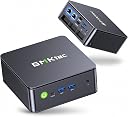
The GMKtec K12 is a barebone mini PC featuring the latest AMD Ryzen 7 255 (Zen 4) CPU with 8 cores and 16 threads, paired with Radeon 780M integrated graphics. It supports up to 128GB DDR5 RAM and triple M.2 SSD slots for up to 24TB storage. Designed for professionals and gamers, it offers 4K/8K multi-display output, dual 2.5GbE LAN, Wi-Fi 6E, USB4, and an OCuLink port for external GPU expansion. Its compact CNC aluminum body includes advanced cooling and customizable RGB lighting, making it a powerful, portable, and stylish workstation or gaming hub.
| ASIN | B0GVM77HWB |
| Amazon 売れ筋ランキング | パソコン・周辺機器 - 7,639位 ( パソコン・周辺機器の売れ筋ランキングを見る ) ミニPC - 24位 |
| CPU | AMD Ryzen |
| CPU モデルの最高速度 | 3.7 GHz |
| CPUスピード | 3.7 GHz |
| CPUモデル | Ryzen 5 3500U |
| HDMIポート数 | 2 |
| OS1 | Windows 11 Pro |
| RAMメモリ採用技術 | DDR4 |
| VRAMサイズ | 16 GB |
| VRAMタイプ | DDR4 SDRAM |
| おすすめ度 | 5つ星のうち4.2 173 レビュー |
| アスペクト比 | 16:9, 4:3 |
| オペレーティングシステム | Windows 11 Pro |
| グラフィックの説明 | 一体型 |
| グラフィックカードの説明 | 一体型 |
| グラフィックカードインターフェイス | PCI Express |
| グラフィックコプロセッサ | AMD Radeon Graphics |
| グラフィックハードウェア | AMD Radeon Graphics |
| コンピュータCPUタイプ | Ryzen 5 3500U |
| コンピュータCPU製造会社 | AMD |
| コンピュータCPU速度 | 3.7 GHz |
| コンポーネントアプトプット数 | 3 |
| システムRAMタイプ | DDR4 SDRAM |
| タッチスクリーン、声認識、他の有無 | キーボード |
| ディスプレイ最大解像度 | 3840x2160 |
| ネイティブ解像度 | 3840 x 2160 |
| ハードディスクの説明 | SSD |
| ハードディスクインターフェイス | PCIE x 4 |
| パソコンデザインタイプ | ミニPC |
| ビデオ出力 | HDMI, USB-C (DP Alt Mode) |
| ビデオ出力インターフェイス | HDMI, DisplayPort |
| ブランド | GMKtec |
| ブランド名 | GMKtec |
| プロセッサソケット | Socket A |
| プロセッサ数 | 4 |
| メモリメディアストレージ容量 | 256 GB |
| メモリーのサイズ | 256 GB |
| メーカー名 | GMKtec |
| モデル名 | GMKtec-JP-NucBox G |
| 保証内容 | 1年 |
| 光学ストレージデバイス | なし |
| 内蔵メモリー容量 | 16 GB |
| 同梱商品 | 本体×1 / 電源アダプター×1 / HDMIケーブル×1 / VESAブラケット×1 / ネジセット / 取扱説明書 |
| 商品の用途 | ビジネス, マルチメディア, 教育 |
| 型番 | GMKtec-JP-NucBox G |
| 解像度 | 3840 x 2160 |
Y**.
低価格、静音・省電力・コンパクト、自宅サーバーとして最高の一台
自宅のProxmox仮想化サーバーとして使用しています。 まず驚いたのが静粛性と省電力性能です。ファンがほぼ回らない状態で常時稼働しており、リビング近くに置いても全く気になりません。電気代も心配不要なレベルです。 現在この1台でAdGuard Home(広告ブロック)、DNS サーバー、WatchYourLAN(ネットワーク監視)、Home Assistant(スマートホーム)、Jellyfin(メディアサーバー)、Tailscale(VPN)、Grafana(ネットワーク監視)、Homarr(ダッシュボード)と、8つのサービスを同時に問題なく稼働させています。 これだけのサービスを快適に動かしながら、ほぼ無音というのは本当に優秀です。 2.5G LANポートが2ポート搭載されているのも自宅ネットワーク環境には十分で、管理用とサービス用に分けて使えるのも気に入っています。 価格・サイズ・性能のバランスが非常に優れており、自宅サーバー用途を検討されている方には自信を持っておすすめできる一台です。
G**G
Excelent m8
Excelent
A**R
個人的には満足
メモリは16GBで増設は不可。これ以上のメモリが必要になる可能性がある人は選択肢から外したほうがいいです。 ネットサーフィンや軽めのゲームなら問題なく使用可能です。OCuLinkがあるのでeGPUも使用は可能ですが、メモリ16GBのためそこまでするなら他の選択肢をとったほうがいいかもしれません。 パソコン本体が小さいのにアダプタが大きいのは残念。
ジ**ル
roonコアとして値段が手ごろ
使用目的:総合音楽鑑賞ソフトウェア「roon」のコア roonコアとしてミニpcを探していたところ、目に触れたのが本機です。ミニpcは使用したことがなく、また、roonコアとしては、roon作動に最適なブラウザ「roon rock」対応のnucleusなどがあるので、「roon rock」非対応の本機は、不具合なく作動するのか、多少の不安がありましたが、まったくの杞憂でした。本機は、「roon」コアとして問題なく動作します。それから特筆すべきは、価格の安さです。roonが自社開発した上記のnucleusは、エントリーモデルからして600ドルと、円安状況では割高なので、初めてroonを扱う私には、本機が丁度よかったです。 まとめると、「roon」コアとして、ミニpcを初めて使いたい人向け。曲数、音質など、細かいところに触手を広げられる余裕ができるまでのエントリー機として、最適だと思います。
J**M
No DDR5 or SSD
This Mini PC did not come with any DDR5 or SSD installed. It is basically a barebones mini PC that you have to install your own memory, SSD and operating system If I could give it a zero star I would.
永**ー
リビングで大画面4kテレビに接続で極楽生活
サイズの小ささは予想の2回りほど上回ってきた。 これって物理コネクターがサイズのネックになっているほど小さい。 音は静かだが結構聞こえるが割り切れる程度。 テレビの後ろに置いて4k液晶TV、トラックボールマウス+BTキーボードでリビングでソファーに座ってネットサーフィンやら山日記の作成やら安楽すぎてメインPCの出番が相当無くなった^^; Kindle利用も画面がでかく快適だし、VODはPCの方がテレビより処理が速いのでかえって見やすい事も。 メモリやストレージの値上がりがすごいが何とか安いうちに買えた。 予想以上に快適。大画面4k液晶があり、気になる方は早めに購入をお勧めする。 CPUのクラスもこの辺がバランスが良かったのではないかと思う。 つまり満足しかない。 最初のセットアップ時だけ若干性能の限界を感じる。 更新にものすごく時間がかかるのでそこだけ乗り越えよう。
A**ー
軽い負荷なら温度も控えめで静かなミニPC
初めてのミニPCとしてどうせなら丈夫なやつをと思い購入しました。 普段は動画視聴をしたり容量の軽いゲームを走らせたりブラウジングしたりしています。 とにかく静かで熱もそこまで出ず扱いやすいと感じました。 最新3Dゲームのような重たいゲームは流石に厳しいようでモンハンワイルズのベンチマークはダメでした。 総じて負荷の軽い用途で使うなら静かで熱くならない最高のミニPCだと思います。
な**1
良いです。
良いです。取説もある程度分かりやすくなっ初期設定もスムーズに完了しました。
S**N
I love it
Model Purchased: - AMD Ryzen 7 5825U (Turbo 4.5GHz),16GB DDR4, 512GB SSD - Paid $290 before tax - And connected it to a 4K monitor @ 60hz What did I do: - First thing was to install a super clear de-bloated Windows11 from USB. Worked great. - Obtained and installed latest drivers from GMKtec google drive. Worked great. - In BIOS made sure the CPU was in Balanced mode since performance mode caused too much fan noise. And set power mode to Balanced in Windows as well. - This new computer replaced a large desktop Intel i7 + Nvidia card. The Positives: - Very quiet, but I did place it under the desk as there was a very slight high-pitched coil hum and fan noise when it sat on my desk. - The performance in general rivals my old system with a few tweaks. Given my old system's dedicated NVidia card, I was gaming at 4k 60frames or higher. I had to step that down to 2K and less frames in general, but I didn't want this for gaming. If I wanted a better gaming experience I would have purchased a higher-end GMKTec gaming system. - The form-factor is tiny, I've had larger Intel i7 desktops that were so bulky, heavy, louder, and didn't perform this well. I don't even need a dedicated graphics card any longer. - My old computer used 250 watts, this new PC is using 8-12 watts as I write this review and up to 25 watts under heavy load. For comparison, my monitor steadily uses 50 watts. It just runs cooler. - I recommend this or the higher-end GMKTec PC's for anyone looking for a new PC. It just works, is affordable, and I enjoy using it. I just don't think about my PC as much any longer, since it is so quiet, has the performance I need, and it's out of sight and literally out of reach, which means I use the Windows Sleep feature to "turn it off/on" and it uses less than a watt in sleep mode. The Negatives: - The onboard fan is tiny and therefore loud if you intend to push this PC beyond the limits I described above. It will run at 65watts BIOS Performance mode, and you can get great performance but you'll hear the fan. - When I plug in a USB memory stick into the front USB-A 3.0 port to backup data I notice that the bluetooth mouse cursor/pointer will skip sometimes on screen as I'm using the PC, like a lag or delay. It's very annoying, so I just remove the USB stick and don't leave it plugged in. It's not a big-enough problem to try to find the root cause. I don't know if anyone else has seen this issue. Conclusion: Absolutely great all around inexpensive PC. I love it and this brand!
L**S
Windows did not function properly in my GMK mini PC
I have been a loyal Amazon customer for many years. In all that time, I believe this is only my second review. I was compelled to write this review to warn others about my extremely bad experience with this product. I purchased this GMK mini PC back in March 2025 and retired it today after enduring various problems for 6 months. Straight out of the box I discovered Windows had been setup to run under the Korean language. I should have immediately returned it, but I managed to overcome this hurdle after many hours of trial and error configuration tweaks. After a few weeks of usage, the PC began failing with RESET ERRORS. The resets were few at first, but gradually became a chronic condition. This forced me to reinstall Windows as a final solution. Reinstalling Windows solved the reset issues, but I lost WiFi capability and was never able to restore it. And yes, the reset problem eventually started reoccurring. As a desperate final measure, I successfully converted the PC to an Ubuntu Linux machine. This solved the reset problem and restored WiFi. However, I need a Windows machine and today I purchased an HP OmniDesk to fulfill my requirement. I will continue to use the GMK mini PC as a hobby toy to explore the capabilities of Linux OS. Thus far it has been running fine. It's great for internet access and runs effortlessly without all the bloatware Windows crams into their OS. I feel small degree of satisfaction with my experience. I feel it has not been a total loss. At least the GMK is good for something more than a paper weight.
R**T
A Powerhouse of Performance and Efficiency
The GMKTEC AMD Ryzen 7 5700U 16GB+512GB is an impressive piece of technology that delivers on all fronts. It’s powered by the AMD Ryzen 7 5700U processor, which is renowned for its superior performance and energy efficiency. This makes it an excellent choice for both heavy-duty tasks and everyday computing needs. The 16GB RAM ensures smooth multitasking, allowing you to run multiple applications simultaneously without any lag. Whether you’re editing videos, playing games, or running complex simulations, this machine can handle it all with ease. The 512GB storage is ample for storing all your files, documents, and multimedia content. It also contributes to the overall speed and performance of the system, ensuring quick boot times and fast data retrieval. One of the standout features of this model is its robust build quality. It feels sturdy and durable, promising a long lifespan. The design is sleek and modern, making it a stylish addition to any workspace. Another major plus is the ease of setup. The process is straightforward and user-friendly, making it a breeze even for those who aren’t tech-savvy. In conclusion, the GMKTEC AMD Ryzen 7 5700U 16GB+512GB is a high-performance machine that offers great value for its price. It’s a reliable choice for both professionals and casual users who demand speed, power, and efficiency from their computing devices. Easy setup for the folks that are not computer savvy.
A**N
I'm using this as a desktop replacement with dual monitors
I think these little computers are a great value - and this is my second GMKtec mini AMD PC. I'm not a gamer, but performance is important to me. Before buying this I checked the CPU benchmark rating from cpubenchmark . net, and the score for this CPU is 15,856 - which is about the same as my primary desktop computer (which is a full size Dell desktop but does happen to be 3 years old, yet I use my desktop computer for quite a bit of processor-intensive applications). I've seen a lot of mini-PC's with a CPU Benchmark score at 10,000 or below, and I didn't want something with a slower processor. I got this particular mini-PC as a replacement for my children's full-size Dell desktop computer. For a size comparison, in one photo, I've got this mini-PC on the older Dell desktop that was having random-reboot issues. The children are primarily using Edge (tied to Microsoft family safety settings) along with Microsoft Office. While testing the machine I was surprised with the quality and volume of sound coming out of the box as default speakers - although I generally use headphones. If you want to run some basic speed tests on your current machine to compare to this, you can go to silver . urih . com and run some tests. These are the tests and scores I ran on this computer: - 4/2024 Regular benchmark (16 core): P30094 - 4/2024 extreme test = x3051 - 4/2024 stress test – FPS after 3 minutes = Frame 12 FPS 0.0681 I'm using a USB hub/connector so that the front ports of the computer are open/free. I like running Windows 11 and was glad it was installed by default. I did not run into any issues getting Windows configured and running the initial Windows Updates. While I've only been using this for a week I'm happy with it.
Z**F
I wasn't sure but I am now.
I bought this as a small secondary machine that I was hoping I might be able to run one particular game that has issues on my main system. I love tiny machines and normally buy refurbished Lenovo Tiny systems but I already know their graphics would not be remotely up to the task. So, I took a shot and purchased this one after reading loads of the reviews. For reference the game I wanted to run is 7 Days to Die. Well, the setup took no time at all. Windows 11 was activated, I ran updates and finally downloaded the game. The networking was great (ethernet) and the game downloaded in record time (speedtest is showing 980 on my gig connection). Now to see if it works. Is it up to my main gaming system? No but the other system has an RTX 2060 so the graphics comparison isn't truly fair. Running with everything set to high it runs a dismal 12 fps. I turned down a number of the high impact settings and got ti up to 26 fps which is surprising playable. So, is it a great gaming system? Probably not, but does it do what I needed it for? Absolutely. I would say if you are looking for low end gaming it might work well for you. If you are looking for a relatively inexpensive, but very nice general use system this is great. I have no idea what the life span will be for it as I've only had it about 1 month but so far I am pretty happy with the purchase. Now if you will excuse me I am off to kill some zombies.
Trustpilot
1 month ago
2 days ago