Buy anything from 5,000+ international stores. One checkout price. No surprise fees. Join 2M+ shoppers on Desertcart.
Desertcart purchases this item on your behalf and handles shipping, customs, and support to Croatia.
🚀 Upgrade your connection, upgrade your life!
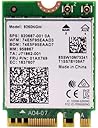
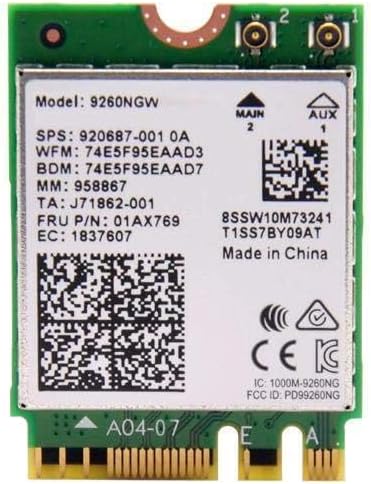
The Intel Wireless AC 9260 Single Pack is a high-performance internal network card delivering up to 1730 Mbps Wi-Fi speeds with dual-band 2.4/5 GHz support and Bluetooth 5.0. Compatible with both Windows and Linux, it offers a hassle-free installation to boost wireless stability and speed for laptops and desktops alike.
| ASIN | B079QJQF4Y |
| Best Sellers Rank | #79 in Internal Computer Networking Cards |
| Brand | Intel |
| Color | multicolor |
| Compatible Devices | Desktop, Laptop |
| Compatible Operating System Family | Windows |
| Customer Reviews | 4.6 out of 5 stars 1,391 Reviews |
| Data Link Protocol | Bluetooth |
| Data Transfer Rate | 1730 Megabits Per Second |
| External Testing Certification | Wi-Fi, FIPS, FISMA |
| Global Trade Identification Number | 00735858358248 |
| Hardware Interface | Bluetooth |
| Item Weight | 0.1 Ounces |
| Manufacturer | Intel |
| Mfr Part Number | 9260.NGWG |
| Minimum Required Operating System Version | Windows 10 |
| Model Number | 9260.NGWG |
| UPC | 735858358248 715663079149 |
| Unit Count | 1.0 Count |
J**N
Solved my issues
My old wireless card (2018) was going out. This was causing Windows to BSOD, and in Linux the card would just stop showing up in the devices list after about 5-10 minutes of use. I replaced the old card with this one (very easy installation) and it did what it's supposed to do. Now I have stable internet connection on Linux, and Windows now longer crashes. Very affordable fix!
J**B
Works with Linux
I bought an HP laptop a few months ago. Nice laptop, but I wasn't a fan of the Windows 11 OS installed on it. I decided to upgrade the Storage, the RAM and switch to a Linux OS (LMDE). Everything went smoothly, until I got to the Wi-Fi. The laptop wouldn't detect my Wi-Fi router. After trying a few "fixes" suggested online, I decided I wasn't wasting any more time going that route. There was a Realtek Wi-Fi card installed on my laptop. It turns out Realtek cards don't always work well with Linux, so I looked for a replacement. I found and ordered this item for about $16. I installed it and booted up my laptop. This card immediately detected my Wi-Fi router and I'm good to go. If you are comfortable opening up a laptop, this is a pretty simple job switching out the Wi-Fi cards. The laptop's 2 wire connectors are tiny and a bit fiddly, so if you have old eyes and sausage fingers like myself, a magnifying glass and some needle nose pliers might be helpful. Just remember if your device is still under warranty, you will most likely be voiding it. Now my Linux HP laptop can wirelessly connect to the internet, 5 stars!
Y**G
Worthwhile just for the Bluetooth 5.0
This is a nice drop-in upgrade for most laptops or all-in-one systems. My old system had the 7265 with bluetooth 4.0, works fine but getting old in the tooth. I simply swapped out the old card and plugged this one in. In terms of wireless performance I see no real differences. My connection is limited to 100mps so it's the service that's the limitation, not this card. However Bluetooth 5.0 is nice. It's got better broadcast range, faster transfer speeds, and you can use multiple devices on the same connection. Few devices support bluetooht 5.0 since it is so new. Overall, great upgrade worth $30 and 5 minutes to install!
N**Z
The cards is working very good, with no drop outs
I bought 2 of these cards to replace a Killer 1435 from an Alienware 17R4 and an Asus ROG Z370-i mini itx board. The cards is working very good, with no drop outs, a very high average connection speed and no weird problems, glitches or whatever. I have a complain though, this card receives a very poor signal in both computers, and compared to 2 different wifi cards (one Realtek/Qualcomm and the Killer 1435).
C**U
Tricky to get Wireless Display working, but solid end result
Upgrading Dell 9570 from Killer Wireless NIC to this. Prior to installing the new card, I removed all connected Bluetooth devices (if not, there will be removal error after the new card is installed and will need to go through Windows Device Manager to comb through). Hardware install is easy, regardless of antenna color, I connected the original Main to the Main connector of the new card and the original AUX antenna to the AUX of the new card. After the new card is installed, Windows 10 drivers are installed automatically. At this point WIFI and BT should work and I was able to pair all BT devices. The last step required is to un-install the Intel Display driver, reboot, re-install the Intel Display driver and reboot to get the screen mirroring aka projection to wireless monitor aka widi aka miracast working. Very happy with the end result, just took about 30 minutes of trial and error to finally get everything working; and hope this helps somebody.
A**X
Effective and inexpensive wi-fi upgrade
Bought this to replace an old Realtek rtl8822BE wi-fi card for use in an ASUS X411UN laptop. Installation was easy but will vary based on your computer model. Drivers were simply installed using Intel Driver Assistant (found on their main website), but you can probably just do a quick google search for them. I've been using this wi-fi card for a few weeks and have noticed only a minor increase in internet speeds. I have, however, also found that my connection stability has vastly improved. No longer does my wi-fi cut out at random intervals! The same can be said about my bluetooth connections. They are stable and do not cut out like they used to. Overall, I will say that this is a good purchase for those who want to upgrade their underperforming wi-fi cards. It is inexpensive, the drivers are easy to find online, and it will greatly improve your wi-fi stability.
D**.
Cost-effective replacement for the Realtek RTL8822BE in a Lenovo Legion Y530-15ICH laptop.
Bought this as a replacement for my laptop's Wi-Fi card. The Wi-Fi would randomly drop and require me to reboot it it, and the bluetooth would randomly freeze the service, causing any device connected to it to repeat the last input that was sent to it, therefore, needing a laptop reboot. Needed to replace the poor-quality Wi-Fi card that Lenovo installed in my Legion Y530 (they installed the Realtek RTL 8822BE, which is notorious for dropping Wi-Fi signal and bluetooth connectivity/intermittency issues). My specific laptop did not have a whitelist implemented in the BIOS, so I was able to install the replacement card easily, updated the Wi-Fi and bluetooth drivers through Windows Update on WIndows 10 22H2, and reconnect my bluetooth devices with no issue. Card is cheap, reliable in terms of function, and supports both M and E key configurations. Thought this review would help others who also have encountered the same problem.
J**R
Works Great on Dell 5559 laptop.
Had to replace the power input connector on the wife's Dell Inspiron 5559, so I figured I'd update her aged wireless card. New card fit perfectly, but make sure you download and install the new Intel drivers for it. Download speeds went from around 224 mbps to almost 600 mbps. A great $11 investment.
D**O
Funciona correctamente
En mi caso 3 detalles a tener en cuenta. 1. Los cables de las antenas en mi caso tenían el código de color (blanco/negro) al contrario que los de la tarjeta que reemplazaba, pero llevando cuidado con eso no hay mayor problema, en mi caso hice el intercambio y todo bien. 2. Me costó un poco conectar uno de los cables de antena (no se llegaba a conectar bien del todo), el otro sin problema. 3. En linux tuve que actualizar la versión del kernel a una más moderna, compatible con el driver oficial de Intel (en intel te indican la compatibilidad del driver de la tarjeta y la versión de kernel mínimo que necesitas). En windows 10 sin problemas.
A**7
Risolto il problema WIFI del mio Lenovo 730
Ho da poco comprato un Lenovo Yoga 730 che, nonostante le buone prestazioni complessive, ha sempre dimostrato una connessione Wifi molto capricciosa, con velocità di connessione lenta e frequenti disconnessioni. La sostituzione del prodotto non ha risolto il problema e nemmeno gli aggiustamenti software proposti da Lenovo. Per cui, incoraggiato da alcuni tutorial visti su internet ho deciso di provare a sostituire la scheda wifi di serie Realtek con questa AC 9260. I problemi di connessione sono scomparsi completamente e anche la velocità di connessione è aumentata di molto rispetto a prima. Nessun problema di configurazione software perché la scheda è stata riconosciuta immediatamente da Windows. L'unica cosa che mi ha creato qualche problema è stata la rimozione del pannello posteriore perchè i giochi di montaggio sono talmente stretti che dopo aver tolto le viti non riuscivo a trovare una fessura sufficientemente larga per poter infilare qualcosa e togliere il pannello (possibilmente senza graffiarlo). Non avendo in casa attrezzatura specifica, ho risolto utilizzando gli utensili in plastica per sostituire i coppertoni della bici (pochi euro da Decathlon).
P**Z
Kanon
Funkar perfekt
T**X
Super WLAN Chip
Der WLAN Chip wurde schnell geliefert. Ich habe diesen in einen Asus Laptop, auf dem Linux Mint läuft, eingebaut. Der Chip wurde sofort erkannt und hat sofort funktioniert. Ich erreiche jetzt eine viel bessere Geschwindigkeit.
A**O
Carte Wifi AC + Bluetooth 5 très stable et sure
Montée sur une carte de KALEA-INFORMATIQUE - Contrôleur PCIe pour PC de bureau, achetée en même temps sur Amazon, cette carte fournit à ce module 2 antennes WiFi à haut gain. Le module pour portable a ici été placée dans un PC de bureau pour pouvoir le faire fonctionner sans prise ethernet à proximité. Je savais que ce module fonctionne très bien, de manière fiable et avec mises à jour du progiciel. Il donne jusqu'à 170 Mo/s maximum de débit théorique (voir le test de débit pratique ci-dessous). Ce module offre aussi Bluetooth 5 (et non 4) de manière intégrée. J'ai la même carte M.2 Intel dans mon PC portable, ce qui m'a porté vers ce choix. Et il fonctionne également très bien aussi sur cette carte PC. Je n'aimais pas trop les commentaires lus sur d'autres cartes WiFi AC intégrées sur Amazon, fabriqués par des fabriquants pas toujours connus pour 100% de fiabilité, d'après les commentaires 1 étoile, d'où le choix de ce module sûr et stable (j'ai expérimenté des modules WiFi Intel depuis très longtemps et cette fiabilité et qualité technique me coute moins cher au final). Résultat: de très bons débits et un très bon fonctionnement d'ensemble. Les grandes antennes à haut gain (18cm ce qui m'a surpris au départ) dépassent derrière le bureau, sous la ferraille des portes câbles et structure métallique de ce bureau mais contribuent au bon débit du module. Ce module s'enfiche facilement dans son support M.2. Remarque: l'assemblage des fins câbles coaxiaux des deux antennes reste très très délicat. J'ai dû prendre une très large loupe de couture pour ce montage. Il y a deux connecteurs coaxiaux d'un peu plus de 1 mm de diamètre (pour 2 fils). Ils se clipsent et s'enfichent à la petite pince sur un connecteur de 1,2mm de diamètre, fil coaxial au milieu. J'ai serti à la mini pince à fin becs finalement en mettant les becs dans l'alignement des micro fils coaxiaux, fils vers le centre de pince, ce qui a finalement fonctionné le mieux sans trop presser. J'avais au départ pris une bonne pince à timbre-poste: à oublier car bien trop léger! On entend un petit clac quand c'est serti (et pas écrasé...). L'épaisseur du capot à clipser fait moins d' 1 mm! (donc 1mm de diamètre et 0.8mm d'épaisseur à l'oeil car j'avais égaré mon vernier électronique). Le démontage est - d'expérience - encore plus risqué (risque de décollement de la prise support sur le module wifi). Cette difficulté est inhérente à tous les modules M.2, ultra fins et à toutes les cartes de supports pour de tels modules (comme celui-ci), mais à noter. Doigts trop tremblants et mauvais yeux s'abstenir si pas un peu habitué et sans loupe. Sinon risque plus élevé de casse. Du coup, je vais m'acheter une bonne loupe de bureau + éclairage intégré (style bijoutier mais moins sophistiquée donc moins chère) sur Amazon. Plus qu' utile dans de tels cas et trop longtemps postposé! Et puis, j'ai lancé les tests sur mon vieux PC sur un énorme fichier venant d'un vieux serveur NAS (le tout de 2009), réseau 100Mhz, donc ensemble cohérent et classique mais pas des plus performants (je ne suis pas un gamer et j'amortis bien mon matériel). Résultats: 1) par réseau filaire ethernet, débits moyens 11,1 Mo/s, très suffisant pour moi. 2) par WiFi AC 5Mhz (ma maison en ville), débits moyens stables autour de 10,7 Mo/s, assez loin du point d'accès (30m, pièces séparées d'une maison, étage, planchers béton ferraillés), donc un petit peu moins mais tout de même super. J'avais expérimenté chez moi que plus près du point d'accès, ce module WiFi AC + point d'accès Asus RT-AC66U donne des débits plus rapide (2x à 3x) et aussi fiable que mon réseau câblé ethernet 100 Mhz (vieux switch ordinaire 24 ports 1000 Mhz mais des câbles ordinaires UTP5e et des connections pas toujours terribles ni homogènes). En bref, très content. Objectif atteint, rapidement. Livraison rapide et sans problème. Installation facile du module si on fait très très attention au raccordement des deux câbles d'antenne.
Trustpilot
1 month ago
1 month ago