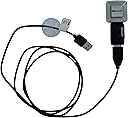
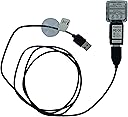
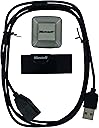
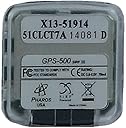
GPS Receiver: Microsoft Pharos GPS-500 III GPS Receiver
Product ID: 8564053
Details
- Audio Output ModeStereo
- BrandMicrosoft
- Connectivity TechnologyUSB
- Included ComponentsUSB Cable
- Map TypeNorth America
- Model NameGPS-500 III
Microsoft Pharos iGPS-500 convertible receiver is a small, slim and highly sensitive GPS receiver that connects to your PC and Mac via the included USB cable. With third party mapping software such as Microsoft Streets & Trips you can now accurately view your position in real time on your laptop, tablet or ultra-mobile PC. For Mac users the GPS receiver works in Parallels Desktop without rebooting into Windows so you can use Front Row for a more driver-friendly iTunes interface. Review: Great item, works great with google earth - When I received this gps device, I hope that some kind of software to manage it was included in the package, but there's no any instruction or software. Installed in a Laptop with Windows 7. It's plug and play, placed the receiver at the roof of my car. At first a little disapointed, because I found on the web that it works only with Microsoft Street and Trips thats is useless for me, because this had only maps for USA and Canada, and I live most of the time in South America. But after trying with Google Earth, I found in the tool menu an option for GPS, open the 'Realtime' folder option, select the NMEA Protocol, mark 'Automatically follow the path' and click the start button, and after 4 or 5 seconds, my position appear in the map. It's simple to use and a cheap solution if you need a GPS to travel. P.D. The Google Earth needs an Internet connection to display constantly the position, in my case, I have a 3G Modem and an Internet Service Provider that's give me an unlimited data download at a flat cost. Review: GPS Receiver for Canape - I bought a few of these for my coworkers and myself to use with CANape to get vehicle location and speed information for development work. They interface well with CANape. Win XP pro has all the drivers already. CANape picked the GPS up without any trouble. Update rate is 1Hz, which makes it good for a reference point. It also interfaced fine with Microsoft Map point. I downloaded the demo version and fired it up and it found my location and provided navigation directions. The receiver even was able to pick up some of the satellites inside my office building, and was able to see all the satellites that were available once out side.
| ASIN | B000VQGSKE |
| Additional Features | Cross-Platform Compatibility |
| Are Batteries Included | No |
| Audio Output Mode | Stereo |
| Brand | Microsoft |
| Built-In Media | USB Cable |
| Compatible Devices | Laptop |
| Connectivity Protocol | USB |
| Connectivity Technology | USB |
| Control Method | Touch |
| Customer Reviews | 4.0 out of 5 stars 58 Reviews |
| Display Type | touch screen |
| Human-Interface Input | Touchscreen |
| Included Components | USB Cable |
| Manufacturer | Pharos |
| Map Type | North America |
| Map Types | North America |
| Mfr Part Number | PB010 |
| Model Name | GPS-500 III |
| Mounting Type | Panel Mount |
| Operating System | Windows |
| Resolution | 480 x 272 |
| Special Feature | Cross-Platform Compatibility |
| Supported Satellite Navigation System | GPS |
| Touch Screen Type | Resistive |
P**R
Great item, works great with google earth
When I received this gps device, I hope that some kind of software to manage it was included in the package, but there's no any instruction or software. Installed in a Laptop with Windows 7. It's plug and play, placed the receiver at the roof of my car. At first a little disapointed, because I found on the web that it works only with Microsoft Street and Trips thats is useless for me, because this had only maps for USA and Canada, and I live most of the time in South America. But after trying with Google Earth, I found in the tool menu an option for GPS, open the 'Realtime' folder option, select the NMEA Protocol, mark 'Automatically follow the path' and click the start button, and after 4 or 5 seconds, my position appear in the map. It's simple to use and a cheap solution if you need a GPS to travel. P.D. The Google Earth needs an Internet connection to display constantly the position, in my case, I have a 3G Modem and an Internet Service Provider that's give me an unlimited data download at a flat cost.
K**R
GPS Receiver for Canape
I bought a few of these for my coworkers and myself to use with CANape to get vehicle location and speed information for development work. They interface well with CANape. Win XP pro has all the drivers already. CANape picked the GPS up without any trouble. Update rate is 1Hz, which makes it good for a reference point. It also interfaced fine with Microsoft Map point. I downloaded the demo version and fired it up and it found my location and provided navigation directions. The receiver even was able to pick up some of the satellites inside my office building, and was able to see all the satellites that were available once out side.
R**Y
Must have a bad wiring inside
does not work every time, I have to wiggle it. Must have a bad wiring inside.
C**I
unable to receive signal
I am 7th day of my 26 days trip in Glacier National Park,Montana. Microsoft Street & Trip keep saying about every 5 minute "off route, back to route and or lost signal" on main highway around the Glacier National Park, Also could not receive any signal in Yellowstone National Park.
L**S
receiver Works Very Well
The GPS receiver plugged into a USB port. I tried it on Windows Vista laptop with a free nautical navigation package which required it be on a serial port. The system automatically downloaded a driver which made the USB look like a serial port. Then I had to change the serial port number on the software to match the driver port number. This all took about 5 minutes. The receiver acquired the satellite lock very quickly and even inside the house gave a location with an accuracy of a few feet.
A**T
Works with Co-Pilot Laptop
This GPS was originally purchased for MS Streets and Trips software, which can use GPS input. But, soon I discovered the advantages of the truck version of Co-pilot for laptop, and install that. A friend told me Co-pilot was finicky about which GPS would work, but I found that this one performed fine, and it wasn't very expensive. There's no need for an external antenna or other such device on my truck because the roof of the truck cab is fiberglass, which is invisible to the GPS signals.
S**A
GPS Receiver: Microsoft Pharos GPS-500 III GPS Receiver
Very nice GPS receivr for Microsoft Streets and trips. Good Price and easy to set up. I am a trucker and this is a fine accurate receiver for my laptop Streets and Trips program. As for weether resistance, it's not. Don't get it wet. What I did was took one of those roof mount small oval amber lights with the rotating beacon inside apart. Painted the inside of the globe with white plastic based spray paint. Ran a long USB cable through the hole in the base then used spray foam to seal and create a bed for the receiver to rest on. after it dried, I shaped the foam and taped the unit to the bed of foam and placed the cover back on. Now I have a magnetic protective housing with the GPS antenna in it and it works and looks great.
A**Y
MS GPS Receiver
Two thumbs up on this product. Very small and compact & works great. I bought three of them and installed them hidden in the upper dash under the windshields of my vehicles. Then ran the cords to the glove box where they are stored when not in use. I just pull the cords out when needed for my GPS notebook. The adapter between the antenna and cord is actually a USB plug that allows one to plug the antenna directly into a notebook. I didn't realize that until much later. No instructions come with the product.
Trustpilot
1 month ago
3 weeks ago