


❄️ Cool tech, hot looks — keep your CPU chill and your setup lit!
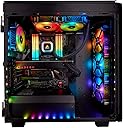
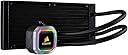
The Corsair H100i RGB PLATINUM is a premium 240mm all-in-one liquid CPU cooler featuring dual 120mm ML PRO RGB PWM fans with 75 CFM airflow and ultra-quiet 37 dB operation. It boasts 16 customizable RGB LEDs on the pump head, controlled via Corsair's intuitive iCUE software for full lighting and performance management. Compatible with a wide range of Intel and AMD sockets, it combines high-performance copper cold plate cooling with sleek aesthetics, making it a top choice for enthusiasts seeking both power and style.





| ASIN | B07JWB5BSN |
| Air Flow Capacity | 75 cfm |
| Best Sellers Rank | #3,038 in Water Cooling Systems |
| Brand | Corsair |
| Brand Name | Corsair |
| Compatible Devices | Desktop |
| Cooling Method | Water |
| Customer Reviews | 4.6 out of 5 stars 7,841 Reviews |
| Global Trade Identification Number | 00843591035460 |
| Included Components | Hydro Series H100i RGB PLATINUM Extreme Performance Liquid CPU Cooler, Mounting kit for most modern CPU sockets, Two ML PRO RGB Series PWM 140mm fans, Fan and radiator mounting screws, USB 2.0 motherboard header cable, Thermal compound (pre-applied), Quick Start Guide |
| Item Dimensions L x W x H | 10.9"L x 4.72"W x 1.06"H |
| Item Type Name | CORSAIR Hydro Series H100i RGB PLATINUM AIO Liquid CPU Cooler, 240mm Radiator, Dual ML PRO 120mm RGB PWM Fans |
| Item Weight | 1.8 pounds |
| Manufacturer | Corsair |
| Material Type | Copper |
| Maximum Rotational Speed | 2400 rpm |
| Model | CW-9060039-WW |
| Noise Level | 37 db |
| Number of Items | 1 |
| Number of Packs | 1 |
| Part Number | CW-9060039-WW |
| Power Connector Type | 4-Pin |
| Product Dimensions | 10.9"L x 4.72"W x 1.06"H |
| UPC | 843591035460 |
| Unit Count | 1 Count |
| Voltage | 12 volts |
| Warranty Description | 5 Years |
D**W
Great RGB AIO but just decent CPU Cooler
*******Edit 5/29/2019 I had an issue with my unit in which the H115i when updating the firmware. While the update was taking place the H115i disappeared from iCue and remained updating (over 30 minutes) which was irregular as most of the previous firmware updates lasted several minutes. I tried restarting iCue to no avail but the H115i fans started to max out and the pump would go full speed. This was way too loud so I hard reset my computer. To my confusion the pump was recognized by iCue on restart with the pending update once again. Attempting to update restarted this cycle of a disappearing H115i that would go full blast. At this point I contacted Corsair support and issued a ticket. They gave me some suggestions (plug usb header onto another motherboard header) but this did not solve the problem. At this point they issued an RMA and graciously provided the shipping costs. I thought they would attempt to just fix it but instead sent me a brand new unit. After install, I was able to update to the firmware that borked the previous unit and the pump is working flawlessly. Will update this review if anything happens. TLDR: Firmware update borked H115i but Corsair support came to the rescue quickly and provided a new replacement unit. Not docking a star cause it wasn't the pump that malfunctioned but iCue. If I could give iCue a rating, it'd be a 1 out of 5. Come on Corsair, fix iCue! ********** This is quality all in one (AIO) liquid cooler from Corsair that comes with RGB LL 140 maglev fans that are reliable, quiet, efficient and allow for a lot of colorful customizations for any PC build. I previously owned the Corsair Hydro Series H115i and this is a decent improvement over that model. I purchased the 280mm version of this product and this is the current build I am using it with: Corsair Obsidian 500D RGB Corsair Commander Pro ASUS Maximus Code XI motherboard Intel Core I9 9900k Corsair Vengeance RGB 2 X 16GB 3200 MHz Asus ROG Strix RTX 2080 TI Corsair H115i Platinum Seasonic Prime Platinum 1300W 2 X Samsung EVO Plus 1 TB NVMe 2 X LL 120mm Corsair RGB Fans Build Quality: This is a solidly constructed AIO. The radiator is thick and the tubing is not extremely rigid, allowing for some decent positioning/maneuverability if using as an exhaust or intake. The fans provided are Corsair's LL140mm RGB fans which are maglev and are beautiful to look at. The CPU block has a ring that lights up with RGB lights as well. Now there are a lot of cables to manage with this package as the RGB is connected via a micro USB cable that needs to be connected to a motherboard USB header. Then the fans also need to be connected to the motherboard (or preferably a Corsair Lightning Pro Node or Commander Pro) and the whole thing is powered via a Sata cable. Overall it's a quality AIO but comes with a mess of wires which is somewhat counter intuitive when going for a clean RGB look. Perfomrance: Now I am judging the Platinum's ability to cool my particular CPU and your results will vary depending on what CPU you end up using. Regardless, bare in mind that trying to cool an I9 9900K overclocked (to 5.0 GHz all cores at 1.335v) is really difficult for any AIO to accomplish efficiently. When running CPU stress tests (AIDA64, RealBench, Prime 95), the 9900k will hover around 85-87 Celsius. When gaming however, it runs much cooler mid 50's to highs of 60-65 C. Overall you're not going to be blown away by the performance but you should be able to adequately cool most consumer grade CPUs. Noise: The AIO is very quiet on idle as the both the pump and the fans function at a mere whisper. If you crank up the fans to 100% or put the pump on extreme mode they can get very audible (like a jet taking off). However, you can create custom fan curves to fit your preferred noise-to-performance level using the iCUE software that simultaneously allows for RGB control. RGB Lighting: Both the fans and the CPU block can be customized to the color of your choosing utilizing Corsair's iCue software. You can create custom effects or use presets and can even control the brightness (three levels) of the LED's or simply turn them off. They work well and look great all around. Price: This is somewhat subjective as RGB always commands a price premium. Compared to the Corsair Hydro Series H115i PRO RGB AIO at $138.63 (current price on Amazon), you're paying almost $20 more for the same performance without RGB fans. However, if you take into account the fact that this product has the better LL140mm RGB fans that are quieter and cost $39.99 each, the $!59.99 price tag starts to sound like a phenomenal deal. In my opinion, this product is reasonably priced for what you get. Side Notes: -The Corsair iCUE software is hit or miss. It is buggy and not as easy to configure as it should be. I didn't factor this into the review rating because the software works with many products and doesn't actually reflect the AIO's quality in itself. That being said, to fully utilize the RGB you will have to use the software no matter what. -Extra screws, RGB cable extensions, and fan cable extensions are included in the box.
C**L
Simple To Install
Hello, Normally I use the nzxt coolers but I have down sized to a smaller case. So I have picked up the 240 mm corsair to go along with my corsair fans that came along with my 220t case. I found this cooler to be little bigger then others due to fan's that this comes with they are a 120 mm but the casing these fans are in are of a larger profile . So I did have little trouble making this fit in my case but I was able to make it work.The install part is by far the easiest I have done, very simple bracket for the back and once threw the m/b then can just attach the cooler with ease. I have this pair with my 8700k and it seems to keep this thing under load just fine for cooling and I don't really hear much noise just some but over all not that bad. ICUE works fine I don't mind application and with some tweaking I was able to figure out how to link all my fans rgb with the coolers rgb. Overall I feel like with this 240 mm AIO cooler I get a 280 mm cooling out of it .
N**D
Great, beautiful liquid cooling for my new Intel i9-9900K build
This being my first experience building a PC with liquid cooling, I was a little nervous about installation. However, it turns out this is one of the easiest to install AIO units on the market, with excellent cooling performance. With RGB lighting on the fans and the pump head that I can synchronize with other Corsair RGB products, it makes custom lighting really easy. My computer is now quite the showcase, and when I added a Corsair RGB mouse, I was pleasantly surprised to see the software immediately recognize it and allow me to easily adjust lighting and other settings. Best part of this cooler is the 2 large fans that float on a magnetic field, making them very smooth and quiet. The one drawback is that the pump comes with thermal past pre-applied with a loose-fitting plaster cover to protect it during shipping. The cover of mine fell off during unpacking, and it could have been really easy to accidentally wipe off some or all of the thermal paste. Just be really careful when you take it out of the box and you'll be fine - or wipe it off and apply your own if you prefer. Overall, I would buy this product again and highly recommend it.
A**E
Perfect for Ryzen 16-core CPU and NZXT case
This is the smaller radiator, and 2 fan unit. There are bigger radiator models and some with 3 fans. I got the NZXT case that has a place in the top to mount this, and it works beautifully. I got the Ryzen 9 16-core CPU, and it recommends the bigger radiator, but they were out. After using this for a while I can say this one adequately manages the heat from the CPU without any problems. It comes with the heat transfer paste on it, but I never trust that, and add my own, just to be 100% sure. I have used these Corsair coolers on my last two serious computers and they have never failed me, never let me down. This one has lights which sync with Aura or other apps, and you can make it flash red if the heat gets too high or something, but I’ve never seen it even get really warm, let alone too hot. Forget a fan, protect your expensive CPU. The cooler they run the longer they live. People say it’s ideal to run warm, not hot, that’s NOT TRUE. The ideal temp for any CPU is -40C, but the burnout is usually >120C, and you don’t want to go above 80C much for longevity of the device. I shoot for 60C as the max on my system and with these coolers I have no issue. The software makes its easy to set curves and performance modes, and keep it running really cool, which is what I do.
W**?
[UPDATE: Transferred to new case]... Works well, in spite of old case
[UPDATE] 2021: Transferred my system to a Corsair 5000D, which has better airflow but just reaffirms the pump noise. It's not a big deal until everything quiets down with my quiet fan curves and all i can hear is the pump. The iCue Quiet profile for it sounds like a low droning sound, while the Standard profile sounds high pitched. The fans are fine, the sound they make are more on the "whoosh" sound and are acceptable in high loads. Temps are still fine. NO, THE LED's DONT MAKE THE SOUND. Turning the LEDs on or off doesn't make any difference for me in loudness and temp. Also, the pump itself have blown out its blue LEDs. If i set lights to blue or white, it will just turn yellow. If i set to some rainbow effect, blue will not be visible Overall, it's still fine in cooling. It's bothersome mostly when not gaming and it's quiet all around. I'd probably take off half a star at most if i could. ------------------------------------------------------ Works well, temps acceptable. I learned to like the iCUE for how it's standard fan controls work for this. It's not as noisy as an old 240mm Corsair H100 on an i7 3700k that i had a long time ago. [UPDATE: however, the water pump in standard iCUE profile is the noisiest part, had to set it in the quiet profile. Still works without temp problems.] LED control works well. Didn't really need the LED as i don't have a visibly open case but price difference between this and the nonLED was negligible at time of shopping (and i was staring at one in a Microcenter that was priced way higher). Connected power as per manual instructions. Main power comes from SATA power cable. Connection to motherboard CPU fan header is not the main actual power and fan control. You just connect it probably to satisfy the motherboard need to have something powering a CPU cooler. The fans themselves connect to the pump and the pump has to connect to an available USB header (USB 2.0 or 3.0 [or 3.1 gen1]) for iCUE control. It fits but I cannot recommend this to anyone with the old Corsair Obsidian 550D case, which i have. I almost considered replacing either this or my case, which i was trying to avoid. It only fits one way on the top exhaust with the tubes on the rear side of the case. Its fine at first until the motherboard (ASUS ROG Maximus XI Hero (Wi-Fi)) and the PSU-to-CPU power cable comes into play. It basically shouldn't fit. Specifics: The 6-pin and 4-pin CPU power cables from PSU would be crammed in tightly once the H115i is installed. The HX1050 PSU does not have flexible cable tips. The clip or hook that holds the CPU 6-pin power cable to the motherboard was preventing me from physically installing the H115i. Also, the top heat sink shroud of the mother board is uncomfortably close to one of the H115i fans. My "fix": I used a wire cutting pliers to cut the hook off of the CPU 6-pin that clips it into place. After installation, the H115i's fan frame is literally sitting on top of the connected 6-pin. I hoped that even when the CPU cables were stuffed and bent to their limits, they will not cause any shorts, and they don't, as far as i can tell. I am just living with the fact that fan blades are just 1 to 2 mm away from the shroud/heat sink thats on the top part of the motherboard. CPU: i9 9900K not overclocked as chip lottery wasn't good to me and i don't want to have to deal with indepth OCing nowadays. Im getting old and not getting richer. Just have XMP set up, fan curves tuned and everything is low noise, fine and dandy. HWMonitor will show that the cores would sometimes peak 5001 MHz anyway (on some non-gaming/non-benchmarking computing)
R**S
Very nice AIO
I wasn't sure what to expect after reading some reviews. But I had recently bought a Obsidian 1000d case and really liked it. So I bought this to go with it. I must say, I am not disappointed. It's a very nice looking cooler, and is quiet if you know how to setup the fan profiles. It's very easy to install. Mind you I had a socket 2066 and it was very easy for that. YMMV on other sockets. It cools on par with the Noctua NH-D15S I had. I really liked it, but it was so big it blocked my RGB memory modules and was a pain to remove the fans as I had to remove the video card to get to the clips. This is much nicer and cleaner looking. There are a lot of wires coming off the water block, but in my case with my motherboard I was able to hid them relatively easy. I have my I7 9800x OC'd to 4.3GHz on all cores with 2 at 4.6GHz and it keeps temps in the low 80's for the cpu package and in the 70's for each core. Wonderful cooler. Would highly recommend. Fingers crossed for no leaks.
J**J
Well made, older model but still a solid option!
Quality components, feels really substantial and well made. Icue is not my favorite but I guess it’s not the worst program out there. But I truly do not like it very much, it’s hard to use and confusing to find settings quickly, huge learning curve for me. Seems like they could have squeezed more wires into a single cable, rather than have stuff hanging off 3 sides of a 4 side CPU block. Not my least favorite design but definitely they would have done better to have all wiring come out top or side, in my opinion. Lighting is nice, wish it came with LL140 fans though. Wow sounds like I’m complaining a lot here but on the whole I really do like this AIO. It keeps my 5800X nice and cool around 29-31*C coolant temp. (CPU 31*C in HWINFO64) Buy this AIO if you don’t have space/want such a large cooler as a 360 or bigger. It does the job keeping higher watt CPUs cool, but isn’t massive at the same time. Noise could be lower but I can’t hear it over my 3080Ti fans so it really doesn’t matter. Buy it!
M**N
Pump is not loud, it is the RGB
When I first installed this cooler, it was running at very high rpms and was very loud. I tried a number of things, install drivers, etc, but nothing seemed to help, until I notice that the temperature sensor on the cooler was warmer than the temperature sensor on the CPU which is ridiculous. I googled this and sure enough, a couple of people noted that the warmer temperatures were coming from the RGB. So in the end, the RGB was completely useless and I had to turn it off to get the fans to quiet down. I am not disappointed since I didn't care much about RGB but others might. I am still giving this product 5 stars since it meets my needs and I figured out how to fix my problem. I noticed a lot of reviewers complaining about the loud noise, so I thought I might chime in to add my two cents to the mix. I am a little sad that the company shipped this out without any indication or warning that using the RGB would cause my fans to spin louder than expected. Maybe it is a bug and they haven't figured it out yet.
L**S
Excelente
Prácticamente le bajó 20 grados al procesador y solo llega a sonar mucho cuando está al máximo y eso ya no pasa ✌🏻
D**O
Muito satisfeito
Muito satisfeito com o produto. Atendeu as minhas necessidades. Houve um redução significativa de temperatura.
G**N
inanılmaz
Soğutucu gaziantepten istanbula geldi. Ne bir koli ne bişeyin içinde dümdüz kutusuyla göndermiş. Başına allahtan birşey gelmemiş. Hava yağmurluydu, ürünün kutusu hamur olmuştu. Ayrıca adrese teslim olması gerekirken saçma sapan bir şubeye göndermiş gidip almak zorunda kaldım. Soğutucu çok güzel ama bu satıcıdan almayın.
P**N
Corsair Hydro 100i RGB Platinum : Performances et Fiabilité au Rendez-Vous
Mon Avis : J'utilise le Corsair Hydro 100i RGB Platinum avec un radiateur de 240mm depuis plusieurs années maintenant, et voici mon retour d'expérience : 1. Fiabilité à Long Terme : Ce système de refroidissement liquide a été un compagnon fiable tout au long de son utilisation. Je n'ai jamais rencontré de problèmes majeurs, ce qui témoigne de sa qualité et de sa durabilité. 2. Performance de Refroidissement : Le Corsair Hydro 100i fait un travail remarquable pour maintenir mon PC au frais, même lors de sessions de jeu intensives ou de lourdes charges de travail. Les deux ventilateurs ML PRO RGB de 120 mm PWM sont efficaces et contribuent grandement à une bonne circulation de l'air. 3. Esthétique et Personnalisation : L'aspect RGB de ce système ajoute un plus esthétique non négligeable à mon setup. La possibilité de synchroniser l'éclairage avec d'autres produits Corsair est un avantage appréciable, permettant une personnalisation poussée et harmonieuse de mon espace de jeu. 4. Bruit de la Pompe : Il est vrai que j'ai parfois remarqué un léger bruit de pompe, mais cela n'est arrivé que très rarement (environ quatre fois sur plusieurs années). Ce n'est pas du tout un problème constant et n'affecte en rien l'expérience globale. 5. Intégration et Contrôle : L'un des points forts de ce système est sa capacité à s'intégrer parfaitement avec d'autres ventilateurs Corsair et à être contrôlé via le même panneau. Cela rend la gestion du refroidissement et de l'éclairage à la fois simple et efficace. Conclusion : Le Corsair Hydro 100i RGB Platinum est un excellent choix pour ceux qui cherchent un système de refroidissement liquide fiable, performant et esthétiquement plaisant. Sa facilité d'intégration et de contrôle avec d'autres produits Corsair est un gros plus. Basé sur mon expérience de longue durée, je le recommande sans hésiter.
P**K
Sehr gute Kühlleistung, kaum hörbar zu einem guten Preis!
Für meinen neuen PC musste auch eine ausreichende Kühlung her. Da ich meinen neuen I7 9700k natürlich auch etwas takten wollte habe ich mich für diese AIO Wasserkühlung entschieden. Sie ist wirklich flüster leise. Wenn die Beleuchtung des PCs nicht aktiv ist, denke ich jedes mal der PC wäre aus. Hatte das Problem das die AIO welche an einen internen USB Anschluss angeschlossen werden sollte ständig die Verbindung verloren hat. Für alle die das selbe Problem haben: Solltet ihr ein Asus Bord mit RGB besitzen deinstalliert die Software. Solltet ihr euren PC Überwachen mit z.B. Aida64 etc. deaktiviert unbedingt Asetek-Support das sollte das Problem lösen. Ansonsten bietet Corsair mit seiner ICUE Software eine wirklich vielseitige Bandbreite zum anpassen. (Beste Software am Markt) Leider kann es passieren das auch diese Probleme macht. Sollte sie euren CPU zu sehr auslasten müsst ihr diese komplett von eurem PC Deinstallieren (inkl. Profil) (auch in der Registry eures PCs) HKEY_Local_Maschine und HKEY_Current_USER jeweils den Corsair Ordner löschen. Ansonsten ist die AIO eine sehr gute Lösung für alle die keine Custom Wakü möchten. Mein Rechner läuft stabil auf 5,8 GHz und bleibt dabei angenehm kühl.
Trustpilot
2 months ago
2 weeks ago