Desertcart purchases this item on your behalf and handles shipping, customs, and support to Croatia.
🚀 Power Your Home Network Like a Pro — Stay Connected, Stay Ahead!
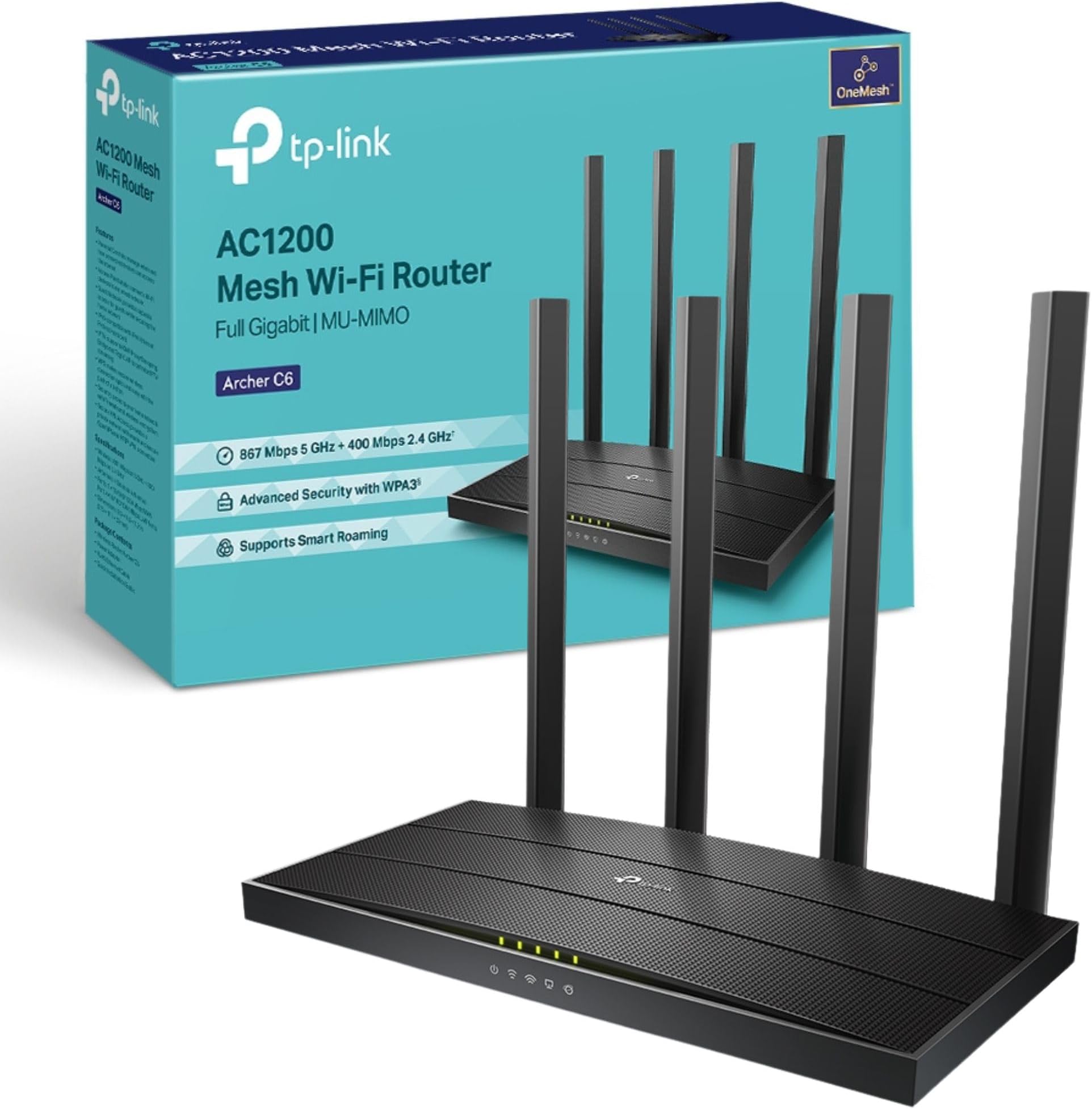
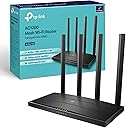
The TP-Link Archer C6 is a high-performance AC1200 dual-band WiFi router delivering up to 867 Mbps on 5 GHz and 300 Mbps on 2.4 GHz. Equipped with MU-MIMO technology and four external beamforming antennas, it ensures fast, reliable connections for multiple devices across your home. With gigabit Ethernet ports, VPN support, WPA3 security, and EasyMesh compatibility, it offers a future-proof, secure, and seamless networking experience. Setup is effortless via the TP-Link Tether app, backed by a 3-year warranty.


| ASIN | B07L5YRYF4 |
| Antenna Location | Home |
| Antenna Type | Fixed |
| Best Sellers Rank | 747 in Computers & Accessories ( See Top 100 in Computers & Accessories ) 2 in Routers |
| Box Contents | Power Adapter, Quick Installation Guide, RJ45 Ethernet Cable, Wireless Router Archer C6 |
| Brand | TP-Link |
| Brand Name | TP-Link |
| Colour | Black |
| Compatible Devices | Laptop, Personal Computer, Smart Television, Smartphone, Tablet |
| Compatible devices | Laptop, Personal Computer, Smart Television, Smartphone, Tablet |
| Connectivity Protocol | Wi-Fi (802.11ac), Ethernet |
| Connectivity Technology | Ethernet, Wi-Fi |
| Control Method | App |
| Controller Type | Ios |
| Country of Origin | China |
| Coverage | Boosted with Beamforming technology |
| Customer Reviews | 4.5 out of 5 stars 15,987 Reviews |
| Data Transfer Rate | 1200 Megabits Per Second |
| Frequency | 5 GHz |
| Frequency Band Class | Dual-Band |
| Frequency band class | Dual-Band |
| Global Trade Identification Number | 06935364089399 |
| Has Internet Connectivity | Yes |
| Has Security Updates | Yes |
| Is Modem Compatible | Yes |
| Item Dimensions L x W x H | 21.5L x 11.7W x 3.2H centimetres |
| Item Type Name | WiFi Router |
| Item Weight | 775 Grams |
| LAN Port Bandwidth | 1000 Mbps |
| Manufacturer | TP-Link |
| Manufacturer Part Number | ARCHER C6 |
| Maximum Upstream Data Transfer Rate | 866.7 Megabits Per Second |
| Model Name | Archer C6 |
| Model Number | Archer C6 |
| Model name | Archer C6 |
| Number of Antennas | 4 |
| Number of Ports | 5 |
| Operating System | Android and IOS |
| Other Special Features of the Product | Beamforming,Parental Control,Access Point Mode |
| Product Warranty | Manufacture's 3-year warranty |
| Router Firewall Security Level | High |
| Router Network Type | WIRELESS |
| Security Protocol | WEP, WPA-PSK, WPA2-PSK |
| Special feature | Beamforming , Parental Control, Access Point Mode |
| Unit Count | 1.0 count |
| Voltage | 230 Volts (AC) |
| Wi-Fi Generation | Wi-Fi 5 |
| Wireless Compability | 802.11ac, 802.11n |
| Wireless communication standard | 802.11ac, 802.11n |
B**W
Finally a router that just behaves itself
I’m not going to overcomplicate it — this thing is fast. Proper fast. Everything loads instantly now, even with loads of devices connected at once. Gaming feels smoother, streaming doesn’t buffer, and downloads actually use my full internet speed. Setup was pretty simple. The app basically holds your hand through it, which I appreciated because I don’t like fiddling around in settings menus trying to guess what does what. What I really like is that I don’t have to think about it anymore. No random drops, no restarting it, no “why is the Wi-Fi slow again?” moments. It just sits there and does its job quietly. I’ve got a bit of a “everything needs to feel organised and stable” thing, and this fits that perfectly. The wired ports are also a big win for my PC setup — everything feels more consistent when it’s plugged in. Only downside is the price, and it’s definitely more router than some people will need. But if you want something solid, future-proof, and stress-free, it’s worth it.
C**N
Great boost to wifi.
I was having problems with my Virgin broadband router and the WiFi signal so I did some research and this router was highly rated. Firstly, the router looks great, it looks like it means business and is made to serve a purpose. I placed the virgin broadband into router mode and connect this device. After connecting via the app the whole setup was so simple and easy that even a not so tech savvy person like myself found it a breeze. I positioned the antennas in different positions and connected to the router using the original ID and password from the virgin router. This can be set during set up and is completly customisable. There are many different settings to choose from including 2.4 and 5 ghz and also guest networks. The speed of my WiFi increased drastically once having this plugged in and went from around 190Mbps to 270Mbps and the coverage also greatly improved across the house. I have had no complaints in regards to the router itself, my firesticks found it difficult to connect at first but once I connected using the WPS button they have worked as normal. I would highly recommend this item if your wanting to replace your ISP router. It is so easy to set up and use it is actually a doddle. I have since purchased additional booster for the garage which easily connects through the mesh network and again is so simple to install its virtually fool proof. If you want a new router, this is the one. Ive found it great for daily streaming in a house of 5.
C**Y
Must have upgrade if you have an Older Deco System
I added the BE65 as part of an upgrade to my old Deco X20 system as it is compatible with all the other new Deco BE9300 3 pack. The Deco App automatically recognised all of my new units and asked me if I wanted to automatically transfer all of my information like SSID and Password securely to the new units which it did. Setup took a maximum of 10 minutes and I was back online. The signal strength was immediately better as I needed 6 units to cover the very thick brick walls in my home before whereas 4 are no more than sufficient. The new units are compatible with All of my connected items including IOTs. On testing the download speed I was more than impressed, it was nearly 3 times faster than my X20s, they also have better built in security features with better notifications of attempted intrusion. They are expensive but in my opinion well worth the price as they will last for many years to come with OTA updates.
A**R
Okay for a single Wifi home use, but not a good fit for building networks or wifi video streaming.
Not as good or customisable as advertised, had compatibility issues even with other TP-link products, just because they were older generations. Flimsy charger that likes disconnecting on light pulls of the cable, so expect frequent trips to the router if you have curious pets. For the price it's a perfectly capable home router for non-demanding customers. I had to return mine to get something more appropriate for networking. If you are building a mesh or slightly more complex network, I'd look for another router.
M**I
Perfect Wi-Fi 7 Upgrade – Highly Recommended
I’m really impressed with the TP-Link Deco BE65 (BE9300). It was incredibly easy to install and set up, with the Deco app guiding me through everything step by step. The app is very user-friendly and offers plenty of advanced settings, making it easy to personalise your network exactly how you want it. Performance has been excellent. As an iPhone 16 Pro Max user, I can connect to the dedicated MLO (Multi-Link Operation) network, which provides faster speeds, lower latency, and a more reliable connection on supported Wi-Fi 7 devices. If you have other devices that support MLO, they can also connect and enjoy the same benefits. The hardware itself is excellent, with Wi-Fi 7, four 2.5 Gbps Ethernet ports, USB support, strong coverage, and seamless roaming. Everything has been fast, stable, and reliable. Overall, I’m very happy with my purchase. If you’re looking for a future-proof mesh Wi-Fi system that’s easy to set up but still offers plenty of features for advanced users, I would highly recommend the Deco BE65.
C**W
📡 TP-Link Deco BE9300 – Wi-Fi 7 Performance That Blows Away Expectations
Having tested the TP-Link Deco XE75 Pro recently, I was disappointed by poor IoT connectivity and misleading port upgrades. I needed a better-performing mesh router—and the Deco BE9300 turned out to be exactly that. This Wi-Fi 7 powerhouse brings outstanding speeds, seamless device connections, and full 2.5Gb Ethernet support—all at a lower price than the XE75 Pro while delivering superior real-world performance. 🛠 Setup & First Impressions Just like previous Deco models, setup was effortless—plug it in, connect via the app, and you’re online in minutes. ✔️ Straightforward installation—fast and simple via the TP-Link Deco app. ✔️ All devices connected instantly—no frustrating dropouts like the XE75 Pro. ✔️ Solid build with a clean design—compact enough to blend into any space. I set it up as an Access Point, and everything worked flawlessly—no hidden config issues, no tweaking needed. ⚡ Performance – Faster Than Netgear Orbi, Stable Across All Devices The Wi-Fi signal strength and speed were outstanding. In every corner of my house, I had strong coverage, and all devices connected seamlessly—a huge contrast to the XE75 Pro’s frustrating IoT issues. ✔️ All four Ethernet ports are 2.5Gb—no misleading upgrades, unlike the XE75 Pro’s single high-speed port. ✔️ True Tri-Band Wi-Fi 7 speeds—streaming, gaming, and smart home devices all ran effortlessly. ✔️ Smart cameras now load instantly—no buffering delays like before. ✔️ Even faster than my Netgear Orbi RBR50/RBS50, which had been my benchmark for years. Whether on wired or wireless, performance was consistently excellent. 🔍 AI-Driven Mesh Stability & Real-World Usability Unlike the XE75 Pro’s band-switching issues, this system handled smart home devices perfectly. IoT gadgets stayed connected, avoiding the dropouts I experienced on the previous model. ✔️ AI-driven optimisation enhances multi-device connectivity—everything feels faster and smoother. ✔️ Multi-Link Operation (MLO) delivers low latency, especially for streaming and gaming. ✔️ Works seamlessly with older devices—full backward compatibility with Wi-Fi 6, 5, and below. No frustrating network instability, just smooth and reliable performance. 🏆 What Makes This Better Than TP-Link Deco XE75 Pro? ✔️ Lower cost but significantly better performance. ✔️ Four full 2.5Gb Ethernet ports—no misleading "Pro" branding. ✔️ Wi-Fi 7 delivers speed and reliability—IoT devices stay connected. ✔️ Network cameras now stream instantly, instead of buffering. The XE75 Pro’s connectivity flaws and misleading port marketing made it a disappointment—this router fixes every issue and costs less. 🔧 What Could Be Improved? ❌ Still limited network customisation—same software restrictions as other Deco models. ❌ Single unit version lacks full mesh expansion—but a 3-pack is available. And it works harmoniously with other Deco units ✅ Final Verdict – TP-Link's Best Prosumer Wi-Fi Mesh Yet ✔️ Outstanding Wi-Fi 7 speeds & stability. ✔️ Every device connects seamlessly—no IoT dropouts. ✔️ Four full 2.5Gb Ethernet ports for future-proof networking. ✔️ Cheaper than XE75 Pro but vastly better in performance. ✔️ Handles streaming, gaming, and smart home automation effortlessly. ❌ Still lacks advanced network controls found in competitors. 👉 If you want a no-fuss Wi-Fi 7 upgrade with premium speeds and reliability, the Deco BE9300 is easily one of the best options on the market today. 🚀📡✨
P**R
Good performance and easy setup
Bought as an add on to an existing Access Point arrangement, really easy and quick. No issues so far.
B**E
Good Budget Router with Decent Performance, but Not the Fastest
The TP-Link Archer C6 is a solid budget-friendly router that delivers reliable WiFi coverage for everyday use. Setup is quick and straightforward, and the EasyMesh support makes it a good option if you plan to expand your network later. The Gigabit Ethernet ports are a nice addition for wired connections, and it works well for casual gaming and streaming. However, the speed isn’t the fastest, especially if you have multiple devices connected or are in a large home. While it handles basic browsing, streaming, and light gaming well, heavy online gaming or 4K streaming might push its limits. Overall, it’s a great value router for smaller households or those on a budget, but power users may want something more high-end.
H**I
Flawless entry-level router that hits above its weight-class.
This router (Archer C80) probably represents the last generation of Wifi-5 only devices, and as such is likely to be among the best we'll see of this kind. This device's pricing (~4.5K at the time of writing) puts it in the entry level, but make no mistake, this wireless router should work perfectly fine for most people. It's got a 3x3 MU-MIMO radio, with beam-forming, and every other wireless feature that is associated with Wave2 Wifi 5 routers. While it has excellent hardware features, note that it's quite light on advanced software features - so if you're looking for some specific feature, read the documentation before purchasing. As a basic wireless router, this device is almost perfect. I used this device to replace an aging TP-Link Archer C50 (v1), which only had a 100Mbit WAN port, and which couldn't handle more than 80Mbps over Wifi under the best of circumstances. I had two important considerations when purchasing this device: 1. To remove any kind of bottleneck on the 5Ghz frequency band. 2. To improve the usability of Wifi in a distant room (~10m, separated by 3 walls and furniture). ## Close-to-mid range performance After replacing the C50 with this device, my PC which is about 3m from the router, and seperated by 1 wall gets a flawless 150Mbps that my ISP offers (April 2021 Update: My ISP now offers 300 Mbps, and that works fine as well). External reviews indicate that this device should handle at least 600Mbps on 5Ghz. I have zero complaints about 5Ghz performance. 2.4Ghz is usually a "backup" band for these days, since all recent devices support 5Ghz 802.11ac at minimum. On my Poco F1, at ~3m line of sight, I get about 120 Mbps on 2.4Ghz, which I think is perfectly fine, considering the limitations of this frequency band. I'm always using 5Ghz nowadays anyway, which is now limited only by ISP's plan speed. ## Long-range performance In the more distant room (~10m, blocked by 3 walls and furniture), I have an old Dell laptop only has a 2.4Ghz radio. This couldn't even get a reliable Wifi signal with the older C50 router. While picking this device, I'd paid close attention to the wireless sensitivity specifications that TP-Link helpfully provides on its website, and noted that this device, while entry-level, sports some of the best numbers in its entire range, sometimes beating their highest end devices. I had high expectations from this router, and it did not let me down. After switching to the Archer C80, the old Dell laptop was able to get a solid connection with around 15 to 20 Mbps on the 2.4 Ghz band. However, since that speed wasn't good enough, I purchased a TP-Link T9UH adapter (AC1900) to see if that would improve things, and indeed it did. With the upgraded Wifi receiver, even the distant room got a reliable ~140 Mbps on the 5Ghz band. In this room, even my Poco F1 is unable to stay connected to the 5Ghz signal, so it probably also has to do with the excellent performance of the T9UH adapter, which is also a modern 3x3 MU-MIMO device that supports beamforming; the router and the adapter have matching specs. ## Conclusion At this price point, I don't think there is any alternative to this device. The closest modern TP-Link alternative is the Archer AX10, a first-generation Wifi-6 (802.11ax) device that I didn't have a use for. I don't own a single Wifi-6 device and it'll be a few years yet before Wifi-6 devices become commonplace. Also, Wifi-5 (5Ghz, 802.11ac) is clearly good enough for a couple of years; I doubt that Gigabit internet connections will become standard in the short-term and a ~500 Mbps connection from the ISP should be fine for ~99.99% of people for the next couple of years - a speed which the C80 should be able to handle perfectly fine.
C**E
Capable wireless AC router
Box comes with router, power adapter, network cable and an illustrated setup guide. Setup was straightforward and quick. Wifi signal is strong and stable; my MBP RSSI reading is -30 dBm, which is much higher than the previous wireless AC router (-38 dBm) that it replaces. Great buy and value.
S**N
Love It
Loved having a separated WiFi for the home devices, guests and home. USB port which can be used for local network storage. Among other software features.
M**A
Importante
Gostei, me atendeu
S**A
Router Wi-Fi potente e affidabile
Ideale per casa o ufficio. Il TP-Link Archer C80 offre connessioni Dual Band AC1900 veloci e stabili, perfette per streaming, gaming e smart working. Le 5 porte Gigabit e la compatibilità con FTTH/FTTB/Ethernet garantiscono massima connettività cablata, mentre la tecnologia MU-MIMO Wave2 e OneMesh assicura copertura estesa e prestazioni ottimali su più dispositivi contemporaneamente. Prodotto ben costruito, facile da configurare e performante, perfetto per chi cerca un router veloce, versatile e affidabile per tutte le esigenze di rete domestica.
Trustpilot
3 weeks ago
3 weeks ago