Desertcart purchases this item on your behalf and handles shipping, customs, and support to Croatia.
🚀 Own the room with wireless precision and pro-level control!
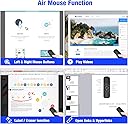
The DinoFire Presentation Clicker Q20 is a versatile wireless presenter featuring 2.4 GHz RF technology with a control range up to 165 feet. It integrates air mouse functionality, allowing full cursor control alongside traditional slide navigation. Compatible with multiple OS platforms including Windows, Mac, Linux, and Android, it supports a wide range of presentation software. Its bright red laser pointer ensures visibility on any background, while ergonomic design and plug-and-play ease make it the ultimate tool for professional, on-the-go presenters.

| ASIN | B07L4LXF2Q |
| Additional Features | Ergonomic |
| Battery Type | AA |
| Best Sellers Rank | #57,872 in Office Products ( See Top 100 in Office Products ) #46 in Office Presentation Remotes |
| Brand | DinoFire |
| Button Quantity | 3 |
| Color | Q20 |
| Compatible Devices | Laptop, Personal Computer |
| Connectivity Technology | Radio Frequency |
| Controller Type | Button Control |
| Customer Reviews | 4.3 out of 5 stars 886 Reviews |
| Item Dimensions L x W x H | 5.3"L x 1.6"W x 0.9"H |
| Item Weight | 2.08 ounces |
| Manufacturer | Shenzhen Qixun Space Technology.,LTD |
| Max Number of Supported Devices | 1 |
| Maximum Number of Supported Devices | 1 |
| Maximum Range | 165 feet |
| Mfr Part Number | Q20-DF-US |
| Model Name | Presentation Remotes |
| Model Number | Q20 |
| Number of Batteries | 2 AA batteries required. |
| Special Feature | Ergonomic |
| UPC | 736961025980 |
A**R
PC Mouse/Remote
I use this so I can use my TV with my PC (10' away) from my bed. Nothing to complain about, it's intuitive and easy. USB plugged in and PnP (Plug and Play) took care of the rest. The Mouse position hold button is good for when I'm dragging the cursor across the TV - lets you hold the longs your arm swing got it, so you can reset your arm, click the button and go again. Laser pointer works, fun for the cat. Makes a mild humming noise when in use. I toss it to the side about two feet away and can't hear it. Turns off after a short time, and I use the power button to wake it up. Have only had it a couple of weeks, but i have no reason to think it's going to die quick. If it does, and I remember, i'll update.
K**N
A great value-for-money presenter cum 3D mouse with a good set of features.
The product is good value for money. Works well on the whole. and the instructions are clear and concise and I have no hesitation to recommend this product. I only have some suggestions for a future redesign: The back portion is rounded and tends to be unstable on slopes so can fall off the table/books that it is careless placed on. It would be good if there is a way to "align" the laser pointer to the position of the mouse cursor. When switching from using the cursor to the laser pointer to highlight something on the screen, these two are in different places. Not sure if it is technically feasible though...
A**R
Good buy
Overall, I would recommend this air mouse. Initially, it was very easy to start using. There are many functions that I am still unfamiliar with, but I really just needed for presenting in a classroom away from my computer. This function works great. The only negative experiences I've had are that the air mouse is a little sensitive if you are using it to specifically click items on your presentation and it can be difficult to manouver the mouse on the screen. Also, the laser pointer does not work on TV screens, but I know there are many other really cool functions that are available. I'm excited to see what else it can do.
B**D
Must have!!!
This is a real review here...I was a little skeptical, but this device totally wowed me. Here's why...The quality and feel of the buttons is great. Size and shape are just right. The distance that I tested successfully was about 40 feet. But, what sets this one apart from most other slide advancers is the full functionality of a mouse is integrated and it works incredibly well. I purchased it for non-traditional uses like, on a plane, in my car (working from the passenger seat) where the angle to use the laptop touch pad just sucks. The mouse arrow moves right along with your wrist movements in the air, so there are many different use cases for comfort and convenience when there's just not enough room for a full mouse on a table/ surface.
A**E
Kind of a pain at first but I think it's going to work out
The first one came with no USB. (Tip: If that happens and you're willing to try again, just send it back and order another one - do not waste your time with tech support.) The second one had the USB but arrived covered in fingerprints - ew! Also, the pouch doesn't say DinoFire but Beboncool, which is weird because that same brand came up in my search when I found this one, and no name whatsoever appears on the actual unit...So after putting the USB with the one that does not appear to be used it works fine on Day 1. There are no instructions, so I just pressed the buttons to see what would happen and it's pretty easy. My only issue is it seems you can't turn it off unless you remove the USB. I tried tapping the power button then pressing and holding it down and it just won't shut off. I don't know if this is a defect or just the way the thing works. Verdict: if it continues to work properly, it's a good buy at $20. I'll be taking it on the road next week and will definitely update if it turns into a pumpkin. If I could remove the missing USB and seemingly used replacement from my experience, I would give it a 4, primarily because it either doesn't power off or figuring out something that basic is way too hard. You won't find all these functions in a bigger brand for the price.
A**N
Perfect!
Works very well
M**8
Has a Mouse!
Other clickers I have used to not have a mouse control. This one does! That makes it easy to be away from your laptop as you are presenting. You can select hyperlinks, and click through the pages on your slides. I got this to be used by anyone who is using our display to present to a group of people. I just keep it stuck to the wall with the other remotes for the tv and sound bar. It was a good addition.
F**K
Garbage
First of all when this did work it was very choppy and difficult to use, almost pointless because I had to keep going up to the computer, there was such a lag in movement and then it would lose connection etc. A few months later I took this out to use again, and it completely wouldn't work. Fresh batteries, it struggled to go on and flickered right out. A complete waste, don't buy. Doesn't work at all, going to garbage.
L**.
Your hand stays in a twisted position!
Soooo, your whole hand and sometimes arm need to move to the direction that u want to point. U have to always look at the small L & R buttons to press. They are rather small, and I'm Asian with small hands! It only took me 10-15min of trying and I knew I wanted my money back!
Á**L
Muy práctico, útil y sencilll de usar.
Súper práctico, útil y con más herramientas de las que usarás. La verdad tiene muchas herramientas como captura de pantalla, usarlo de cursor desde lejos (requiere practica pero te acostumbras rápido), cambiar de pestañas, y mucho más. Valió la pena. Por cierto el láser funciona bien en un salón de clases. Se ve perfectamente sin esfuerzo. El tamaño es muy cómodo, no es voluminoso ni tampoco pesa. No cansa estarlo cargando mucho tiempo.
Trustpilot
5 days ago
3 weeks ago