We remain fully operational. Our teams are working around the clock to ensure your deliveries continue safely.

DOWNLOAD THE APP


Customer Services
Copyright © 2025 Desertcart Holdings Limited
DOWNLOAD THE APP

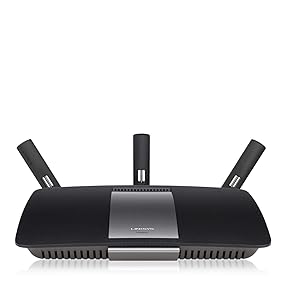
🚀 Elevate your home network—fast, smart, and always connected!
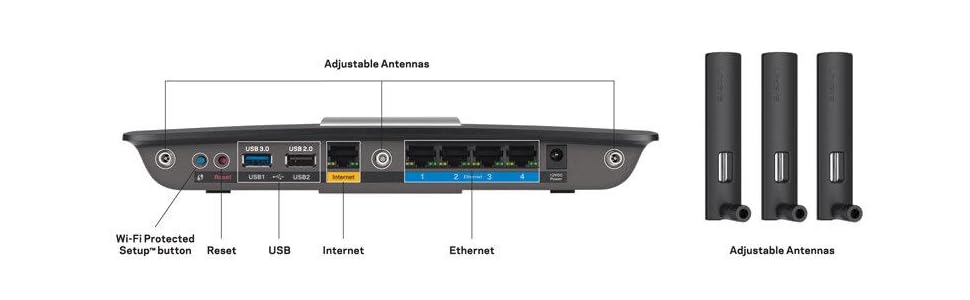
The Linksys AC1900 EA6900 router delivers powerful dual-band Wi-Fi speeds up to 1900 Mbps, enhanced by beamforming technology for targeted coverage. Equipped with four gigabit Ethernet ports and USB 3.0/2.0 ports, it supports high-speed wired connections and device sharing. The Smart Wi-Fi app enables remote network management, parental controls, and device prioritization, making it ideal for HD streaming, gaming, and smart home setups. With robust WPA2 security and easy setup, this router is designed for reliable, high-performance home networking.









| ASIN | B00EXK14S0 |
| Best Sellers Rank | #38,196 in Electronics ( See Top 100 in Electronics ) #259 in Computer Routers |
| Customer Reviews | 4.3 4.3 out of 5 stars (7,912) |
| Date First Available | September 5, 2013 |
| Is Discontinued By Manufacturer | No |
| Item Weight | 1.18 pounds |
| Item model number | EA6900 |
| Manufacturer | Linksys |
| Product Dimensions | 1.58 x 10.1 x 7.26 inches |
M**Y
Best wireless router I've ever owned, and it should get better...
The EA4500 and its predecessor, the E4200, look identical from the outside. Odds are that they're very similar inside as well, which is good because the E4200 is one of the finest wireless routers on the market. It was on my wish list right up until the EA4500 came out. As other reviewers have noted, setup is easy. Plug the router into the wall, plug it into a computer, and walk through the painfully simple CD setup wizard and you're up and running in minutes. If you want advanced configuration options, point a web browser at it. (I've posted a few interesting screen shots from the web interface.) My home was built in 1994, and is 2600 square feet. The worst part is that our cable modem is located on the opposite end of the house from where I normally use my laptop. Getting a signal all the way to me has been problematic at best. In desperation, I modified an old WRT54G router to act as a repeater, to give me enough signal to work with. Now that I have the EA4500, I've been able to unplug the repeater. I don't get a fantastic signal at the far end of the house, but I get enough to work with. That's an impressive feat as far as I am concerned. I've found the reliability of the router to be extremely high. No problems of any kind since it came online. Never had trouble getting a signal anywhere in the house. I can't say that for previous routers. Depending on your sense of aethetics, the EA4500 is either a sleek looking piece of high-tech gear or a dull black box. Personally, I like the look of it... not that I sit around staring at it. While Cisco touts that the "A" in the "EA4500" name stands for "Apps", they have yet to really deliver on that. The Cisco Connect app for mobile devices allows you to connect to the router and do some basic management, but nothing you can't do through the browser without the app. They're promising a "Cloud" app later this summer that will give you access to your home network while you're away. When they deliver that, this router should really shine. Imagine being able to get to your music files, movies, eBooks, etc., from your smartphone, tablet, or laptop - even when you're miles away! That will be something. (Even if Cisco never delivers the software, the EA4500 is an excellent router without it.) But if you have no need of that functionality, you may want to look at the older (but less expensive) E4200.
T**S
Streaming 1080p straight from my DLNA to two TVs simultaneously and wirelessly!
The title may sound like a mouthful of technical jargon for some but if you're looking at this wireless router, chances are that you know why you need this fast speed. Background: Let me give you some background on why/how I needed this wireless router. (Please skip ahead to the next paragraph if you feel that this background info is unnecessary). Previous to this, I had a Linksys WRT160N . When I bought that router several years ago, that wireless router was probably one of the fastest models available because it supported N wireless network cards. I was very satisfied with that router and have been using it for years until now. A couple of years ago I bought network attached storage ( Synology DS211 ) that supported a built-in DLNA server that allows you to stream videos to your TV and other devices that support DLNA. Though I was able to stream 480p videos to wirelessly from my DS211 NAS, whenever I tried streaming anything higher than that, I had problem. 720p videos were choppy while 1080p were out of the question - would not load at all. So here's why I love this router! I finally decided that it was time to retire my old wireless router because I was not getting the Internet speeds I had from my ISP when I attached my Motorola Cable Modem directly to my computer. So when I switched to this wireless router, I am not only getting 50Mbps/sec for down link on my Internet connection tests on my desktop computer that connects over 1GB Ethernet connection to this router, but I am also getting that same Internet speed on my laptops that connect wirelessly to the Internet through this router. The big bonus for me was the overall performance improvement when I'm streaming videos/music to TVs, Home Theater systems, phones, tablets and laptops. I don't use Netflix anymore but I'm guessing that it will also allow me to stream 1080p without any buffering. This wireless router also has a built-in DLNA server so all I'll have to do is plug in an external USB drive and set it up for DLNA streaming. I don't use this feature since I already have a solid DLNA server. Some of you may also be wondering that you have no use of Dual-Band since all of our devices support 2.4 GHz. Before buying this, I never thought I'd need to use the dual-band capability but as it turns out, some of the devices in my home support dual-band too. So I now use 5 GHz band for those devices that support it; for the rest, I use 2.4 GHz. Why? This way, I'm not saturating the channel with all of my devices and it improves the overall performance of my wireless connection. I totally love this router. I can't think of any reason why I would give it anything less than 5 stars. Though it is expensive but I think it's an investment well worth it.
S**N
I used this router over a week now, it works perfectly, very fast! So much better than the old one.
C**U
Works well. Bandwidth drop from Modem though.
D**.
Decidimos probar este Linksys después de utilizar un TP-Link WR841HP con el que tuvimos muchísimos problemas (pérdida intermitente de conexión, no era detectado por algunos equipos, etc) ...y el Linksys NOS ENCANTÓ. La velocidad de conexión y alcance de señal que da el Linksys es muy superior al TP-Link. Fue muy fácil de configurar y la aplicación te permite aplicar ajustes avanzados a tu red de manera sumamente sencilla e intuitiva, tales como red de 2.4 y 5 Ghz, redes para invitados, almacenamiento compartido vía USB, contraseña de administrador y acceso remoto a la red de tu hogar. El diseño y construcción del equipo es excelente. Las antenas no son muy grandes y tienen un estilo sobrio. Por toda la calidad del equipo, el precio nos pareció más que correcto. 100% recomendado.
M**O
Took seconds to set up, after finding a Australian power unit; it came with a US one. It some how can block my cable internet but I am happy with it.
A**S
Excelente Router, facilísimo de configurar, buen desempeño y alcanze, nada como el respaldo de una gran marca, lo recomiendo ampliamente
Trustpilot
2 weeks ago
1 day ago