
🚀 Elevate your workspace with ultra-HD control—distance and devices, mastered.
The TreasLin KVM Extender delivers lossless 4K@30Hz 4:4:4 video and multi-channel HDMI audio over IP, supporting up to 20 km transmission via gigabit PoE switches. It enables one-to-many KVM and USB 2.0 extension with robust PoE power, ideal for professional environments demanding seamless remote control and high-fidelity AV performance.


| Operation Mode | Manual |
| Current Rating | 1 Amps |
| Operating Voltage | 12 Volts |
| Contact Type | Normally Open |
| Connector Type | Hdmi, Usb |
| Brand | TreasLin |
| Terminal | Rj45 |
| Item dimensions L x W x H | 4.92 x 3.15 x 0.79 inches |
| Circuit Type | 1-way |
| Mounting Type | Plug In Mount |
| Actuator Type | Push Button |
| Contact Material | Metal |
| International Protection Rating | IP IP IP |
| Number of Positions | 1 |
| Control Method | Remote |
| Connectivity Protocol | Hdmi |
| Color | 4K KVM point to more(TX+RX) |
| Wattage | 15 watts |
| Unit Count | 1 Count |
| Manufacturer | TreasLin |
| Item model number | TL-KVM-100 |
| Item Weight | 1.38 pounds |
| Product Dimensions | 4.92 x 3.15 x 0.79 inches |
| Item Dimensions LxWxH | 4.92 x 3.15 x 0.79 inches |
| ASIN | B083DMLYBL |
| Date First Available | January 1, 2020 |
Y**R
Doesn't connect to the other kvms by IP Address
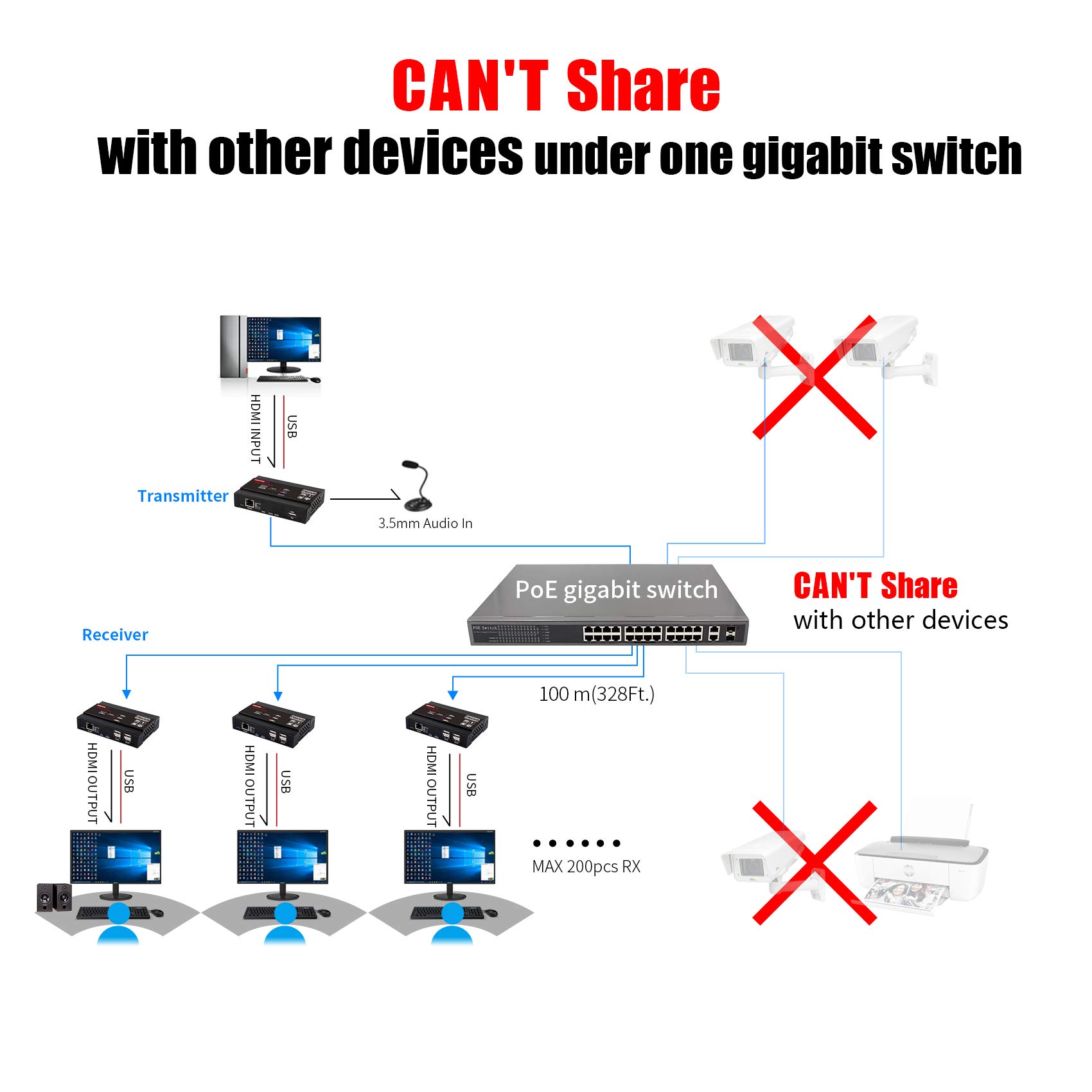
This is a pain in the rear type of product. It hogs the entire bandwidth of your network by "broadcasting" the signal all the time. I have a flatline 400mbps broadcast coming out of the transmitter on my network when it is idle. When it is running, it uses 700mbps all the time. So wasteful. Small IoT devices can route data via LAN much better than this one. I can't configure VLAN correctly either, since it would limit devices on certain ports to this VLAN tag only. Those ports branch out to other devices that also need internet. This is good but only for a dedicated connection, then what's the point. Just run long hdmi and usb cables.
R**O
Technical viewpoint
This device uses extensively network broadcasts to transmit traffic. That will jam your networking gear since it will use high bandwidth/packet count. The solution is to connect with one cable point to point, or if you want it to share your existing networking gear you will need to configure port based or 802.11q VLAN in your switch, to isolate traffic. Only managed switches support this feature. Aside that, the product works pretty good. Transmits HDMI audio, video and USB with unperceptible latency.
L**R
Works well, but has one big problem.
I used these KVM devices to extend HDMI and a mouse for a security camera system. I bought these so that we could send the video over our existing LAN eliminating the need to run a point-to-point cable to connect the devices. This works, but with a couple of huge gotchas.The first is that these units generate between 700-800 Mb/s of network traffic without let up. The network graph our monitoring software produced was a flatopped line that never subsided. This wasn't even for 4K video - just standard 1080 HD video. This means you can't use these KVM extenders with an older Ethernet switch that only has 100 Mb/s ports. This was not a problem in our case since our Ethernet switches have gigabit interfaces.The second gotcha is related to the first. The sustained level of network traffic these extenders produced put quite a load on our switch CPU. Our switch normally runs around 10% processor utilization. When these extenders came online, utilization jumped to 40%! We also saw a small but noticible decrease in overall network speed for all the devices connected to the switch. The switch was so busy dealing with the load these extenders introduced that network latency suffered a small, but noticeble amount. Mind you, our switch is older, but it is an enterprise grade Cisco switch so it can handle quite a bit.In the end, we ended up pulling them off the switch and using a point-to-point Ethernet cable to connect the two devices. We do streaming video a couple of times per week so I didn't want to take a chance that the increased load on the switch would create lag on the network.Since we already had a cable in place, this was not a big deal. What this did show us is that we can't use them as we had wished and be able to provide KVM extensions any place in the building where an existing network drop was already available. I was unable to find any settings which would allow for lower bandwidth on these devices.I love that they are capbable of being powered by PoE (this works nicely by the way). The bottom line is these things will work and work well, in either a point-to-point or through an Ethernet LAN, but you will need some hefty enterprise grade switches to support them.
T**E
Needs a dedicated network
At least one other reviewer mentions connecting these through his LAN, but when I connect the transmitter to my router or ethernet switch it immediately kills my internet connection (the connection is quickly restored after I unplug the transmitter). But these work fine as long as I connect the transmitter and receiver on a separate network, with or without an ethernet switch between them.Not what I was hoping for, but I SUPPOSE it won't kill me to run separate ethernet cables from this transmitter to the several locations where I want to have receivers. I know that there are similar (but more expensive) products specifically designed to connect through either a LAN or WAN, but this works well enough for the price that I plan to keep it despite the wiring issue. I'm only using it as a local KVM extender for my security system (and so don't need it to share my internet connection), but if you tried to use it as, say, a webcam extender this connection problem could be a fatal flaw.
V**O
Do USB ports didn’t work
The USB ports didn’t work
C**S
Love it
Using direct connections and it works beautifully haven’t tried it thru a switch or powe yet but maybe if I need to move it I’ll have to
B**E
Never Could Get It Working
I tried playing around with device for about 2-3 days but never could get it to work reliably. The screen would always flash on/off. I tried different CAT5e cables, HDMI cables and different PCs and devices. The problem never went away.
F**L
Item not as described
Description and user manual clearly state there is a 3.5mm audio input host / output receiver. There is not. That is the specific reason I chose this unit. Shame.
Trustpilot
2 weeks ago
3 weeks ago