Desert Online General Trading LLC
Dubai, United Arab Emirates
Desert Online General Trading LLC
Dubai, United Arab Emirates


🚀 Elevate Your Server Game with V-Color!
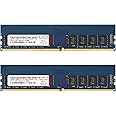
The V-Color DDR4 32GB (2 x 16GB) RAM module is a high-performance, ECC-enabled memory upgrade designed for servers and workstations. Operating at 2666MHz with a low voltage of 1.2V, this dual-rank memory module is perfect for demanding applications like cloud computing and big data processing. With rigorous testing and a limited lifetime warranty, it ensures reliability and stability for your critical workloads.


| RAM | 32 GB DDR4 ECC-DIMM |
| Brand | V-COLOR COLOR YOUR LIFE |
| Series | Server Memory |
| Item model number | TE416G26D819K-VKC |
| Item Weight | 1.06 ounces |
| Product Dimensions | 5.31 x 1.22 x 0.2 inches |
| Item Dimensions LxWxH | 5.31 x 1.22 x 0.2 inches |
| Color | ECC U-DIMM |
| Computer Memory Type | DDR4 SDRAM |
| Voltage | 1.2 Volts |
| Manufacturer | v-color |
| ASIN | B0899GWGYN |
| Country of Origin | Taiwan |
| Date First Available | May 27, 2020 |
R**J
Works great on ASRock A320 Mini-ITX motherboard
I've had these installed on an ASRock A320 chipset Mini-ITX motherboard for some time and they have been stable. These will pass memtest. I wanted something better than "average" RAM for my specific application.
B**R
OC'd to 3600MHz easily! Highly Recommend!
This RAM is epic for a Ryzen SFFF build. You CAN get faster RAM, in fact I'm pulling out G.Skill Trident Z Neo 3600CL14 16GB(2x8GB)RAM (Samsung B-die) and replacing with these. I purchased this RAM because I need VLP RAM, which is notoriously hard to source in good speeds. I bought this RAM and OC'd it to 3600CL18 (CL18-18-21-36 specifically)with ease. That was the first speed I attempted and it booted right up. I haven't finished tweaking it yet, I had some stability issues when I tried 3800, so I will need to mess with the timings still. However the fact it even boots at that speed is insane considering this is 2666MHz RAM.I want to use the Alpenfohn Black Ridge Cooler on an Asus B450i ROG Strix Gaming Mobo to cool a 3700X / 3080 Velka 7 build I'm putting together. I want to use a 120mm fan below the cooler and you must use VLP RAM like this for you to be able to do that. I HIGHLY recommend this RAM. It's pricey, but the SFF world is not cheap, and VLP RAM is scarce. This is a good option for those who need VLP RAM.
W**M
Good RAM in my TrueNAS
Installed this RAM into an ASRock B550M Pro4 motherboard with an AMD 3700x processor. The computer's sole purpose is to be a TrueNAS server.RAM installed like all other RAM I've installed over the years though I was surprised by how low profile it was. At stock timings it is stable and according to Memtest is indeed ECC. I ultimately decided to overclock the RAM and, using a popular Ryzen memory configuration tool, settled on 3200Mhz CL16 at 1.31 volts. Memory is currently 6 hours stable out of a 48 hour stability test.Overall the RAM is priced well for ECC RAM, clocks well, and seems stable at both stock and overclocked frequencies.
S**N
ECC memory seems to work fine with AMD 5950x
I was a little bit concerned because I hadn't heard of this brand before, but it seems to work perfectly fine in my new AMD 5950x build. I used 4 16GB sticks because with 16 cores, I might be running multiple VMs, databases, etc. So maybe 64 GB won't be complete overkill. Memtest 86 9.1 (not Memtest 86+) shows it as having ECC, and the configuration passed 4 passes through Memtest. I didn't try to verify that the ECC actually corrects errors, I'm just taking it at it's word.You can probably find faster memory but ECC is the real draw for me. Faster memory probably isn't going to make a noticeable performance improvement in most use cases, but random bit flips can cause all manner of problems.This was installed in a Gigabyte X570 Aorus Master motherboard. I would have liked to use something off from the qualification list, but these had stats the same as one of the options on the list.
S**E
Easy to install, just what I ordered.
Added two more sticks to take my precision 7530 from 32 to 64 GB of ram. Easy install for the price and straight forward, just like a RAM install should be.
I**V
Good modules, terrible warranty
I bought these modules in Feb 2022. They worked well for about two months until my NAS went into a boot loop. I was able to figure out that the issue caused by one of the memory modules (I identified which one). After that, I contacted v-Color via email. It started fine: I requested warranty, they asked for details, I responded. But then they didn’t respond and and also don’t respond to follow up emails. Nothing, just silence.Amazon support recommended to contact them through Amazon chat and so I just started this route. I hope it would give some better outcome, but so far the warranty experience is very disappointing and I do not recommend buying these modules because it’s a waste of time and, potentially, money if their quality control fails again...Edit: So they responded me and asked to send the product myself to Taiwan without shipping label provided (I have to pay for tracked international shipping). I have to send it there and then they going to take up to 20 business days for testing, so there's a chance I could be without memory modules for about a month. Great.
D**D
Worked until it didn't, but getting a replacement
As other reviewers mentioned, this RAM (64GB) worked perfectly for a couple of months in a Synology RS1221+, even though Synology claims 32GB max. Except at the two month mark, the device randomly powers off and fails memtest instantly.I'm working on getting a replacement, and hope that I just got unlucky given the great performance in the beginning.
C**S
DS1821+ NAS kept crashing periodically
I recently purchased a Synology DS1821+ NAS. I installed 3 Seagate 20TB Exos X20 hard drives in it and set it up for RAID-5 . I put the 'v-Color 64GB (2 x 32GB) ECC SO-DIMM DDR4 2666MHz (PC4-21300) memory RAM in the NAS. Unfortunately, the NAS kept crashing when I was trying to move over a large amount of photos/videos to the NAS. It even crashed one time at night when I wasn't moving any files to the NAS. However, this didn't fix the problem. I tried each of the memory cards and both at the same time, but, it didn't seem to help. At one point I thought it was due to airflow for the NAS. However, this didn't fix the problem. Perhaps the memory is not compatible with the hard drives I purchased? I know they over the 16GB max limit. I ended up removing the RAM and putting the 4GB synology memory back and the NAS hasn't crashed yet (it's been several days now). I wish the RAM worked, but, I may just go for the expensive Synology RAM so I don't have to deal with the headache of the NAS crashing.
Trustpilot
1 month ago
1 month ago
2 months ago
2 days ago