



⚡ Power Your Network with Next-Gen 10GbE Speed!
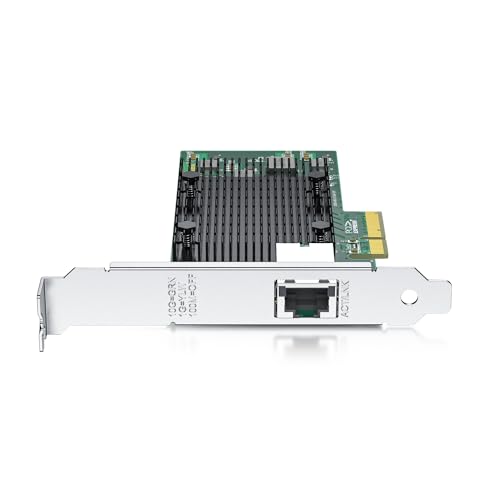
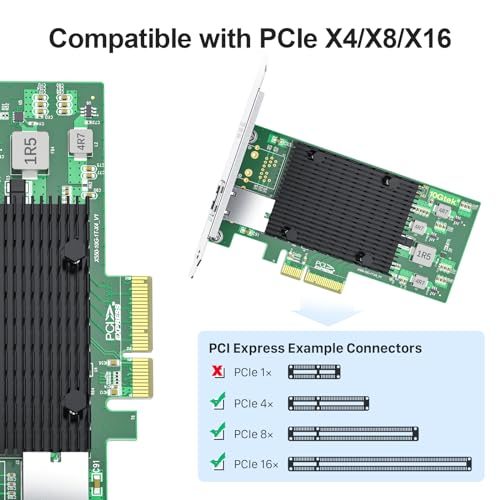
The 10Gtek 10Gb PCI-E NIC Network Card features a single copper RJ45 port supporting multi-gigabit speeds up to 10Gbps, powered by the reliable Intel X550-AT2 chipset. Compatible with a broad range of operating systems including Windows Server, Linux, and VMware ESXi, it offers PCI Express v3.0 x4 lane connectivity for high throughput and low latency. Designed for easy installation with included low-profile brackets, this network adapter is ideal for data centers and professional environments demanding stable, high-speed Ethernet connections.


| ASIN | B076P9PPWN |
| Item Weight | 191 g |
| Item model number | X550-T1(Intel-1pc-EU)-U |
| Manufacturer | 10Gtek |
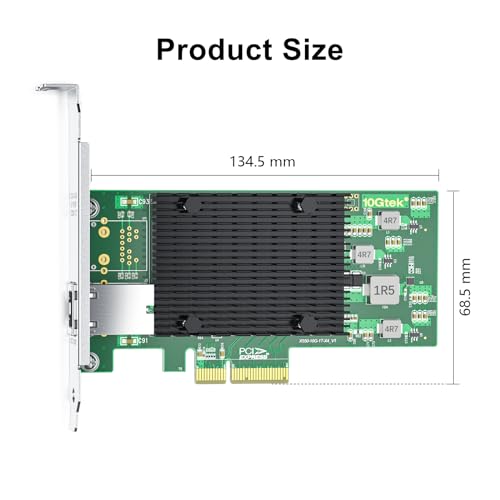
| Package Dimensions | 22.91 x 15.19 x 3.3 cm; 191 g |
W**F
Easy install in a x4 slot. Positive, snug cable latching into the card using CAT8 cables. Current drivers can be found on Intel's site for the X550-T2 chip. Runs as advertised, averaging 1.055GB/s using a large image file directory transfer with NVMe SSDs at either end. Both ports can be teamed by downloading Intel's ProSet wired software. When teamed, transferring large files to 2 different computers simultaneously will produce up to 20Gbs throughput with NVMe SSDs on each end using jumbo frames. The attached test file image used a directory containing a total of 102.8GB of (3) large image files. If you must have a Wake-on-LAN feature, you may want to pass on this card. In Windows 10, the Power Management tab shows a grayed out box... can't enable it. Intel's site states that "Wake-on-LAN is not supported on most Intel® Ethernet 10-gigabit adapter chips." Not a fault of GTek. Really like the card, but won't be buying more because of the lack of Wake-on-LAN. Had to swap out the teamed 10Gb cards in my workstation (always on) to the backup server. Now using this card in the workstation. Overall, still quite happy with this card, it's a keeper! UPDATE: Purchased a second card after getting the first to (indirectly) wake-on LAN. Had an unused 2.5Gb 4 port switch... connected it to the 2.5Gb network interface on the motherboard. Connected from the switch directly to the modem, by-passing the main 10Gb network switch. Used the MAC address of the 2.5Gb motherboard interface on a different private subnet to use wake-on LAN. It's been waking and working fine; so I bought another card. Will also wire it through the 2.5Gb switch. Added bonus is I can now use jumbo (9k frames) through the 10Gb switch, while the 2.5Gb connection remains at the standard 1500 MTU. I can use the internet through the second subnet. Best of both worlds!
N**A
I ordered a 10Gb NIC Network Card with X550-AT2 Controller chip & that is what I got but 10Gtek the makers of the card & the ones who sold me this card, listed it as Compatible with FreeBSD OS and OpnSense OS all not true as I wasted over a month trying to get to work right on OpnSense and the firmware on the card is old fw 2.11.11 nvm 2.10.0 Option ROM V1-b2585-p0 eTrack 0x80000f48 and locked firmware aka no flashing, I knew it was locked before buying it. I just did not think the firmware would be that old. I contacted 10Gtek & told them what was going & they replied that they would look into it. Days later I got an email from 10Gtek saying "After further investigation, our technical team has confirmed that the X550-T2 network card is indeed not compatible with OPNsense v25.7.3 FreeBSD v14.3." and that they would update the amazon page and you can see they did just that. I'm really unhappy with 10Gtek as they should have tested newer stuff with that old intel firmware. I can say for sure I will never buy anything from 10Gtek again.
J**G
Bought these to use with a proxmox cluster. Two of them are working correctly at 10gbps but one of them shipped with a bad port that refuses to connect at 10gbps. It will connect at a slower speed on switch ports which are limited to 1gbps. I tried 3 different cables which all work fine with the other cards and ports. There are no obvious physical defects on this faulty card. I tried to contact 10Gtek but their contact form requires a purchase order, which I do not have because I bought from Amazon.
E**H
This review is for the 10GTek X550-T2 (PCIe 3.0) card, not the X540-T2 (PCIe 2.1), though I suspect that the same performance would be seen with the X540-T2. This card works great for me! I bought 3 of these NICs and a Netgear 10gbps switch (XS708T) as I was tired of my 4x1gbps (Intel Pro 1000 PT NICs) Windows 10 auto aggregated links dropping to 1gbps due to MS dropping support for the automatic aggregation that they accidentally added into Win10 a few years ago. MS pulled this very nice (accidental) support and I was back to 1gbps without doing full switch configured LACP aggregation. I got really tired of backing up 45TB on a 1gbps connection. So I threw $ at the problem and hope to be good until 40gbps, someday. These NICs works well for me via single port (9.9gbps) or dual port with aggregation (> 10gbps). I am running this on Windows 10 Pro and Workstation with the standard (Windows Update) drivers that were automatically installed. Testing I have tested with iPerf3 and even with single, a few or many threads, it is very hard to saturate the connection and show > 5gbps. So for me, iPerf3 just won't do. I now test by performing long running SSD to SSD tests through a Netgear 10gbps router which shows me hitting 10gbps (and greater with dual ports and aggregation). Real World Feel for my daily workflow I have also tested my heavy Visual Studio work flow with my solutions and projects running on SSD on an older 7700k system and the connection seems very snappy, barely noticeable from my main local storage which is 3x Win10 stripped NVMe (Samsun 970 Evo Plus) 1TB drives, where I get 7GB/s sequential block performance and snappy small random block performance. I suspect that if I use this NIC on a mid-high-end NAS with 10gbit NIC that I will be satisfied with the perf of my workload (lots of small files). I will update this review if I am able to test that in the future. Windows 10 auto link aggregation (just plug multiple single-machine Cat5/6 cables to your switch) As of recently (this NIC or Intel Pro 1000 PT) I _DO_NOT_ see automatic aggregation with Windows 10 Pro, but I _DO_ see automatic Win 10 aggregation (this NIC or Intel Pro 1000 PT) after upgrading my Windows 10 Pro servers to Windows 10 Workstation (I don't use Windows Server). I see spill-over behavior where when the one port is saturated (10gbps) then the 2nd port starts taking on any addition load (I have only gone to about 13gbps) . The only reason I upgraded to "Workstation" is that I have plenty of OS keys from MSDN, so why not try it - it worked. Not sure if you would get the same same result - so don't assume. I will keep using these NICs unless I see a reason to not to (which I would add to this review).
T**Y
Mine came with a fan, that fan died in less then a year, cannot find a heatsink rplacement so it is rendered useless and set aside.
Trustpilot
1 month ago
3 weeks ago