🔑 Unlock the Future of Home Security!
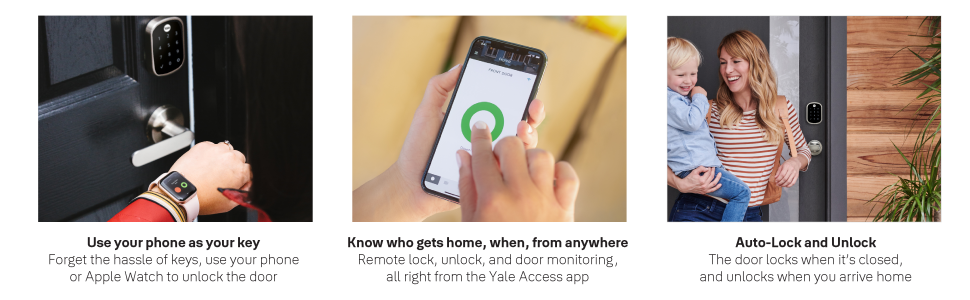
The Yale Assure SL Deadbolt Smart Lock is a state-of-the-art keyless entry solution that combines a sleek design with advanced technology. Featuring a touchscreen keypad, Wi-Fi connectivity, and compatibility with major voice assistants, this lock allows for seamless access management and real-time monitoring through the August app. With a lifetime warranty and a trusted brand legacy, it's the perfect upgrade for modern living.


| Brand | Yale Security |
| Special Feature | Alcohol-Free |
| Lock Type | Keypad |
| Item dimensions L x W x H | 6 x 6 x 14 inches |
| Material | Nickel |
| Recommended Uses For Product | Door |
| Style | With Wi-Fi |
| Color | Satin Nickel |
| Number of Pieces | 1 |
| Finish Type | Bronze |
| Included Components | Yale Assure Lock SL, Yale Wi-Fi Module, August Connect Wi-Fi Bridge, August DoorSense, Deadbolt, Strike Plate, Mounting Hardware, Installation Manual |
| Controller Type | Amazon Echo, Apple HomeKit, Google Assistant, SmartThings, Vera |
| Shape | Rectangular |
| Item Weight | 3 Pounds |
| Control Method | Voice |
| Connectivity Protocol | Z-Wave |
| UPC | 081023044639 |
| Model Name | Assure Lock |
| Global Trade Identification Number | 00081023044639 |
| Manufacturer | Yale - Delivery Box |
| Part Number | YRD256-CBA-619 |
| Item Weight | 3 pounds |
| Product Dimensions | 6 x 6 x 14 inches |
| Item model number | YRD256-CBA-619 |
| Batteries | 4 AA batteries required. (included) |
| Size | Wi-Fi |
| Finish | Bronze |
| Pattern | No Key |
| Power Source | Battery |
| Item Package Quantity | 1 |
| Head Style | Lock Only |
| Display Style | Touchscreen |
| Special Features | Alcohol-Free |
| Batteries Included? | Yes |
| Batteries Required? | Yes |
| Battery Cell Type | Alkaline |
| Warranty Description | Lifetime limited warranty on Finish and Mechanical. One year on Electronics |
D**S
Yale/August Integration Initial Configuration is a Hassle...Otherwise A Great Smart Lock
For the August/Yale integration the initial setup appears to be designed by someone who said let’s make this as confusing as possible.TLDR: Instructions reference 3 different apps (Bilt, Yale Access, August), setup requires ignoring picture from August app and scrolling down. App freezes during setup on iPhone 12 Pro Max multiple times. Eventually setup is complete and the lock works great. App is fine for daily use after setup.My backstory: I live in a smart home mostly with iOS devices and using HomeKit natively and homebridge for everything else. We have a smart oven, robot vacuums, robot mop, smart locks, MyQ garage door, lights/switches (lutron, hue, brilliant smart home), TVs, sprinkler system, shades, etc... Most are relatively simple to get going with the more difficult requiring some tinkering with network stuff. Yale/August was different and not in a good way.Yale Hardware: We’re replacing a Kwikset Premis that after a few years in the Florida humidity started eating through batteries in days (ended up being corroded on the inside). The hardware of Yale feels substantial, clearly this isn’t their first time designing a lock. They have well thought out seals to prevent moisture from getting in and the mechanical motion is just smoother. Feels more metal than plastic. Also unlike Kwikset (thankfully), to change the batteries doesn’t require me removing 3 screws and the entire decorative backplate...brilliant.Yale/August Install: The initial install of the hardware itself is okay. No instructions are provided other than asking you to download the Bilt app (or using a PDF on the website). That works well enough and soon the lock is installed and working as a non-smart keypad lock. Here’s where it goes south. Yale actually has a smart design, they have the base lock and small modules/cartridges that plug into the lock to enable other features (WiFi, Z-Wave, or Zigbee). Think Nintendo Gameboy cartridges but slightly smaller. For August they include an August module for the lock and a August Connect plug in unit. However the labels on the boxes are confusing (remember no documentation is included and neither Bilt or the PDF on the website that you can search to find on the product page has instructions for this). The Yale stuff says use the Yale Access App (August app clone) and the August stuff says to use the August app. So that’s 3 apps they’re asking you to use Bilt, Yale Access, and August. In reality ditch the Yale Access and go right for August. Let my suffering clear that up for you.Once you navigate to the August app to make the non-smart lock...smart that’s where it comes unhinged. After setting up an account in August you’ll see a “Set Up a Connect” button...you’ll think oh that’s what I have. Click that and it’ll walk you through how to set up connect and then tell you that you don’t have a supported lock. Try to call August...they don’t answer. It’s chat or email only with them. Turns out that despite no clear indication in the app and no instructions presented that you can actually scroll down. Seriously no scroll bar (hidden until swiping) and the buttons are spaced in a way that appears to fill up the screen without presenting a hint of options below. Once the user scrolls down the last option is “Set Up a Lock Connected By August”. It doesn’t really look like a button and it seems to imply to use the above but you can actually press it. Doing so allows the user to pair the August module/cartridge with the lock...great. Except it freezes after the firmware update. But no worries after closing and relaunching the app all is good and I can connect to the lock via Bluetooth. Now the user can go back to set up a device and select the “Set Up a Connect” button and pair the plug in August Connect. That also locked up during set up after it was trying to connect to WiFi. Additionally the app reported both wifi and Bluetooth to the lock signals were weak or non-existent when testing (they weren’t the app later shows excellent/good signal for both after a force quit). After that August is intuitive and basically anyone can figure out how to change the settings on the lock. It’s easy going from that point onwards. Except one thing that annoys me. Yale allows an 8 digit code for the lock...August only allows a maximum of 6. Oh well, life goes on.Features/Use: The lock responds almost instantly to commands, settings are easily accessed in the August app, and it’s overall reliable in my few days of use. Even the exterior keypad is fast and easily readable in sunlight. Aside from the poor install experience I’m happy with the feature set and day to day use.Actual Install Instructions for Yale/August:1. Install the Yale lock using the PDF from the website or the Bilt app. Set the master code on the lock.2. Install the August app.3. Create your August account and then when adding a new device scroll down to “Set Up a Lock Connected By August”. Pair the August cartridge/module to the lock as instructed. Update firmware, etc... as instructed during the install. Complete that process for Bluetooth access to the lock. This pairs the cartridge that fits in the lock with the lock itself.4. For the module that plugs into the wall go to set up a new device and “Set Up a Connect”. Follow the steps and don’t despair if it locks/freezes during setup. Just reattempt or see if it worked even if it gave an error. That should complete the install.
C**7
Reliable lock that works well with HomeKit ( and comparison to Kevo)
I really like this lock. To start, I will say that I bought this lock with my own money and have not been asked by anyone to write this review. I was a fairly early adopter of smart locks having preordered the first generation Kevo when it was announced. I’ve had the original Kevo and then the Kevo second gen when it came out. I was convinced Kevo was the best option out there for now despite it being somewhat unreliable. When it came time to put a lock on my garage, I was about to put another Kevo on that door as well but decided to give the Yale Assure a try. I put the old Kevo on my garage and the new Assure on my home’s front door to see if it would give us a better experience than we had with the Kevo. Although it is not as mindless to operate as touching the lock with your finger to lock or unlock it like you do with the Kevo, the Assure ended up being far better in my opinion. Locking is just as easy as the Kevo since you simply touch the keypad with the back of a few fingers and it locks. Unlike the Kevo, the Assure locks immediately and 100% of the time with a single touch whereas the Kevo was maybe 80% on the first touch and took a few seconds to process the request. The Kevo became frustrating when you’d touch it, wait a few seconds, and find that it didn’t respond so you had to try again. As far as unlocking, the Kevo again was very simple as it only takes a touch of the lock with a finger, hand, elbow, or whatever is available when you’re carrying bags of groceries into the house but again, it was only about 80% on the first try and the rest of the time took an extra tap and another 2-3 seconds to respond and unlock. The Assure on the other hand can be unlocked by typing in the user set passcode, asking Siri to unlock it, or quickly getting to HomeKit through the iPhone control center and tapping unlock. Since I keep my phone in a cell phone holder on my car’s dash when driving, I find it very easy to tap unlock or ask Siri to unlock the front door as I’m pulling up to my house and then it’s already unlocked by the time I get to the door. Unlike with the Kevo, I no longer have to stand at my door tapping it the lock once, twice, or even three times to get it to open sometimes. I, by the way, am not trying to put down Kevo, I owned one for several years and still feel that it is one of the best options currently available, just not the best for me any longer. And for those familiar with Kevo, yes, I have done calibrations, installed software updates, kept my phone (or the fob) in a consistent location in my front pocket, uninstalled and reinstalled the software/app and lock within the app, etc... to troubleshoot. My wife actually just gave up on it at times in favor of using her key. For anyone that wants a physical key for grandma, they Kevo is a good option. Another situation where Kevo would win over the Assure is in the case where you only have one door; the Assure doesn’t have a key hoe so if the battery dies, you have to run to the store to buy a 9V battery to touch to the bottom of it to get inside. If your Assure is your only door lock and the electronics in it fail, you’d have no way to get inside other than breaking a window. If you have HomeKit and have a second door to your house with a physical key lock as a backup, the Assure is a really good option. I still have the Kevo and just put it on my garage which I don’t access as often as my front door but after using the Assure for a few months now, I’m considering putting an Assure on the garage as well and just using the Kevo for another side door. I suppose I should mention August briefly as well. I almost bought an August instead of the Assure when I was looking for something to replace my Kevo but when I saw the physical size of it in person at a local electronics store, not just looking at photos online, I was turned off by the enormity of it. August seems like a cool lock with great options and functionality but I just couldn’t bring myself to put something that size on my front door. If August wants to send me one, I’d put it on my door and give it a try I suppose but for now, the Assure is the lock for me; I have zero complaints about it to date and couldn’t ask for more. Hard to believe as I can most often list out several pros and cons to just about any device.
L**B
Easy installation
Replaced an existing bolt with this lock and it was relatively easy. The only problem I had was through the app only, I couldn’t unlock it yet it showed unlocked. After much troubleshooting I called and we figured out the opening in the door frame wasn’t deep enough for the bolt. Unfortunately I don’t think that was addressed in the directions which would have saved me a lot of time but now that it’s working, it’s great! Will be purchasing another one!
V**L
Well Made!!!
Great digital, key free lock! Installation was easy, and instructions were great. Lock works well with no issues. Very happy with this purchase!
A**E
Lock seems okay. Instructions for HomeKit are absolutely wrong!!
Lock seems okay and the install is easy. The instructions for set up are wrong. Then support tool a while to understand the issue. We’re for sure following a long decision tree and acted like I couldn’t read instructions. THE INSTRUCTIONS ARE WRONG.Here’s what you do. Physically install the lock but don’t insert the orange connectivity module yet. You need the 8 digit code off the bottom of it to install home kit. Once you install the module open HOME app (not the Yale secure app) install it using the code. Once it’s set up in The Home app, you can go to the Yale secure app and it will connect. The. Use the keypad to set up your master pin on the lock itself.If you do this in the wrong order you will have to do a factory reset which involves taking the lock back off the door because the reset button is inside.So easy but the instructions are in the wrong order.Lock also won’t update firmware so that’s another reason I’m not rating it higher.
Trustpilot
1 month ago
5 days ago
1 month ago
4 days ago