🚀 Unlock Your Data’s Full Potential with Speed, Space & Safety!
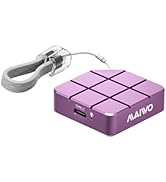
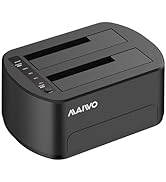
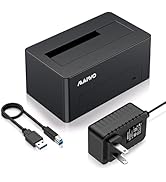
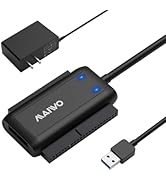
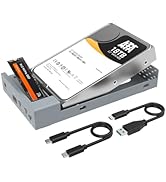
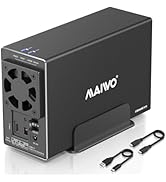
The MAIWO 2.5 inch Dual Bay SATA RAID Enclosure supports up to two 7mm or 9.5mm SATA SSDs/HDDs with a combined capacity of 16TB. Featuring USB 3.0 with UASP for transfer speeds up to 6Gbps, it offers four RAID modes (NORMAL, RAID 0, RAID 1, JBOD) for customizable performance and data protection. Its compact aluminum alloy case ensures portability and durability, while tool-free installation and hot swapping provide hassle-free use. Ideal for professionals repurposing old drives or expanding storage with high-speed, flexible RAID options.









| ASIN | B0B6PPM8DT |
| Best Sellers Rank | #190 in Enclosures |
| Compatible Devices | Laptop |
| Customer Reviews | 4.1 4.1 out of 5 stars (140) |
| Data Transfer Rate | 6 Gigabits Per Second |
| Date First Available | July 15, 2022 |
| Global Trade Identification Number | 06921271224015 |
| Hard Disk Form Factor | 2.5 Inches |
| Item Weight | 12 ounces |
| Item model number | K25272 |
| Manufacturer | MAIWO |
| Max Number of Supported Devices | 1 |
| Memory Storage Capacity | 12 TB |
| Product Dimensions | 5.12 x 3.27 x 0.98 inches |
N**E
Perfect for reusing old SATA laptop drives
I don't have a need for another RAID unit per-se. But I've accumulated lots of laptop hard drives over the years. Seemed wasteful to just toss them. So what do I do with them? I use this unit in large drive mode, and use old drives as scratch space. Like temporary quick storage for media files on the go. Large mode means that you get 1 big drive. 1TB + 250GB drives get you a virtual 1.25TB drive with this unit. I just run the drives until one of them finally dies. Figure out which one is bad, get rid of it, reset, reformat and keep going. It just works. And I feel like I'm not wasting old hardware.
M**H
So far so good
Initial impressions are good. It has a nice aluminum case, and the entire thing is very compact, yet holds 2 SSD's. It comes with 2 cables: 1 USB3.0 for the data transfers and 1 micro USB for additional power that you probably won't need. It also comes with 4 screws a small screw driver so you can attach the drives to the tray (optional), and secure the tray to the aluminum case. I had a practically identical product with the Vantec Nexstar GX, but I had to return it because it just wouldn't work reliably. Interesting to me is that the Vantec Nexstar has alot more purchases and reviews and even has the Amazon Choice tag, but I had alot of problems with it. Maybe I just got a bad unit. So far this Maiwo unit is working the way I hoped that the Vantec Nexstar GX would work, and has the same (maybe even slightly better) build quality. It was also alittle bit cheaper than the Vantec. This is just an early impressions, and I only have 1 SSD in the unit right now for testing purposes. At this point, the only thing I would change is I would add a power button so I can leave it plugged in to my USB hub but still disconnect it and turn it off when not in use.
D**.
Good for the price
Have two of these units I use on my server (small brick n100 with Ubuntu server). One has 2x 2TB ssds as separate mounts and the other is a 256gb mirror for important stuff. Price was good and they serve their purpose. Might not be the fastest but your not paying top dollar either.
W**B
MAIWO Dual Bay External Hard Drive RAID, Simply does not work. Instructions are useless.
Please do not buy. I worked with two of these "raid0" drives for over a week. The simple instructions do not work. The reset button seems meaning less. The system boots up with either all three blue LEDs on or sometimes with only the "Large" mode. No matter where you place the small white switches the reset button has no effect. By separately formatting the two drives on a different system then placing them back in this system you have some hope on a power cycle to get it to "raid0" mode. The system seems to work for a short time. Once you power off/on you have to start all over. The system seems to once again forget what mode your are in. It starts up often in the "Large" mode even though the switches are set for the "raid0" mode. Re-format the drives is needed to start over again. Once again the system seems to work for a short time, but eventually fails to mount the drives. Windows returns an error that "the device is not ready". Disk Manager just shows the system as "unknown" with no disk size displayed. The system also has a "raid1" mode, which seems to be impossible to ever select. As an added feature, I do not know why, but it jams any local wireless mouse hookups. This was tested on two different PC system. I have tried this disk drive unit with both unformatted and formatted drives with similar results. All 4 disks that I used for testing were New. All disks were the same size and same name brand. Just a follow up. Please do not buy these. Once I got them running I left them powered on continuously to see how long they would last. Both of the drive enclosures lasted only 4 months. Both apparently have burnt out the same way. No indicator LED, disk appear to be spinning but no response. Both appear dead.
T**D
Just what I needed- (Update) Except Not
<update> I've forgotten that these DYI enclosures have lead to tears. I was looking forward to happily using my 4tb drives and forgot the bad of the past. The faster drives with the enclosure had my Mac warning me "Disk Not Ejected Properly" see attached. It ejected itself, and seemed to corrupt the contents, both in "Large" and "Normal" modes. It seemed intent on going to sleep would be my guess. No dashboard, so I'm not sure. Returned. I've ordered an assembled WD 2GB drive and will be using it. Cost the same as these 2 enclosures. </update> Sadly Drobo Inc (or their parent company) has failed me the dashboard hasn't been updated for MacOS Ventura, so I'm moving on, Beyond RAID or Beyond DROBO (hehe). I'm not sure if I need a RAID. I'm moving my User Folder off of the internal drive on one of these units using the 4X1TB drives from the Drobo. in Large mode. And will have 4TB on 2 drives for backups. I have an existing drive. Playing around with the switch settings last night left me with nothing that would mount, the instructions are hard to read and unusable. I went to bed. This morning they both work (after resetting them). RAID 0 doesn't seem to work for me (see screenshots Raid 0 on the left) perhaps I need to buy faster drives. Opened box, nice presentation tray with enclosure wrapped in plastic. Remove plastic and "Sled" falls out of "Tube". Lift plastic tray and there's a lot of stuff, 4 screws (2 long, 2 short), UBS 3 cable (Data) USB 2 cable (data), and 2 screwdrivers. Bagged nicely. Popped drives in "Sled" plugged used long screws to stabilize drives (1 each), into Mac received "disk unreadable" error (good), put "Sled" in "Tube", put screws in, plugged in and formatted. Good: Inexpensive and fits what I want. Solid box when installed, easy assembly. Metal on outside. Bad: "Sled" is plastic, DIP switches seem fragile, be careful. Not quite sure how to reset drives, but I have them in Large Mode, which is what I wanted. LEDs flicker when you eject the disk, but stay on after, so you're not sure if they are unmounted. No feet on drive. I'll add some. LEDs don't tell you drive is sleeping. Bad documentation. YMMV: LEDs are not too bright, but can't seem them on the shelf under my desk(where they will live, vertical). When not sleeping , they run warm. Don't know if my user folder will allow it to sleep. Satisfied.
M**S
Includes screws and a few appropriate screwdrivers to install the SSDs. In 'normal' mode it appears as two disks. Under linux I partitioned them, assembled a raid mirror , formatted them then mounted them. Just a few minutes. JMicron JMS551 bridge in the box.
G**S
Easy to install & setup using the dip switches - make sure to turn the enclosure off/on after setting the switches to make sure the change takes effect. I installed 2 X 1tb hard drives in RAID 1. The only thing I noticed is that it gets quite hot as there is no active cooling.
E**R
This unit works well in my QNAP NAS. My NAS was giving write errors on the cheap NVMe disks so I replaced them with newer ones and use these as a backup in this enclosure. So Far, so good.
J**D
It was hard to find this, it is exactly what have looked for. Just enough size to keep two 2.5" SSD and capable of RAID 0, 1.
N**G
Bought two to expand my old hard drives, very easy to config and high performance.
Trustpilot
2 months ago
1 month ago