

Desert Online General Trading LLC
Dubai, United Arab Emirates
Desert Online General Trading LLC
Dubai, United Arab Emirates


🎨 Elevate your creative command center with the Craft keyboard — where precision meets innovation.
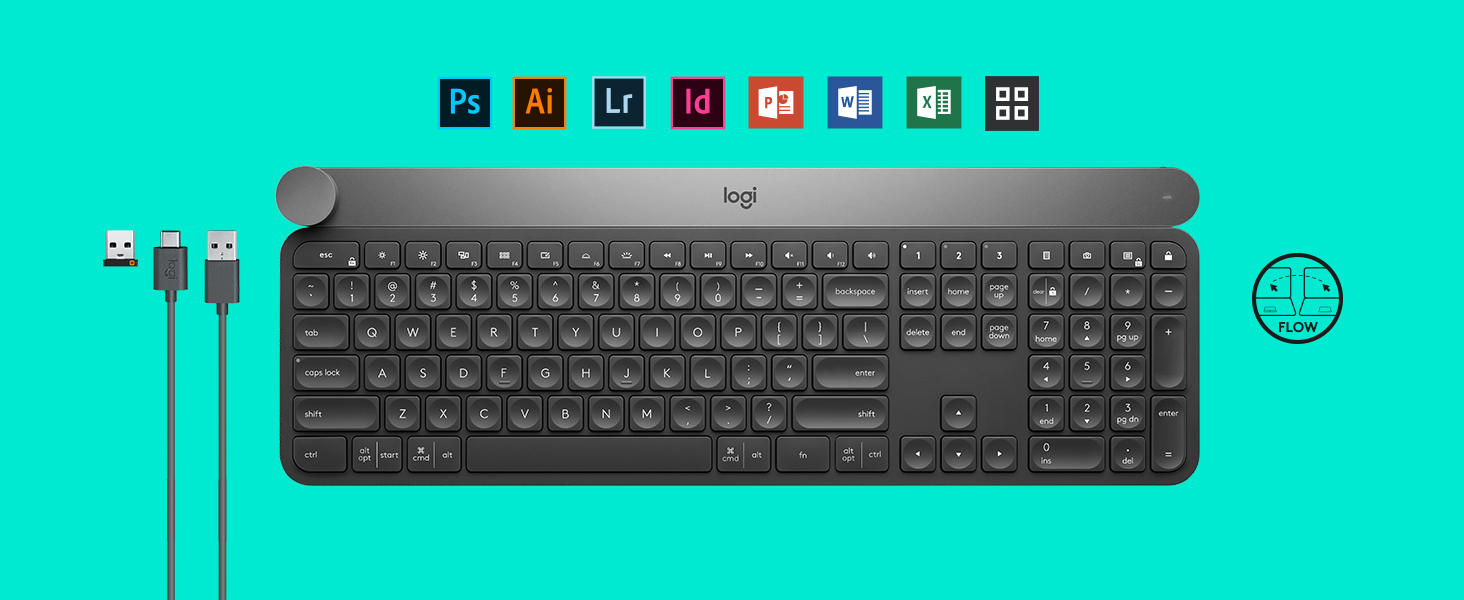
The Logitech Craft Advanced Wireless Keyboard features a unique aluminium creative input dial ('The Crown') that dynamically adapts to your software, enhancing productivity in Adobe Suite and Microsoft Office. It offers premium typing comfort with quiet, stable keys and smart backlighting that responds to your presence and environment. Connectivity is versatile with both Logitech Unifying 2.4GHz and Bluetooth Low Energy technologies, supporting Windows and Mac OS. Rechargeable via USB-C, it delivers a clutter-free, efficient workspace tailored for creative professionals and managers alike.
| Brand | Logitech |
| Series | Craft |
| Item model number | 920-008484 |
| Hardware Platform | Laptop, Mac OS |
| Operating System | Windows 10, 11 or later |
| Item Weight | 2.12 pounds |
| Product Dimensions | 5.86 x 0.39 x 16.94 inches |
| Item Dimensions LxWxH | 5.86 x 0.39 x 16.94 inches |
| Color | Graphite |
| Power Source | Battery Powered |
| Batteries | 1 AAA batteries required. |
| Manufacturer | Logitech |
| ASIN | B0768LTVCQ |
| Is Discontinued By Manufacturer | No |
| Date First Available | October 3, 2017 |
R**Y
Awesome keyboard, best I can find; but could be better
Pros:* Very high quality feel; heavy, capacitive touch trigger backlight, and functionality of the dial.* The dial has a very high quality feel. It makes a ratchet noise when touched for application-specific continuous or discrete scrolling.* I've found the (programmable) dial very useful.* The device switching buttons are very nice to have; I use the dongle with my PC, and Bluetooth with my phone.* The software is the best I've seen for non-gaming mouse/keyboard. There is rich integration with the MX Master 2s mouse.* Low travel, fast typing.* Backlighting.Cons:* No height adjustments. Having the space-bar so close to the desk made my thumb ache.* The keys had a very subtle squeaking noise, that triggered randomly. This drove me nuts. Logitech replaced the keyboard due to a firmware issue I reported. The replacement didn't squeak, I think.. though every once in long while I still think I hear something.* I want the backlight on always. When I disconnect, then reconnect, the backlight turns and stays off. It must be manually turned back up. This drives me nuts.Software limitations:* Only a handful of keys are programmable; the function keys and the fn key. They are also shared. fn + number pad keys would have been nice to have programmable, for example.* Complex macros are not possible with the software. For example, I cannot program a key to be 'ctrl + b' followed by just '/', but I could have 'ctrl + shift + tab'. Meanwhile there is lot of named functionality (like "tab switch" or "switch desktops") target at possibly less technical users.* Per application profiles could be managed better. Programmable keys have global options, and application-specific overrides; but if you ever want to clear out all the application-specific functions for a specific key, you have to clear it for each application individually. This is a problem when you have lots of profiles (which you do be default because Office products' profiles, ect, are pre-installed), and you want to change the application-specific function for a key that it is mapped to for one of those programs. This leads to unexpected behavior if an application has a combination mapped that you never use with that application, but you later map globally, then discover the application-specific mapping by accident when that application happens to have focus. I've gone through and deleted all my pre-populated application profiles as a workaround.* Both keyboard an mouse (if you have a matching mouse) must each be switched between profiles separately. Logitech has a feature called "flow" in their option software which is like synergy (as far as I can tell, I haven't used it) .e. https://en.wikipedia.org/wiki/Synergy_(software) , however it can only be installed on PC and Mac, but it could be made to treat your phone or tablet almost like a second like a second monitor if they supported android/iOS.Other thoughts:* I got tired of high travel mech keyboards slowing my typing. I waited for the Gram XS to come out (low travel mech keyboard) and was disappointed when it was larger (wider) than a standard keyboard and they keys were very poorly stabilized. I gave up on mechs and got this, and haven't looked back. It could be better, but its the best I can find. Logitech mice have been good to me over the years, and I'm very glad Logitech has made a keyboard of the same caliber.* RGB backlighting would also be nice; I'd like to color-code home row, ect, a different colors.* I really don't need to be wireless for use with my PC. It's always plugged in.
L**T
Solid, pretty, the knob needs more customization options
I've been using this keyboard for a month now with my new PC, and all in all, it's quite alright. At first it was difficult for me to switch from a standard older MBP keyboard (late 2013 model) as it had a way more sparse layout, but I'm slowly getting used to the new one, although still need time to fully adjust.Pros:- It's very well built, solid, pleasantly heavy and sturdy, doesn't feel cheap or flimsy in the slightest. Packaging by itself is exquisite.- Battery life is good, although I prefer to keep the keyboard constantly connected with backlight on at all times.- Backlight is very stylish and sharp looking, no RGB nonsense. I love it.- Keys are great, perfect height, feel and travel. I wish the layout was more sparse, but that's simply because of my many years of typing on Mac. I need a couple of months to fully adjust, I guess.- Bluetooth works fine, paired it simultaneously with both my PC and Mac, no problems switching between the two. Although I only use Logitech with the PC since Win and Mac layouts are different and it's confusing to use OS-specific shortcuts on the same keyboard; hand-memory is a thing.Cons:- The main con would be not having a height adjusting mechanism. Not a deal breaker, buy I'm buying a pair of rubber stands for $16 because of it.- The knob... Well, it's very useful to have it to regulate volume or switch Spotify tracks, I'll give it that (and it's very satisfying to operate, a well built little metal thingy), but for other purposes... I was really trying to incorporate it into my Adobe Premiere workflow, but I ended up using it like 1% of the time on "horizontal scroll" only. There is a limited list of actions you can bind to the knob via a Logitech Options app, and custom shortcuts are unavailable, which is the greatest shortcoming of this otherwise excellent product.Another thing, everytime you touch the crown a big notification appears on screen, "Volume", "Horizontal scroll" etc, which is annoying especially in Adobe Premiere where notifications covers a part of the timeline. There is really no need in having it, and Logitech should have an option to hide those notifications completely. Those are software problems, though. I wish Logitech would allow us more customization.If I were to choose again I could probably go with the knobless model (Logitech MX Keys Advanced Wireless Illuminated) as it is the same keyboard but 50 bucks cheaper and I don't really use the crown while working because of software limitations, but what the hell. The knob is great for regulating volume and switching tracks so I would've probably bought a standalone one anyways.Also, I spend 12 hours a day doing my work on the computer, why wouldn't I buy one of the best keyboards there is.5 stars overall, 4 for ergonomic, needs more software customization options for the knob/crown, and also needs fold out feet.
Trustpilot
3 weeks ago
2 months ago