
DOWNLOAD THE APP


Customer Services
Copyright © 2025 Desertcart Holdings Limited
DOWNLOAD THE APP

🖤 Elevate your setup with the MUSETEX Y6 — where style meets powerhouse cooling.
The MUSETEX Y6 Mid Tower ATX PC Case combines a striking 270° tempered glass display with advanced cooling solutions including three pre-installed 120mm fans and 360mm radiator support. Featuring a dual-chamber design for superior airflow and cable management, it supports GPUs up to 400mm and CPU coolers up to 176mm. High-speed USB 3.2 Type-C and USB 3.0 ports enhance connectivity, while tool-free panels and magnetic dust filters simplify maintenance. Perfect for gamers and professionals seeking a premium, spacious, and visually stunning chassis.


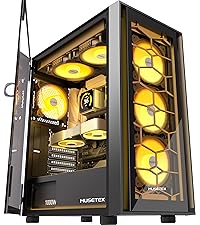

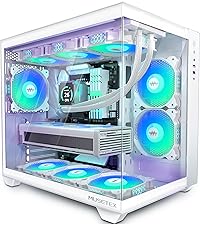


| ASIN | B0CP7SQ58Z |
| Best Sellers Rank | #19 in Computer Cases |
| Brand | MUSETEX |
| Color | Black |
| Customer Reviews | 4.6 4.6 out of 5 stars (588) |
| Date First Available | January 8, 2024 |
| Item Dimensions LxWxH | 16.54 x 11.61 x 14.49 inches |
| Item Weight | 16.9 pounds |
| Item model number | Y6 |
| Manufacturer | MUSETEX |
| Number of USB 2.0 Ports | 1 |
| Number of USB 3.0 Ports | 1 |
| Product Dimensions | 16.54 x 11.61 x 14.49 inches |
| Series | Y6 |
S**I
Good
Amazing case. Beautiful glass. Amazing airflow. Good dust filter top and bottom. If you want to use the front sides fans as intake you can buy a pc mesh magnetic filter and cut it too fit the opening for the side intake and the power supply intake. Plenty of room for my cpu cooler and graphics card. and lots of room inside to work with. the back chamber for the psu and cables was really nice and also very spacious. The quality is very good and the removable brackets for the gpu or graphics card have screws and don't need to be broken off. Excellent quality and the price was very nice allowing me to spend more on my pc's performance. and internal quality parts. Very good case
O**R
Great case for a clean and easy build!
The case looks amazing — the tempered glass panels and RGB fans give it a premium look without breaking the bank. Cable management was smooth, and there’s plenty of space for my components. The airflow is really good with the three pre-installed fans, and everything runs cool and quiet. Perfect choice for anyone building their first PC or upgrading an older setup.
S**Y
Very Nice Case and Better than Lian Li Case
This case is just awesome with 2 minor issues. Let's talk about the 2 minor issues. 1. the back plate that mounts to MB has a missing standoff hole to mount that 1 hole for mATX board. It is at the bottom left. Not sure if this is an oversight in the design or simply manufacturing error. 2. there is no HDD LED. I understand that not providing HDD LED would give the case more "quieter" look and feel, but it would be helpful sometimes to see that your computer is working on something by looking at the HDD LED flashing. Now the better part of the review. It is the smallest case that would fit ATX MB (at least that i could find), but I don't recommend using ATX board because it literally would flush up against the bottom plate of the case and you will lose some functionalities of cable management. Functionally, it is a well thought out case considering ample air flow, small form factor, and top notch build, and lastly aesthetically it is a very good looking case for 1/2 the price of Lian Li case. There are a few places that are sharp and have cut me 2 times while putting together my build. Cable management design of the case is execellent. My build is mATX Gigabyte Aorus Elite B650m, Ryzen 9 7950x, RTX5070, 6 LED Thermalright fans, 64GB DDR5. Everything just seems to fall into place and made the build super nice. To accommodate the missing HDD LED, I purchase HDD LED and you can buy it from Amazon here: https://www.amazon.com/dp/B074XDTVN1?ref=ppx_yo2ov_dt_b_fed_asin_title. My case is now just what I envisioned.
B**S
Nice But Not Without Issues
Not a novice - Been building computers since the XT, AT, 386, 486, Pentium, all iNtel’s, and AMD’s, including Threadrippers, and, you get the idea. Lost count after 3,000 builds. Having said that, I never thought it necessary to write a review before. First Impressions: The case looks nice, as expected. Challenge 1 - Getting it open for the first time. There are no screws to release the covers. The instructions are inside the covered case. All you have to try to figure out how to get the covers off, is a yellow warning label, advising you to be careful not to break the glass trying to get the cover off. Challenge 2 - Backplate. This should have been a simple, “Remove the parts from the old case, and put them in this one.” But, the I/O backplate (ASUS), which easily fit in annother other case, would not snap into place in this one. No biggie. It’s not unusual to have a glitch or two with a new case. Challenge 3 - Standoffs - Putting the motherboard into this case was, without a doubt, the most challenging out of any computer build I’ve ever done. First, the suppled screws had difficulty screwing the motherboard down. They stopped, not because they bottomed out, but as though the screw threads didn’t exactly match the threads in the standoffs. Eventually, they all (gently) screwed all the way in. That is, until the last one snapped off with almost no force. Time to remove the motherboard, replace the standoff, and start over. Challenge 4 - Standoff Spinning. When trying to remove the motherboard, another standoff (not the broken one) spun loose, preventing me from removing the motherboard. Out of thousands of computer builds, I’ve seen this maybe twice. Oh well, removal was difficult, but, I was able to get a tiny pair of channel locks down there to hold the stan doff while unscrewing the screw. If this had been one of the stand off’s in a tighter spot, I would have had to resort to drilling it out - Which would have been very very difficult to clean up after. Challenge 5 - At this point, I thought it necessary to pre-install every screw into the standoffs, then back them out, to ensure a smooth motherboard installation. This proved challenging. The last thing you want to do, is struggle to get a motherboard screwed in, then, if you ever have to remove it, have the stand off’s spin. So, prudence dictated just go ahead and change all 9 standoff’s, which I did. Challenge 6 - Alignment. One of the 9 standoff screw holes is enough out of alignment, that it is not possible to get a screw into it. Not worth fussing over. This install will have to do, with only 8 screws in the motherboard. Well, I’m tired and disappointed. What should have taken 15 - 20 minutes, has taken half the day. going to hit it again tomorrow. I’ll update this review when I’m done. The next day, things went more as expected. The rest of the build was easy. The only other critique, is that this case lacks rubber grommets where cables pass through. It also lacks a HDD LED, and could use more Hard Drive mount locations. Hated the build. Love the results. Here’s how I rate this case, 10 being best: Quality - 6 Ease of build - 3 Precision - 6 Functionality - 9 Air Flow - 10 3 Fans - 10 Quiet - 9 Looks - 10
M**R
Great case tons of cooling and cable Management!
This case is great! Super easy to set up! The metal shell is thick and good quality with no sharp edges! The tempered glass gives great visibility especially with RGB fans and AIO cooler! Venting on the bottom and top for great air flow still keeps the fan noise down. The case is wide but the benefit is great cable management. I liked it so much I bought a second one for my son.
Z**H
Looks great and easy to build with
This is a great case for the price point. Has decent airflow and looks great. Definitely and bit on the cheaper side material wise but mine did not come damaged at all. Very easy to build in and a lot of room for cable management and your parts to be showcased. Would definitely buy again if it stays around $60-70 range.
S**Y
Great case
Amazing case, great value, is pretty wide so be aware of your space, comes with 3 fans, A LOT OF FAN SPACE, real estate is so high in the case you could rent it to 2 families. Can fit 160 mm fans and you can attach a total of 9 of them to the case. The cable management space is also great and they come pretty neat already. Had no issues during building in it. I did take the front glass off when building for ease which was screwed on but the side panels are both screwless. Can fit a 3 fan gpu but your motherboard size is limited. Great front IO but it is a little heavy so put it somewhere sturdy just in case.
M**R
This case was amazing to build in. It offers plenty of space for fans, supports a 360mm AIO, and fits a 7800XT while keeping everything cool. Cable management is also excellent, with lots of room to route and organize wires. Especially at a price point of 100 CAD
T**L
Incredible case, it looks absolutely amazing. The case is almost entirely tool-less massive plus there, it comes with some nice cable management zip ties and velcro ties, and its very easy to build in it with it having tons of space! I am extremely happy with it and cannot wait to evolve and upgrade my build with this case in the future !
G**S
She's a big girl, real purty. Great to look at too, the only downside I had were the flimsy as hell front panel connectors, power + power - etc. I connected one, then tried to connect another then the first one would come off. Got so frustrated but finally was able to get them all in place. Three fans keeps it cool, and there room for more. I'm loving it, now that everything is all attached.
D**U
Amazing case it fits my setup perfectly. Very good build quality with no paint chip after 2 years. Fans are very good with very good ventilation.
R**D
Love it, very well built
Trustpilot
1 month ago
2 weeks ago