🎬 Record, rewind, and relive—your personal cinema, upgraded.
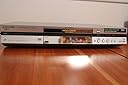
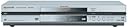
The Panasonic DMR-E80H is a pioneering DVD player and recorder featuring an 80GB hard drive that stores over 100 hours of content. It supports progressive-scan output for HD-ready TVs, offers Time Slip for live playback during recording, and records up to 6 hours on DVD-RAM discs. Compatible with multiple disc formats including DVD-R, DVD-RAM, CDs, and MP3s, it combines versatile media playback with advanced editing and navigation tools, making it a robust all-in-one solution for digital video enthusiasts.
| ASIN | B00009KXA3 |
| Analog Video Format | NTSC |
| Audio Output Mode | AC-3 (Dolby Digital) |
| Best Sellers Rank | #499,564 in Electronics ( See Top 100 in Electronics ) #101 in DVD Recorders |
| Brand | Panasonic |
| Color | Silver |
| Compatible Devices | Television |
| Connectivity Technology | RCA |
| Connector Type | RCA |
| Controller Type | Remote Control |
| Customer Reviews | 3.6 out of 5 stars 86 Reviews |
| File Format | MP3 |
| Global Trade Identification Number | 00037988407088 |
| Item Weight | 11.4 Pounds |
| Manufacturer | Panasonic |
| Media Type | CD, DVD |
| Model Name | DMR-E80H |
| Other Special Features of the Product | Progressive Scan |
| Resolution | 1280×720 |
| Special Feature | Progressive Scan |
| Supported Audio Format | MP3, Dolby Digital |
| Surround Sound Channel Configuration | 5.1 |
| UPC | 037988407088 |
| Video Encoding | MPEG-2 |
| Video Output Resolution | 720p |
| Warranty Description | 1 year warranty |
J**R
I love this machine!
I've had this machine for over 2 years and I love it. It's completely eliminated any need for me to EVER use video tapes for any reason. Simple and logical to use, record everything to the HD first, then edit it nice and neat and burn to disc. I wanted to put in a review though specifically to comment on what some other reviewers have said. Someone said they encountered the 'recovery' & 'bye' issue when a burn failed, and that happens sometimes. Especially if you clog up the HD with files, it can have a minor heart attack, but that doesn't mean the machine is broken, it doesn't need to be fixed. Just erase the problem file and it'll be fine again, it's very rare that this happens to me, and it's a minor annoyance compared to all the wonderful things this machine does. Clear off the HD and maybe reformat it and it'll be golden again. Sometimes if gets really confused and has a serious breakdown, I've found I might need to unplug it to just get it to quit trying to figure out what went wrong and reset, but that always works, and once it recovers it's fine again. This is a complex machine, but it's very robust. Regarding HD failure, that DID happen to me. All hard drives are susceptable to eventual failure, and I ran that thing into the dirt with heavy use, and it eventually failed completely. But you don't need to pay some electronics shop jerk $320 to fix it, that's a rip off. There's absolutely nothing unusual about the HD in these things. I just opened up the case, pulled out the HD, went to CompUSA and bought a new one (got a 120 of the same manufacturer cause they were out of 80's), plugged it in, closed it up, machine recognized it immediately, formatted it, and it's been working like a beauty ever since. Total fix cost was less than $100 to buy the new drive. My machine has been in heavy use for 2 years, and it's performed like a champ. It's needed a bit of babying sometimes, but 99.5% of the time it's the best recording machine I've ever had, and the other 0.5% of the time you just have to let it recover, perhaps give up on a file or two if they got corrupted (VERY rare, but the machine isn't broken). I won't claim it's perfect, but it's SO good the occasional weakness is so minor that I can't get upset by it. Hope this helps some of those who already have this machine. Don't give up on it at the tiniest hiccup. It's a tough machine and does a fantastic job if you stick with it. Oh yeah, one last cool thing I discovered about this machine. Near as I can tell the Panasonic models of DVR/DVD recorders are the only ones that maintain 640 x 480 resolution at LP speed. All the other brands start cutting out lines to save data space below SP, but the Panasonic stays full res, with perhaps a few more encoding artifacts, but I'd rather have some extra coding artifacts than dump entire lines of resolution. Most things look great even at LP, which allows 4:20 to fit onto a single DVD.
J**E
WOW-
The DMR-E80 is just what we expected and more. The first task was to transfer and edit a home movie taken during a long trip across the USA. I have edited video for commercial television, medical and educational use since 1967 and this unit is the best yet. It is now possible for the average customer to edit videos with ease and perfection. The scene start and stop features, search and other editing functions make this product complete. Panasonic, you could have spent a few more cents on "soy ink" to add a few editing tips to the instructions for those not familiar with video editing and I would have given 5 stars. Well worth the price and once again Amazon.com came thru with fast, easy purchase and delivery of my items.
F**H
Problems of other reviewers are real
This sounds like other reviews on Amazon.com. After about six months of use, my recorder started losing the ability to recognize commercial DVDs. Then, it locked up while dubbing from HD to DVD-R, went into Recover, and made the disk useless--at $1.50 or so a pop. Then, it stopped working altogether. The repair place that Panasonic sent me to said that they couldn't get a new "deck" from Panasonic for about six weeks. I called Panasonic, got the part expedited, but, when the repair part was installed weeks later it turned out to be defective. That was weeks ago. New repair parts are still weeks out. The parts guy at the repair place told me that these things break constantly, specifically that they were released to the market before the technology was right. So, the Panasonic DMRs are piling up at the shop. It takes a long time to talk to someone at Panasonic (I'm on hold now and have been for about 20 minutes). The people I've talked to are nice but refuse to connect me to anyone above them and essentially are not permitted to do more than pass on the problem to their bosses. The most recent one even said this was my fault because I didn't call every few days to see if they had done anything about the part. When I told him that this was corporate responsibility, he just got evasive and continued to make it my fault. So, if you buy this, expect it to break, expect that there are no parts, expect to get the run around. I paid a lot of money for something that doesn't work and can't be fixed. Anyone for a class action lawsuite?
D**K
works good for me
I got this unit for Christmas 2003, and have loved it ever since. I really can't say that about very many electronics I've purchased. First, ease of use. There is a small quirck in the system, in that you often switch to the box and it is already playing. None of the remote controls really work at that point, so you (I) quickly learn to press "Stop", and then the "functions" button will pull up a menu for you. Then everything works fine. On the Plus side, Timer Recordings work GREAT, and are really, really, easy to setup and monitor. The box will automatically switch between several different inputs (Cable box for premium content, or direct attach cable) or channels if you're recording several different programs. Also a "BIG PLUS", pressing "Stop" or any other key will not stop a recording in progress. (...) Also a Plus: the fast forward and reverse seek of 2x to 100x are addictive. I can't imagine working with any less. Quality: Superb. I haven't even tried the "XP" quality setting yet, the "SP" setting looks so much better than standard VHS. DVD (-r or +r) disks burned with "SP" play on everything I've tried. We transfered several VHS tapes to DVD, and I swear that the DVD looks much better than the original VHS source. Fun things to play with: Playing one recorded show while recording another still blows my mind. Seeking back to the beginning of a show while you are still recording works great. Open Issues: I still have not found the magic incantation to take a DVD disk from my computer and transfer it to the Panasonic hard disk. NITS: Moving through the menu of previously recorded shows is still a bit slow. Not a biggie. Encourages you to keep the hard drive list relatively small. (Burn 'em to disk to save) Security: No Tivo (...). No extra per month charges. No one will ever know what I am watching or recording ever. Hope this helps.
C**A
Good for recording TV broadcast or Home Video only
I purchased this unit for 3 reasons 1. dubbing my home video from dvd-ram to HDD (ok) 2. recording TV Life Broadcast to HDD (ok) 3. dubbing Netflix DVD's to HDD (will not do) 4. dubbing CD's to HDD (will not do) it does 2 out of 4. It took about 1 day to setup and burn 1st dvd-r disk. Manual is not very good, you need to read multiple times plus trial and error routine. However by 2nd day I was able to get 80% of what it can do done. Still have problem removing comercials from stored recordings but I need to spend more time doing it. I guess in my case it would have been cheaper to buy dvd recorder for my pc to do all 4.
C**.
DVD Recorder with Hard Drive
This is an easy to use recorder. You record the video to the hard drive, edit it, title it, and then burn it to disc. While it only has video and svideo inputs, the picture is better than standard dvd video if you record from a high definition source. The hard drive holds about 30 hours of standard video before you must delete something. I normally keep it about half full so that I can rewatch the best videos a couple of times. The only downside to this good machine is that it stores the wide screen information in narrow screen format to save space, but it is only noticeable on other players.
M**R
Smudging Problems
I have Dish Network and an excellent 35" television. The problem I have noticed is that smudging appears on walls and certain backgrounds on some shows/movies etc. They are not always obvious unless you look for them. On certain broadcasts, they are completely un-noticable. Changes in brightness levels often show up in black and white shows on such things as dark suit coats. If I watch these shows on the TV without going throught the DVD recorders tuner there is no such problem. I was able to try an exact same model of this recorder and got the same results. No other reviews seemed to touch on this so I wondered if anyone else had this problem. What I see on the screen when I record to the HDD or DVD is exactly what the tuner portrays.
B**O
Still going strong!
I purchased this product the very month it became available and as of this review that is almost four years ago. I have treated it with kid gloves and it has repayed me by performing brilliantly. I have created well over a hundred DVD's, (probably closer to two hundred), and countless HDD recordings. Using the editing functions, the playlists, and other features is relatively easy and intuitive. If I were forced to find fault with this excellent product, it would only be that it takes a bit too long to power-up, and when dubbing from playlists the high speed dub feature can't be used. There are probably other Panasonic units available now which supersede this one, and they may well be as excellent, but I like this one just fine!
Trustpilot
1 month ago
1 month ago