We remain fully operational. Our teams are working around the clock to ensure your deliveries continue safely.

DOWNLOAD THE APP


Customer Services
Copyright © 2025 Desertcart Holdings Limited
DOWNLOAD THE APP


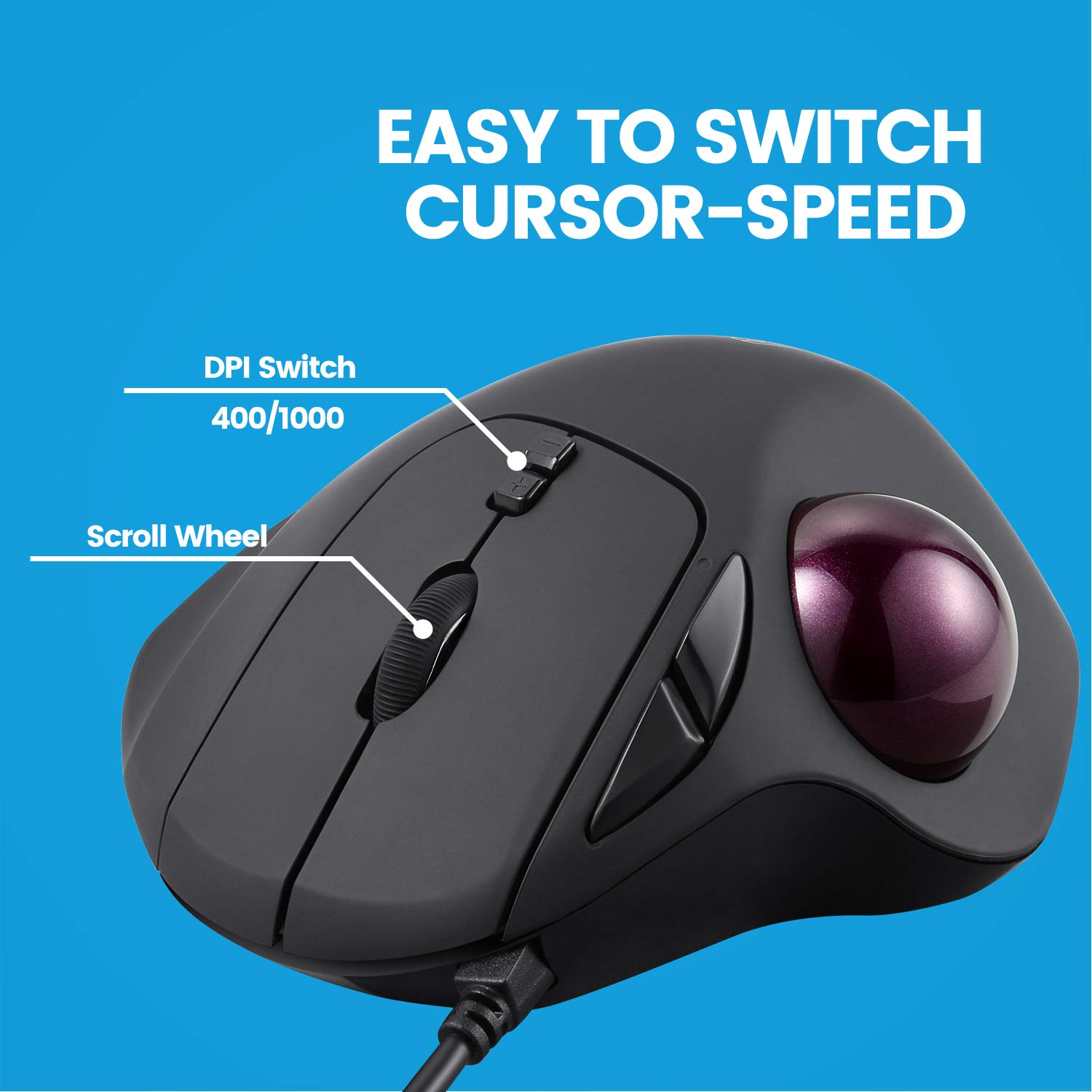

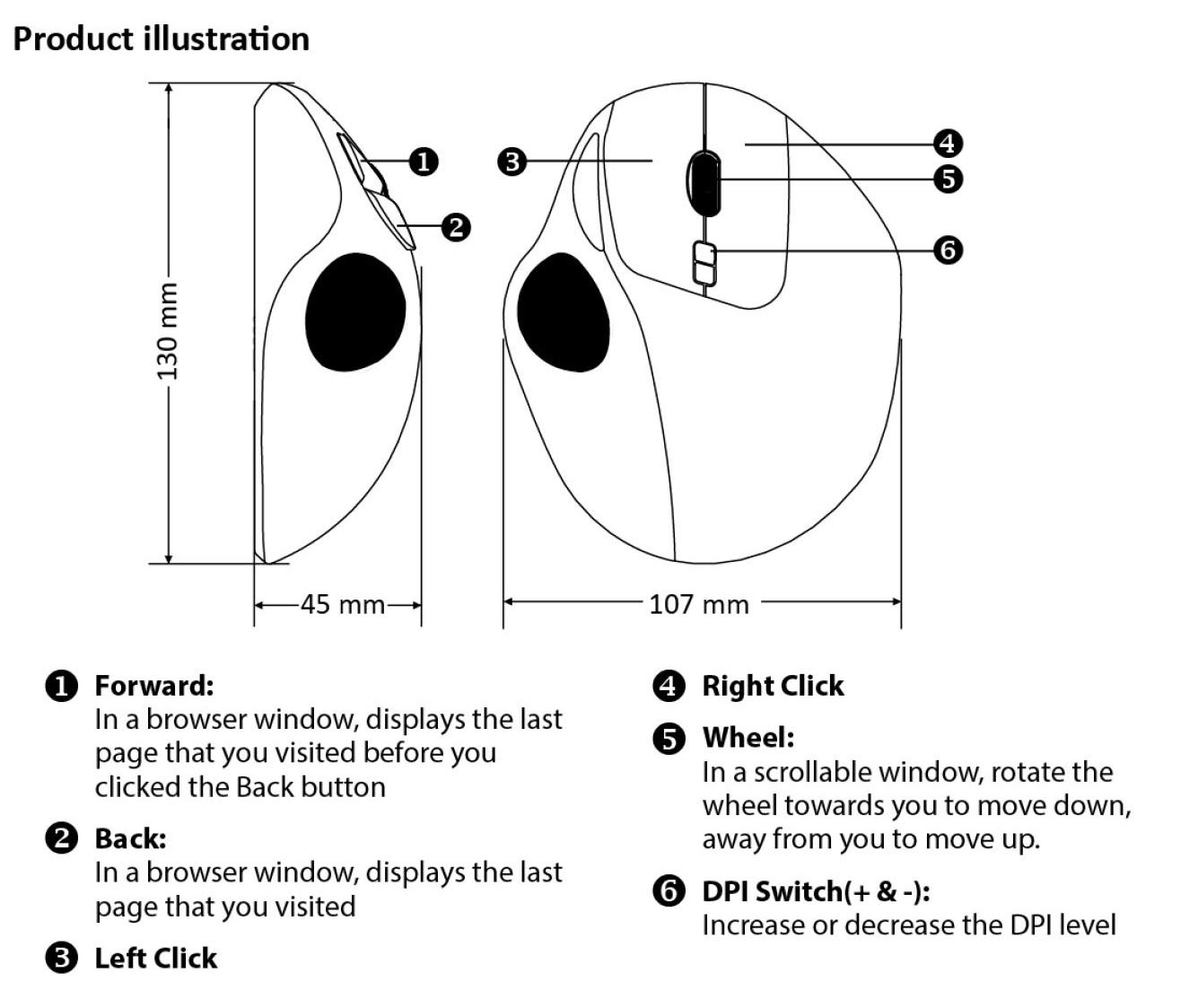
🖱️ Elevate your desk game with precision, comfort, and control!
The perixx PERIMICE-517 is a wired ergonomic trackball mouse designed for right-handed users seeking comfort and efficiency. Featuring 7 programmable buttons, dual DPI settings (400/1000), and a glitter-coated high-density trackball, it minimizes arm fatigue and maximizes precision. Ideal for professionals prone to RSI or anyone working long hours, it offers plug-and-play USB connectivity with no driver hassle, saving desktop space while enhancing navigation speed and accuracy.




| ASIN | B07CPW9GZC |
| Antenna Location | Office |
| Are Batteries Included? | No |
| Are Batteries Required | No |
| Battery Average Life | 12 months |
| Best Sellers Rank | 22,078 in Computers & Accessories ( See Top 100 in Computers & Accessories ) 520 in Mice |
| Box Contents | mouse |
| Brand | perixx |
| Brand Name | perixx |
| Button Quantity | 7 |
| Colour | Wired |
| Compatible Devices | Laptop |
| Connectivity technology | USB |
| Country of Origin | China |
| Customer Reviews | 4.3 out of 5 stars 4,695 Reviews |
| EU Spare Part Availability Duration | 1 Years |
| Embellishment Feature | Glitter |
| Enclosure Material | Plastic |
| Global Trade Identification Number | 04049571002125 |
| Hand Orientation | Right |
| Hardware Platform | PC |
| Item Dimensions L x W | 10.7L x 10.7W centimetres |
| Item Type Name | Perixx 11567 PERIMICE-517 Wired Ergonomic Trackball Mouse, 7 Button Design, DPI 400/1000 |
| Item Weight | 176 Grams |
| Manufacturer | Perixx |
| Model Name | Perimice-517 |
| Model Number | 11567 |
| Mouse Maximum Sensitivity | 1000 Dots per Inch |
| Movement Detection | Trackball |
| Movement detection technology | Trackball |
| Network Connectivity Technology | USB |
| Number of buttons | 7 |
| Operating System | Windows |
| Power Source | Corded Electric |
| Product Features | Soundless |
| Product Finish Type | Glänzend |
| Product Warranty | 24-Month Limited Seller Warranty |
| Range | 10.0 meters |
| Special feature | Soundless |
| Style Name | Wired |
| Theme | Ergonomics |
| Unit Count | 1.0 Count |
J**.
Trackballs are better than mices!
Always amusing watching someone try to use my computer and sliding my trackball around the desk in confusion. Well, they shouldn't be using my computer! I bought this to replace a Chinese one I had for around... 4 years? It had a good run but eventually the buttons started to go and I looked to replace it. I'd have happily bought the same model again but it was out of stock so I settled on this one which was a good price and looked alright. Glad I did - can't fault it. It's comfortable, the surface has a nice, dry feel to it. Hard to describe it better than that but it's not tacky, hard plastic, more of a natural feel. It's more than accurate with the DPI switch in the middle (you wont activate this accidentally if you're wondering). I don't use the Forward / Backward buttons much mainly through lack of habit - I forget they're there and do everything manually. But they're convenient and I'm trying to train myself to use them because aside from their use in a browser they have automatically mapped in Windows to cycling back and forth through tabs in my terminal windows and other applications. And it's VERY nice to be able to do that at a button click once I've trained out the motor-reflex. I started with trackballs with Logitech long ago but stopped using them when my old wired trackball broke and they no longer made wired trackballs (at least thumb-operated, hand-resting ones like this) in favour of Bluetooth only. I loathe Bluetooth mice and trackballs. They're okay while you're using them but they go to sleep when you're not - they have to save battery life - meaning whenever I've been typing for a few minutes and go to use the trackball or mouse there's this annoying little lag of around half a second where the cursor doesn't respond. Then you have to mentally readjust to make the same motion again. Annoys me every time and all for the supposed advantage of it being wireless - because yes, I need to be able to juggle with my mouse while I'm using it! *smh*. I'm rambling - this is a great device, feels robust and comfortable to rest your hand on. I have no reservations recommending it and if in another five years time I'm buying again, it's likely to be another of these if they don't change it and mess their designs up like Logitech did.
M**S
2018 Model - Large but seemingly well made and works with Manjaro Linux
Likes - All keys recognised in Linux despite official support being for W7 through 10 only. DPI switch is fine, I prefer the accuracy setting* over speed so will leave it on that permanently. *The supplied ball is the glossy variety rather than Perixx' matt version. No need to pair, it does that itself. Dislikes - My old Logitech used 1xAA battery, this needs 2xAAA which aren't included. I have taken some out of a remote control to test it out. The receiver also protrudes further out than the Logitech Unified Reciever. The signal strength is good though. The soft rubber touch coating is an acquired taste, I'm not overly keen on it. I'll keep this as a spare and put the ball from it in my M570 for now. The ball for that got damaged, I recently ordered a ball alone and got an empty box. That's partly why I ordered the whole device this time but also out of curiosity as to how it would work with Linux.
C**L
Close enough to a mouse with all the buttons
The button placements and mouse wheel are close enough to the things I liked about mice that I'm happy. You have a scroll wheel and that also acts as a third button. The trackball helps me avoid the RSI I get when I do use a mouse these days. There is a similar logitech design to this, but it's only available in a wireless package these days, which is a problem for some of the places I use these. The one area I have found problematic is that the scroll wheel doesn't seem to last as long as the rest of the trackball. It seems to stop reliably scrolling after a point. Having searched the web I've discovered that seems to be a common scroll wheel complaint with cheap mice. I'm just a little disappointed that this seems to happen as quickly as it does (I'm just ordering my 3rd of these trackballs now). I guess I get a couple of good years out of it before it dies. None of these devices are going to last forever, this is just a bit quicker than I'd expect.
V**R
Very comfortable for heavy use!
I saw a lot of reviews telling how cheap the plastic feels. I don't think so. The plastic won't flex when pressed and is sturdy enough to withstand falls without cracks. It will feel slightly flimsier than trackballs £20-30 more expensive, but in the other hand it does offer middle click and dpi buttons. For some weird reason it is extremely difficult to find a trackball with middle mouse and scroll wheel, both very important if you use Linux or BSD (middle button acts as the paste command). It is also super comfortable for prolonged use, and as it says very ergonomic: Even playing Quake and Quake 2 feels more natural. this is the cheapest pointing device I ever bought and I made it my main one without any regret.
P**S
Brilliant
The best I have had
F**N
not for me
been using trackballs for years as they're easier on my hand, switching to the thumb ball was the wrong move for me as it requires a lot of thumb movement, the product itself for the price seems well made no issues that way hand fits over it nicely but precision movement was difficult and not good for gaming, it may be more suitable for browsing the internet etc or tasks that don't require a lot of fast precise movements
D**C
2018 version seems to work fine
This is my first trackball mouse, so I haven't any previous experience to compare, but it seems to be working fine and smoothly compared to the experiences of 2017 version reviewers. The option of changing the dpi with buttons on the top is great for speeding it up or slowing it down, now I just need to get used to using it instead of a regular mouse. It's quite a bit bigger in size, taking up most of my open hand, but you get a decent length lead so I can't imagine not being able to find a comfortable place to put it. I got it for use with my laptop when travelling as I really hate using a trackpad, but it installs itself so quickly on a PC once plugged in that I've been using it with my desktop too. One downside of using a mouse like this is that after my kids have been using it, I tend to find crumbs stuck in the ball cavity and greasy prints on the ball itself, but it is very easily cleaned so that's not too much of a problem. Very pleased with it so far.
H**P
You get what you pay for
I bought this item as I've previously had several Logitech ones and after one of the buttons started failing on my current one I tried a different make. Logitech are about £50 and this was about £30, and boy can you tell. First impressions were it's bigger than the Logitech ones, but still felt quite comfortable under hand. So I plugged it in (another reason I wanted this make was it's wired instead of wireless), and gave it a try. It felt awful, almost like there was grit stuck in the ball socket, very rough and nothing like the smoothness of my current one. Aside from that, it seemed quite unresponsive, with the cursor not moving as I expected - that brings another thing, who thought it was a good idea to have the DPI selector switch on top of the thing? I can imagine this getting pressed accidentally quite easily. So unpacked, plugged in, re-packed, and return arranged within 20 mins. The adage of you get what you pay for does seem true in this instance. Never again.
Trustpilot
4 days ago
1 month ago