We remain fully operational. Our teams are working around the clock to ensure your deliveries continue safely.

DOWNLOAD THE APP


Customer Services
Copyright © 2025 Desertcart Holdings Limited
DOWNLOAD THE APP
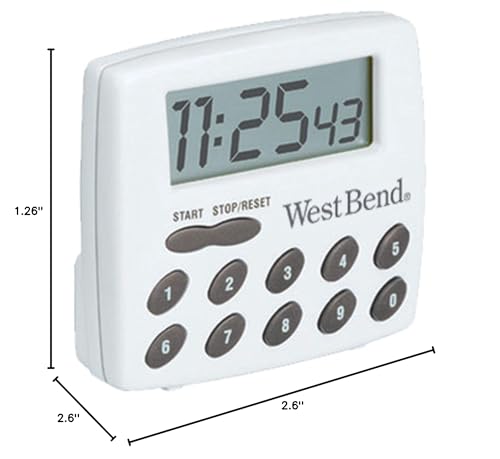
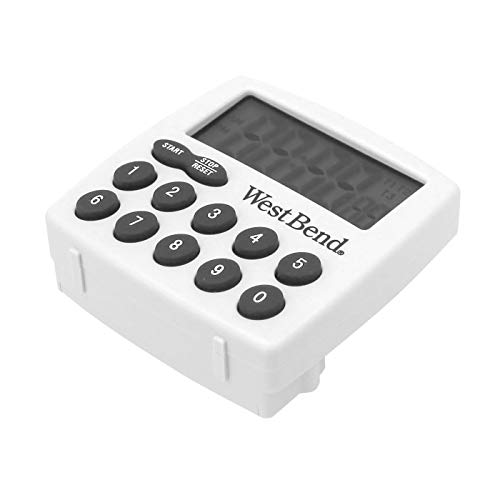
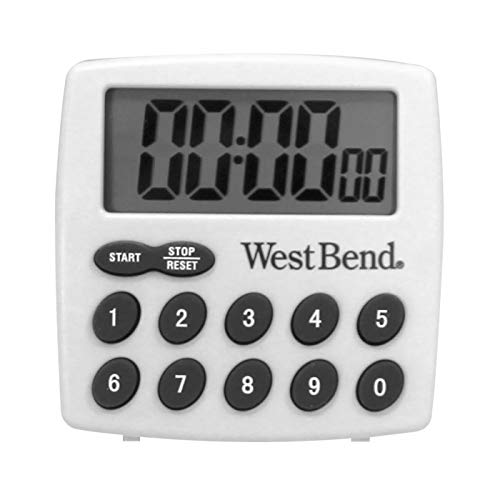

⏰ Elevate your kitchen game—because every second counts!
The West Bend Easy to Read Digital Magnetic Kitchen Timer features a large, easy-to-read LCD display and a clear electronic alarm. It counts both up and down for up to 99 hours, 99 minutes, and 99 seconds, making it perfect for any cooking or baking task. Designed for convenience, it includes a strong magnet, clip, stand, and hanging hole for versatile placement. Powered by a single AAA battery (included), this timer combines simplicity with professional-grade functionality to keep your kitchen on schedule.


| ASIN | B0002JA1JE |
| Batteries | 1 AAA batteries required. (included) |
| Best Sellers Rank | #336,212 in Kitchen & Dining ( See Top 100 in Kitchen & Dining ) #1,530 in Timers |
| Brand | West Bend |
| Color | White |
| Customer Reviews | 4.1 4.1 out of 5 stars (1,379) |
| Date First Available | July 12, 2006 |
| Global Trade Identification Number | 00072244100051 |
| Is Discontinued By Manufacturer | No |
| Item Weight | 0.01 ounces |
| Item model number | 40005X |
| Manufacturer | The Legacy Companies USA |
| Material | Plastic |
| Number of settings | 4 |
| Product Dimensions | 2.6"D x 2.6"W x 1.26"H |
| UPC | 072244100051 |
J**L
Bigger and better than the previous model.
WEST BEND made something very similar to this many years ago (like 10 or maybe 15 years ago?), ye old model number 40005. We liked them so well we kept two in our kitchen. One day, one finally stopped working (and it wasn't merely the battery). The other has developed a key bounce (typical of the technology). SO, we tried a couple of those nasty 'press hold and wait (ho hum) until it gets there' timers that are (apparently) so popular (because those are all we could find around town) and we couldn't stand them. Thankfully, I found these on Amazon, the new model 40005X. DIFFERENCES between the old and new models include: a) old used hearing-aid sized battery, new uses AAA. b) Old limited to 99 min and 99 seconds (4 digits), new can time up to 99 hours, 99 min, 99 seconds (6 digits). c) new has larger buttons! and larger display! d) old timer could only count down, new counts-down or counts up from zero. e) new is slightly larger and stands at 90 degrees on the battery compartment (as shown) or leans back to an easy to read (perhaps) 55-50 degrees on a fold-out clip. old couldn't stand at 90 degrees. f) old and new have the same volume. g) as I recall, the old model's magnet was too weak to hold it to the fridge, but new model's magnet is larger. (Our remaining old model no longer has a magnet; it fell off the fridge early on in its life and the magnet popped off -- I kid you not. I haven't dropped the new model yet, but it looks sturdier). Like someone else said, you'd have to take it off the fridge and hold it in your hand to set the timer. (We're used to leaving them on the counter). USAGE EXAMPLEs: To set the timer to 4 hours, 30 minutes, press 4, 3, 0, 0, 0, and start. To count up, press stop/reset to zero the display (unless it is already zero) and then press start. (Great for the BBQ). UPDATED Oct 21, 2008 - OHHHH NOOOO! One of the two units developed a problem with the display after only a little more than a month of use! The left-hand column for the minutes digit started flickering, and now it won't display! (i.e., It can't display a 1 in the minutes digit). New battery didn't help. Still works, just annoying. I guess they don't make them like they used to. (Made in China) UPDATED Jul 13, 2009 - Regarding the unit that developed a problem with the display? I tightened the screws on the back cover plate and the minutes digit works perfectly again. We're so happy with this unit, we just ordered two more. (To use in our offices)
B**A
Simple and VERY GOOD digital timer -- West Bend
I bought 4 of these wonderful and very simple little timers because my old ones were wearing out and none of my local hardware stores carried them. I love these timers -- well-made by West Bend -- because they are so simple and work so very well. They have 10 numbers on the keypad: 1-9 followed by a 0, and only two functions buttons: "Start" and "Stop/Reset". They take one AAA battery (supplied). These timers are 2-1/2 inches square. The model is 40005X -- which is what you'll need to enter into Google to find them quickly on line. I LOVE how simple they are to use. To time something, just push the "Start/Reset" button, then enter the number of seconds you want to time, then push the "Start" button. The timer will beep pleasantly when the time is up. To stop the beeping, push any of the buttons. You can time something up yo 99 hours and 99 minutes and 99 seconds. Useful as an alarm clock, too -- just enter the total amount of time you want to sleep, or whatever. To start the timer running FORWARDS in time, just push the "Start" button, and it will begin counting. To stop it, just push the "Stop/Reset" button twice. (I used this feature to time how long it takes this computer to boot up.) It comes with an instruction sheet, but is so intuitive to use that you probably won't need it. You'll know the timer needs a new battery when the beeps become too soft. (Or the screen goes blank.) I am SO glad West Bend still makes this great little` timer!
A**R
A good timer/stopwatch that can be quickly programmed. All timers need to have a number pad! But I wish that it also had a clock
இ Fuzzy Wuzzy's Summary: ѾѾѾѾ Recommended with warm fuzzies. փ Positives: փ Unlike some timers that limit the number of hours they can count down from, this timer can count down from 99 hours, 99 minutes, and 99 seconds. փ Unlike some timers that use two buttons to slowly increment/decrement the time settings, this timer can be easily and quickly programmed by pushing eight buttons in a matter of seconds. փ The timer can also be used as a stopwatch to count up, instead of down, although the stopwatch still increments in seconds and not milliseconds. փ The rear of the timer allows for three ways to mount it, either using the magnet, hanging it from its hanging hole in the rear, or using its stand to prop it up. փ The rear stand also has a double function as a clip to hold small papers or cards. փ This timer comes with a 1-year warranty, which is good for an inexpensive product like this. ჯ Negatives: ჯ I wish that this timer also included a regular clock. ჯ The rear magnet needs to be stronger to prevent it from detaching from a refrigerator if you press the buttons too hard. ჯ The LCD display needs an on/off button to turn off the display, both to preserve battery life and to prevent LCD screen burn-in of the "00:00 00" digits. This timer is very handy for a variety of uses: kitchen, office or workplace, hobbies, afternoon nap timer, overnight alarm clock, and timing durations using the stopwatch function. It is more flexible than some timers that either cannot count down up to 99 hours, 99 minutes, and 99 seconds (over 4 days in duration) or have to be programmed by pushing two buttons to increment/decrement the time settings. To program the timer, you always just press eight buttons, which can be accomplished in just a few seconds. Many other digital timers require you to tediously press-and-hold two buttons to increase/decrease the hours, minutes, seconds. Do you need to count down 45 minutes of wait time for something in the kitchen? Press the [Stop/Reset] button to zero the display, followed by 0, 0, 4, 5, 0, 0, and then the [Start] button to start the timer. 45 minutes later, the timer beeps with a fairly loud shrill sound that can be heard throughout the house. You can press any button (not just Stop/Reset) to turn off the beeping. If you do not manually stop the alarm, the beeping stops after one minute. Do you want to take a 30-minute nap? Press Stop/Reset, 0, 0, 3, 0, 0, 0, Start. Do you want to use this timer as an alarm clock overnight after sleeping 8 hours? Press Stop/Reset, 0, 8, 0, 0, 0, 0, Start. Eight hours later, when you wake up and press any button to turn off the beeping, there is no snooze function, so you either have to get out of bed, or if you want to snooze for ten more minutes, you need to wake up enough to reach over and press Stop/Reset, 0, 0, 1, 0, 0, 0, Start. Just make sure that you do not drowsily push 0, 1, 0, 0, 0, 0 instead and end up snoozing for one hour instead of ten minutes :-) How about using this timer as a stopwatch? Press Stop/Reset and then Start to start the stopwatch. To pause the stopwatch, press Stop/Reset once. To resume the stopwatch, press Start. To clear the stopwatch, press Stop/Reset once to pause and a second time to reset the display back to "00:00 00". There is no on/off button and the LCD display always remains on. To increase the lifespan of the single AAA battery that this timer uses (and a battery is included with this timer), it needs to have an on/off switch. Just as important, being able to turn off the LCD display prevents screen burn-in. Over time, the "00:00 00" image may be etched into the LCD screen, reducing the display's clarity and legibility. Some timer/stopwatch devices also have a regular clock function, and this West Bend timer cannot display the a clock time. If the LCD display always has to stay on, it can at least just always display the clock time when it is not being used as a timer or stopwatch. And if this timer's display could be used as a clock, you would not even need to program the timer if you just wanted to watch the clock increment the seconds and minutes on its display. The rear of this timer provides three ways to mount it. You can either open up the spring-loaded stand to set it on a counter or table, use the rear hanging hole to hang it from a small nail or string, or attach the rear magnet to a metal appliance or surface. The magnet is not that strong so if you have this timer attached to a refrigerator and press too hard on the buttons, you can knock the timer off and have it drop onto the kitchen floor, possibly damaging it. It is possible to lightly press the timer's buttons without causing the timer to detach from its magnetic hold, but the safest way is to always hold the timer in your hand whenever you press its buttons to program it or stop its beeping. Many brands of small timers like this also use a weak magnet, so this is a common problem amongst digital timers. This timer comes with a 1-year warranty, so keep your receipt as proof of purchase if the timer malfunctions. But I imagine that the warranty does not cover damage due to the timer dropping onto the floor. Overall, this is a great little timer. I would have rated it 5 stars if it also included a clock function, which many other timers also have.
S**N
It's so hard to find a digital timer with direct time input that can function both as a count-down and a count-up timer, so I'm very happy with this one. It's very similar to a Radio Shack timer (63-878) I bought quite a while ago, and I've looked in retail brick-and-mortar stores for a similar one without success. In addition to the "0"-"9" buttons, the timer also has a "Start" and a "Stop/Reset" button. With the display reading "00:00:00", pressing "Start" initiates the count-up function - you can pause the count using the "Stop/Reset" button and resume it by pressing "Start" again. To use the count-down function you enter the desired time using the digit buttons and then hit "Start". This can also be paused and resumed using the "Stop/Reset" and "Start" buttons. In both cases pressing "Stop/Reset" twice will clear the time. I like the fact that the unit takes an "AAA" battery because it leverages my investment in "Eneloop" AA and AAA batteries and a smart charger. Much nicer than the button battery in my Radio Shack timer, IMHO. There's a magnet/clip on the back which lets you either mount it on a metal surface like a fridge, clip it to your belt or pocket, or stand it up (at an angle of about 30 degrees from vertical) on a flat surface. The magnet is strong enough so that the timer is secure on a fridge, but if you try to push the buttons close to the left or right edges it will release, so beware. In fact because of the clip the timer won't really lay flat on a table if you're trying to push the buttons and so there really isn't a good way to enter the time or start/stop it without either using two hands or picking it up. I don't find that to be a problem but some might. The only real negative for me is the fairly small "seconds" digits on the LCD display which makes them a little difficult to read depending on the lighting and the distance you are from the unit. But balancing that is a full 2-digit hour readout that allows times up to 99 hours. I don't use it for intervals quite that long, but my other timer only goes to 99 minutes (100 minutes less 1 second) so I appreciate that this timer lets me go beyond that limit.
S**N
I purchased two of these; one is for use in the kitchen, the other for different things around the house. They're sturdy and easy to use, the display is easy to read, and the alarm is loud enough to hear from another room. Best feature: the number pad lets you enter an exact time. This may seem like a minor benefit, but it's a pain to have to press a button 35 times to set for 35 minutes. Don't think of it only for cooking; get an extra one and you'll be surprised how often you use it for other tasks. A very satisfactory product.
H**Y
Works perfectly. The buzzer is nice and loud so I can hear it from another room. The magnet is not an issue. Stays on the side of the fridge really well. I take it on and off the fridge to program the time, so there is never a concern of trying to use it while it's attached to the fridge. Update after two weeks: just happened to be standing too close to the fridge. Knocked it off and the magnet instantly snapped, rendering it useless. But the timer still works. So now it just sits in the drawer and I take it out and rest it on the counter to use it. It's not the end of the world.
M**M
I love this timer. I had been looking for a timer with a loud sound and a buzzer that lasted more than a few seconds before it shut off. This timer was just what I was looking for. It is also so easy to use - I just input the numbers on the keypad, rather than having to scroll up or down for the desired time.
C**R
I would give this 3.5 stars. Like others say, it's not balanced with the centre-only magnet. So if you push on an end button, you can unmount it and it can fall to the floor (happened once to me). It's a bad design aspect. But now I grab hold of it with my thumb and ring fingers while pressing the buttons with my middle and index fingers. The beeper goes on seemingly indefinitely until you stop it. Sometimes I miss the microwave timer that only sounded for a few moments. However if I were elsewhere in the house, it would be better that it keep sounding. While I did not buy it with this expectation, I find it odd that it does not double as a clock. (Don't let the picture fool you.) As it is, it stays on all the time and adding a clock should add very little to the cost (if anything). But overall, it's handy and having ten buttons to set the time is a strong point.
Trustpilot
4 days ago
1 month ago