Desert Online General Trading LLC
Dubai, United Arab Emirates
Desert Online General Trading LLC
Dubai, United Arab Emirates


🖥️ Elevate Your Workspace with Effortless Control!
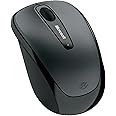
The Microsoft Wireless Mobile Mouse 3500 in Loch Ness Gray combines a sleek, ambidextrous design with impressive features like an 8-month battery life and a 10-meter wireless range, making it the ideal companion for professionals seeking comfort and efficiency in their daily tasks.


| Material | Plastic |
| Item Dimensions L x W | 1.85"L x 7.9"W |
| Unit Count | 1.0 Count |
| Item Weight | 181 Grams |
| Style | Retail |
| Color | Loch Ness Gray |
| Battery Average Life | 8 months |
| Range | 10.0 meters |
| Number of Batteries | 1 AAA batteries required. (included) |
| Power Source | Battery Powered |
| Hardware Platform | PC |
| Button Quantity | 3 |
| Hand Orientation | Ambidextrous |
| Compatible Devices | Personal Computer |
| Operating System | Windows Vista, Windows XP, Windows 8, Windows 7 |
| Connectivity Technology | Wireless, USB |
| Special Features | Wireless |
| Movement Detection | Optical |
S**Y
Good working top quality mouse
Excellent quiet mouse that is lightweight, comfortable, great bluetooth connectivity and buttons are very easy to use that is top notch quality.
J**T
Great mouse, even for big hands
Great mouse, even for big hands. Use a mouse with your laptop. The small finger pad on a laptop is great for travel, but when at home or doing a lot of work on your laptop, use a mouse. It's a lot easy to get work done too. Also, by using a mouse, you'll have less wear and tear on your laptops buttons. Avoid wearing out your laptops mouse buttons. I have seen a handful of laptops with broken mouse buttons. Wear out an external mouse. I wear out at least one mouse a year. I like the Microsoft Wireless 3500 mouse. It's wireless, all you do is plug in a small USB receiver in your computer, and it works. The 3500 is "Blue Track Technology," the light coming out of the bottom is blue, not red like other laser mice. "Blue Track Technology" works on just about any surface, so you do not need a mouse pad. It even works great on bedspreads and pillows. And the "Blue Track Technology" is SAFE FOR THE EYES. I think that's very important especially if you have children in the house. The 3500 runs a few months on one AA battery, just a click of the thumb turns off the mouse when you turn off your computer. I know it sounds like a hassle now, but it's not. When you click shutdown on your computer, simply push the little slider on the bottom of the mouse to turn it off. The 3500 is a small mouse, so it's great for a woman's small hand. But I love it too, it works great with my big hand. The 3500 works great for travel too. Just pull the USB receiver out of the computer (no need to disconnect), and slide the USB receiver into the bottom of the mouse, takes about two seconds.
G**R
Works Perfectly
I got this for use with a laptop that I use 90% of the time in my living room. So, my needs were:1) Wireless2) Inexpensive3) Work on odd surfaces (couch, recliner, my leg, etc)4) Use regular batteriesSo far it meets all of the above, so it's everything I was needing in a mouse. It's smaller than your typical Desktop mouse, but not overly small. I don't find it to be uncomfortable. Performance wise it hasn't had a single issue, it's worked on every surface I've tried it on and all of the buttons and the scroll wheel have worked every time.I put the USB receiver on the side of the laptop that the mouse is being used so the distance is extremely short. I haven't tried it from any distance (for example using it on a HTPC). I tend to leave the USB receiver plugged into my laptop at all times, it's very small and dosen't protrude much at all. If you desire there is an area to store it on the bottom of the mouse, you just push it in and it snaps in place. Press a button and it will pop out.It uses your standard AA size battery, and only a single one at that. Replacement is extremely easy and does not require any tools (no small screw holding the battery cover, keep away from small children). It has an on/off switch on the bottom to conserve battery power. On top under the scroll wheel is an LED that will let you know if the battery is low.No software is required to be installed to get this to work (I have Windows 7 Home Pro 64-bit). You can, if you wish, download software from Microsoft to give you a few extra features, but is not required for basic use.
B**N
Nice little mouse is big enough for adult male hand that ...
... uses either a claw grip or my version of a palm grip. (My fingers lie flat, with the tips extending over the button end of the mouse. More comfortable than it sounds.) Want an inexpensive no-frills wireless mouse that uses blue light? This one does the job. The slightly bumpy feel as the scroll wheel rotates is just right, as is the click resistance. As with any self-respecting wireless mouse, the dongle is small and can be left on the computer, even if the computer travels with U. A single AA battery provides the power.Some other reviews complained about the click noise or the on-off switch. Yes, the click noise is a *little* louder than with many mice. Tho easily annoyed by gadget noises, I do not mind the click noise. Dependence on an old-fashioned manual on-off switch has the obvious disadvantage of running the battery down quickly if U forget to turn the mouse off. There are also some unobvious advantages. I was pleasantly surprized by how easily I formed the habit of turning wireless mice off when going away from the computer for more than a few minutes. (Full disclosure: I am ancient enough to have grown up in a world where everything needed a manual on-off switch.) It would be nice if the tiny green LED that glows briefly when the mouse is turned on would stay on, as a visual cue that mouse is on. Maybe the LED blinks or glows red when the battery is low; otherwise it would be totally useless.Footnotes: (1) Tho the package lists nothing earlier than Win Vista, the mouse works fine on a Win XP machine also. Just plug in the dongle. U only need Vista or later if U want to program the scroll wheel to be a "middle button" as well as a scroll wheel. (2) The blue light really does let the mouse work on myriad surfaces, but switching from a mouse with red light will speed up the pointer motion. Go into Control Panel and take the mouse pointer speed down 2 notches, if U want to keep your old speed. (3) The "Loch Ness Gray" color is what I would have called "dark silver" -- brighter and much better looking than the very dark gray that appears when U look at the available colors online. (4) I accidentally dropped the mouse from about 3 feet above a vinyl floor; only damage was a barely visible scuff; no functional impairment at all.
Trustpilot
3 weeks ago
1 month ago