Desert Online General Trading LLC
Dubai, United Arab Emirates
Desert Online General Trading LLC
Dubai, United Arab Emirates


🚀 Upgrade your system speed without breaking the bank!
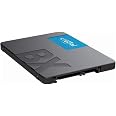
The Crucial BX500 120GB SSD leverages advanced 3D NAND technology to deliver blazing-fast 540MB/s read speeds, dramatically improving boot times and system responsiveness. It’s 45 times more energy efficient than traditional hard drives, extending battery life for laptops. Compatible with any 2.5" SATA drive bay, this lightweight, reliable SSD comes with a 3-year limited warranty, making it the perfect affordable upgrade for professionals seeking speed and efficiency.
| RAM | 120 GB |
| Hard Drive | 120 GB Solid State Hard Drive |
| Wireless Type | Radio Frequency |
| Brand | Crucial |
| Series | BX500 3D NAND SATA 2.5-Inch Internal SSD |
| Item model number | CT120BX500SSD1 |
| Hardware Platform | Linux, Mac, PC |
| Item Weight | 2.11 ounces |
| Product Dimensions | 3.95 x 0.27 x 2.75 inches |
| Item Dimensions LxWxH | 3.95 x 0.27 x 2.75 inches |
| Color | Black/Blue |
| Number of Processors | 1 |
| Flash Memory Size | 120 |
| Hard Drive Interface | Serial ATA |
| Hard Drive Rotational Speed | 540 |
| Voltage | 12 Volts |
| Manufacturer | CRUCIAL TECHNOLOGY |
| ASIN | B07G3KRZBY |
| Is Discontinued By Manufacturer | No |
| Date First Available | August 28, 2018 |
J**N
AWESOME!
If you are looking to upgrade your PC, look no further. I was actually debating on going out spending a couple extra hundred dollars on a new PC, but then I thought. Let me try to upgrade this and see what happens, because it doesn't have the best processor, but decent operating System. I order a 4GB Stick of RAM (Crucial of course :) ) along with this SSD and man, this thing is blazing! I don't do a lot of benchmark testing or programming or anything, but this thing is still 10x or probably more faster than your standard Hard Drive. This was my first time using an SSD & Cloning Software, so I tried Macrium Reflect. It was easy, straightforward and it even automatically resized the partitions. I only use my laptop for light webbrowsing and DJing, so this is primary for booting the computer and loading software., and it really gets the job done in a very fast and efficient. I highly recommend this for people who want to have something close to a new laptop, but cannot afford/do not want to pay extra prices for a brand new one. GREAT JOB CRUCIAL ON THIS ONE!!!!!!!!!!!!!!!!!!!
S**Y
MADE MY $200 LAPTOP A ROCKETSHIP!!! A+
Only one think to note that you need do know.It does not come with the cable(SATA? I believe) to Migrate your old drive to the new one.I had one so it wasn't an issue.I installed it in my "garage" computer that I only use to find parts for my cars and boat or listen to music programs without going into my home.It is easily 40X faster using just about any program, opening up programs and everything else.Internet, Chrome, programs like Spotify/Pandora, ETC.IT MADE A JUNKER COMPUTER A TOTAL ROCKETSHIP and this computer has a Celeron processor so it's a slackerto start with I paid about $200 for new.I installed it in a 3-5 year old:Toshiba - Satellite 15.6" Laptop - 4GB Memory - with 320GB Hard Drive to start with.I don't store any music/docs or videos so 120 GB easily does the job as far as storage size.I think I'm using 60 GB with Windows 7.It will REALLY speed things up.It's so cheap, it's a no brainer.Just get it.
B**S
My old laptopis now my new laptop
I have considered switching to an solid state drive for some time now . Now that I have I can't believe I waited as long as I did . My old laptop went from booting in minutes to booting in seconds . I mean that literally . Programs open almost instantly and they run lightning fast . My virus scanner now takes less then a minute for a full system scan . The installation is a snap . The drive comes with Acronis disk clone and it does all the work for you . I was worried because my old HDD was quite a bit bigger then the SSD is was migrating to , but the Acronis software handled it with no problem . You will need to buy a separate cable to connect the SSD drive to USB port so that you can clone your old disk image onto the new drive , but they are only a few bucks . The cloning didn't take long and swapping the drives only took a few minutes , and there videos on YouTube from Crucial that will walk you through the entire process . I would recommend watching the videos before beginning and I highly recommend buying one of these drives .
A**R
A good drive for the money spent
Crucial makes very good products in my experience. The BX500 is their budget line. If your expectations are realistic about what you are going to get for what you play, this is a good drive. I have this installed in a mid-2010 MacBook Pro running Linux and a MacBook probably around the same age also running Linux.Because the OS itself is light not taking up much disk space and the OS is light on system resources, this is a very effective drive. I would certainly recommend under these conditions.
R**X
Fast and Reliable
This is my first SSD and for the money its perfect. I mainly use this to store files for video production and even in USB 2.0 its fast. Its super thin so be careful not to drop it, also its about 119GBs up and running. Im not too sure on using this as a dedicated main drive because i have yet to but as an external drive for storage it works great. 5 stars beybey
J**N
Never again will I buy from Crucial
I ordered 2 of these from Amazon.com Services at the beginning of December 2019. They were mainly used once or twice, as backup drives. 7 weeks later (too late to return to Amazon), the SMART Disk attributes report BOTH SSD drives as "Failing." Every time I try to load these disks unto my desktop, I consistently get this "Failing" error. It doesn't matter which computer I try this on; the results are always the same: "FAILING."In this case, the Smart Utility is reporting it as failing because of (Type) "Old Age"; (Updated) "Always; (Failed) "In the past."This isn't the first Crucial SSD I've bought that has gone bad. Usually they go bad in 18 months or so; thankfully they come with a 3-year warranty, but the return process via Crucial's web site is so convulted and time-consuming, in this case, it's not even worth returning them -- only to be replaced by two more SSDs that, probably, will also go bad -- if not now, well, within 18 months.It's not worth the risk anymore, always wondering when an SSD will fail with valuable data on it. Since my first use of Crucial SSDs many years ago, only 1 is still working. The rest all had to be replaced. I just decided that the lower cost of Crucial's SSDs wasn't worth it, and I have switched over to Samsung's brand and have yet to have a single failure.
K**E
Made my laptop usable
I bought a new, cheap laptop about a year ago and made the mistake of sacrificing speed for storage capacity. I bought it with a 1TB HDD. Laptop was a lot slower than I was expecting. Bought this SSD and put it in last night. Boy is everything so much faster and more responsive. It almost feels weird. Boots up in seconds now. Now it actually feels like a new laptop. If you ever buy a new PC (laptop or desktop) get an SSD. Mechanical hard drives are outdated now!
J**L
Good price, easy install
The SSD was a good price, and as long as you can back up to the cloud, it is fairly easy to install the new SSD and re-install your files, programs, etc. It has been working well for a couple of months now.
Trustpilot
1 month ago
2 weeks ago